The 7 Best AI Chatbots & Agents for Customer Service


AI chatbots and agents can help you provide better, faster support to customers while freeing your team from repetitive tasks so they can focus on the things that only humans can do well. But the support market is flooded with options, every solution sounds the same, and it's hard to know what you really need if you haven't used these tools before.
To make it easier for you to put together a shortlist of options to consider, we've compiled this list of the seven best AI chatbots and agents for customer service teams. Below, you'll find our detailed reviews of each platform, including how each tool works, what's unique about them, and how much they cost.
At Help Scout, we only publish deeply researched, human-written content. If you find our content to be as helpful as we strive to make it be, you can set us as a preferred source in Google so you'll see our content surfaced more often when you're searching.
| Platform | Summary | Free Trial for AI Chatbot/Agent Features | Starting Price for Plans | Chatbot/Agent Pricing |
|---|---|---|---|---|
Help Scout | Best for ensuring customers are getting high-quality AI answers, Help Scout's AI agents come with many tools for monitoring and improving AI responses. | 3 months | $25/user per month | $0.75/resolution |
Intercom | Best for using AI to manage specific workflows, Intercom lets you write detailed procedures that AI agents can execute to handle common step-by-step tasks. | 14 days | $29/seat per month | $0.99/outcome (resolution or procedure handoff) |
My AskAI | Best for reducing the cost of AI support, My AskAI is an affordable AI agent that can be used in Zendesk, Freshdesk, Gorgias, HubSpot, and Intercom. | 30 days | $199/month (includes 1,000 conversation credits) | Usage above what's included in plan pricing starts at $0.10/conversation credit |
WotNot | Best for startups and small businesses without a dedicated support team, WotNot lets you launch a standalone AI agent using any documentation you have. | 14 days | $29/month (includes 1,000 AI credits) | All plans include a specific number of AI credits; additional credits are only available via plan upgrades |
eDesk | Best for ecommerce companies, eDesk's AI agent can answer questions coming in from any channel, including marketplaces and social media sites. | 14 days | $39/agent per month | $0.99/outcome |
Dialpad | Best for call centers and teams focused on phone support, Dialpad's AI agents can answer voice calls and perform specific actions in connected systems. | Not specified | $80/user per month | Contact for pricing |
Chatwoot | Best for teams that want to self-host their help desk, Chatwoot is an open-source platform with an AI agent that uses OpenAI's API to answer customers' questions. | 15 days (on cloud-hosted plans only) | $19/agent per month for self-hosted plans that include its AI agent | Self-hosted plans do not have AI agent usage fees, but you may incur charges from OpenAI for use of its API |
1. Help Scout – Best for ensuring customers are getting high-quality responses from AI

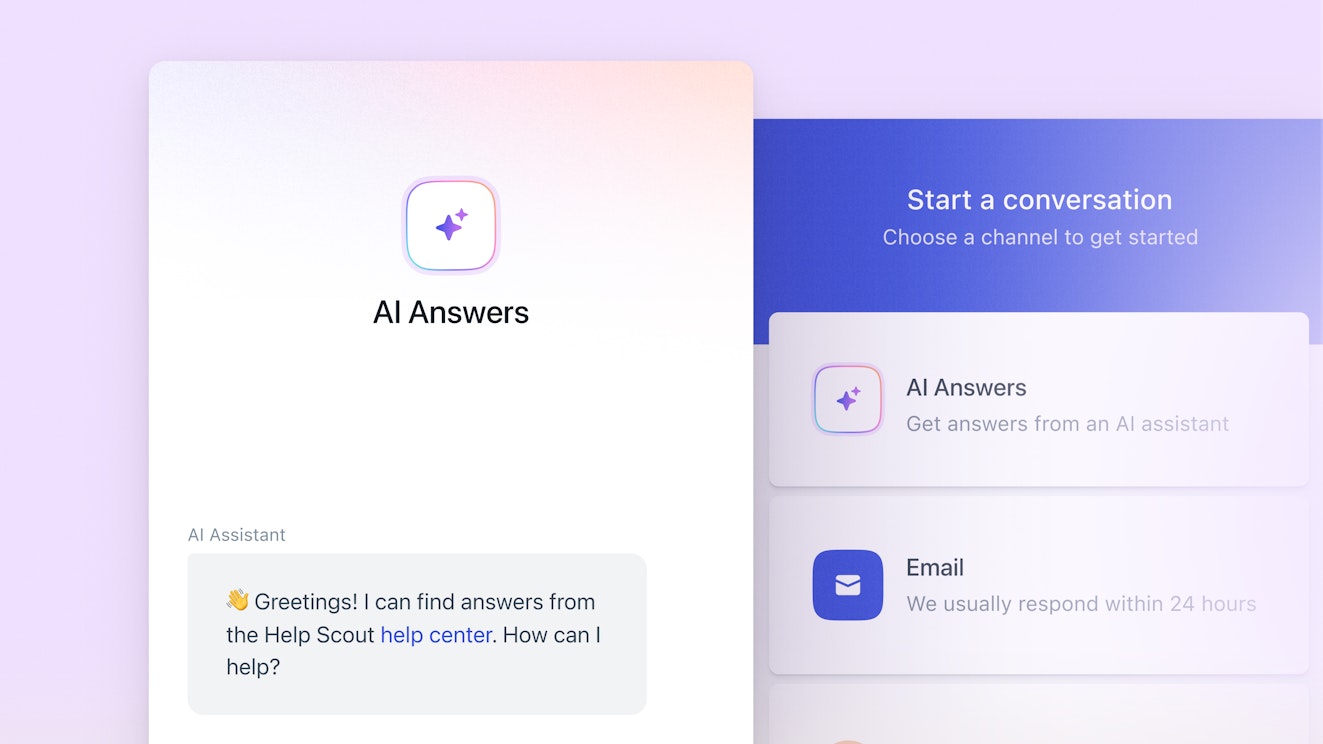
Help Scout is a customer support platform that teams can use to deliver support across email, live chat, social media, and SMS; build a knowledge base; and launch AI agents.
Help Scout's AI agents use information from your knowledge base and any publicly available websites/documents you add to answer customers' questions immediately. What makes it unique is that there are lots of tools you can use to make sure the answers your AI agents provide are high-quality:
Create one or multiple agents with different knowledge sources and training data. For example, you could create one agent to reply to customers asking questions using your in-app Beacon and one for answering questions from prospects on your website. Or you could create different agents for different products that are each trained on product-specific help content.
Dictate how your agent talks to people. You can tell each agent you create what tone and style to use when writing replies. Make your presales agent more casual to sound like your sales team and your customer agent more formal so it doesn't sound like you're taking serious issues lightly.
Customize what agents do in different situations. You can write a custom greeting message, specify how the agent responds when a customer says something like "Hi" without writing a question, write a list of FAQs that customers can simply click to get an answer, and dictate what agents do when they encounter an error or don't know how to answer a question.
Set guardrails for what the agent shouldn't handle. If there are specific requests that you know you don't want your AI agents to handle, you can set up guardrails that tell the agent to always send those requests to your support team. Just write the response it will provide to the customer in those situations and specify the options it should offer for contacting your team.
Teach your agents how to improve. Your team is able to review the transcript of every conversation that customers have with your agents. If you find places where the agent didn't respond accurately — or not exactly how you'd like it to respond — you can add an improvement. Simply open the conversation, click "Improve," and tell it what you want it to do going forward.
Test your agents before launching them to customers. All customers get a three-month free trial of Help Scout's AI agents and access to a sandbox environment for testing before you release them to customers, so you'll have plenty of time to build, optimize, and test the agents as a team — and with customers — before deciding if you want to use them long-term. Check out our AI Support Strategy Playbook to learn more about how to build, launch, and scale AI agents.
Measure your agents' performance. You can collect customer satisfaction ratings for every AI agent interaction and view detailed reports showing the number of conversations that your agents resolved or had to send to a human for resolution.
Finally, there are also little touches that make the AI support experience better for customers. Help Scout's agent interface makes it clear to customers that they're interacting with AI, and if AI isn't able to help a customer with their question, they can always request help from the humans on your support team easily.
A note from Neal: Ease of implementation is something that Help Scout brings into the entire suite of tools that they offer. I’ve been a long-time customer of Help Scout at AIHR, and we were able to support a growing customer base from 8,000 users to 23,000 users without a hassle. It’s Help Scout's ease of use that recently allowed us to roll out AI agents at speed, where it would have taken a lot more time, energy, and budget to implement a third-party tool.
Pricing
Free trial available. View Help Scout's current pricing.
Learn more about Help Scout:
2. Intercom – Best for using AI to manage specific workflows


Intercom is an omnichannel support platform with an AI agent (Fin) that can work across all channels: email, chat, messaging (WhatsApp, Slack, and SMS), social, and phone. Fin can also work over API, which allows you to integrate AI agents into any other platform you use to support customers.
In addition to being able to answer customers' questions on every channel, Fin can also take actions on behalf of customers and orchestrate complex procedures. You create procedures in Intercom using natural language with an AI assistant that prompts you to provide the details it needs to execute the procedure.
For example, say you want AI to be able to handle a return from a customer. You start by describing when the procedure is used (e.g., a customer requests a refund), then you tell it what specific steps to take to execute the process:
First, you might want to confirm that the customer recently purchased what they want to return. You can tell the agent to request the customer's contact information and check their recent orders in your ecommerce platform.
Next, you can tell it to ask the customer about the reason for the return and send follow-up requests based on the reason (e.g., asking for a photo if the item was damaged).
Finally, you can tell the agent what to do based on all of the information it gathered: refund the purchase amount to the customer's credit card, email them a return shipping label, or send a replacement order to your fulfillment provider.
Because Fin is able to read and write data in multiple different systems, it can take lots of different types of tasks off your support team's plate: processing refunds, freezing credit cards where fraud is suspected, updating customer contact or billing information, and much more. It takes time to build the procedures, but if they work, it can save your team a lot of time in the future.
Finally, while Fin can be used alongside Intercom's customer support software, it can also be used as a standalone AI agent with platforms like Salesforce Service Cloud, HubSpot Service Hub, and Freshdesk. This makes it a good option to consider if you're already using one of those help desks and want a better AI agent that doesn't require you to migrate to a new support tool.
Pricing
Free trial available. View Intercom's current pricing.
Recommended Reading
3. My AskAI – Best for reducing the cost of providing AI support


While most help desks offer their own AI chatbots and agents these days, the cost of using a platform's built-in AI tools can add up quickly. My AskAI is an affordable AI agent that integrates with Zendesk, Freshdesk, Gorgias, HubSpot, and Intercom. You can use it in those systems to answer customers' questions without having to pay the high usage fees of those platforms' built-in AI tools.
For example, at the time of writing this article, Intercom charges $0.99/outcome for its AI agents, Freshdesk $0.49/session, Gorgias $1.50/automated interaction, and Zendesk $1.50-$2/resolution. My AskAI charges between $0.10-$0.20/conversation credit, which can end up being significantly less expensive.
My AskAI works inside of the help desk you've connected it to and can help answer customers' questions in two different ways: it can draft replies to requests automatically that your support team can review before sending, or it can directly reply to requests. It works on any requests you get in your help desk, meaning it can reply to requests sent via email, chat, social, SMS, and messaging channels.
My AskAI gets its training data from multiple sources. It can train on the replies you send from your integrated help desk, the knowledge base you've built in your integrated help desk, any websites you ask it to reference, and PDFs or other documents you upload. It can also integrate with systems like Google Drive and Notion if you have documentation stored in places that aren't publicly accessible.
Finally, to have more control over how My AskAI interacts with customers, you can provide it with guidance on using your brand's voice, tell it when to escalate issues to human support reps, and specify what follow-up questions to ask in different scenarios. Additionally, you can improve its responses over time using Echo, an AI agent that lets your team use natural language to offer improvement suggestions.
Pricing
Free trial available. View My AskAI's current pricing.
4. WotNot – Best for startups and small businesses without a dedicated support team


The other tools we've looked at so far have all been designed to work within a help desk tool. WotNot is different because it doesn't require you to have an existing help desk or purchase a new one. Instead, you can train the system on whatever information you have available to you — a website, help center, or documents — then embed the widget on your website and use it to offer AI and live chat support.
This makes it a good option for startups and small businesses that don't have a dedicated support team and just need a way to get prospects and customers answers to their questions more quickly. The widget can be embedded on your website or used on Facebook, Instagram, WhatsApp, or SMS, and if the agent can't answer the customer's question, it can hand the conversation to a human via live chat.
One interesting aspect of WotNot is that in addition to answering customers' questions in natural language, you can also build menu-based sequences in the widget. Use the platform's no-code builder to create decision trees that guide customers through specific steps to help them arrive at an outcome, and connect it to your other systems via integrations or the API to let it take action in other systems.
Another unique feature of WotNot is that you can select which specific LLM your agent runs on. You can apply different models and test the answers the agent provides, then move forward with the one that you feel provides the clearest and most accurate responses.
The design of WotNot's widget is fully customizable, so you can change its colors and add a logo and your business name to make it match your brand. Finally, it works across more than 80 languages, so you can easily provide multilingual support if your business has customers across the globe.
Pricing
Free trial available. View WotNot's current pricing.
5. eDesk – Best for ecommerce companies

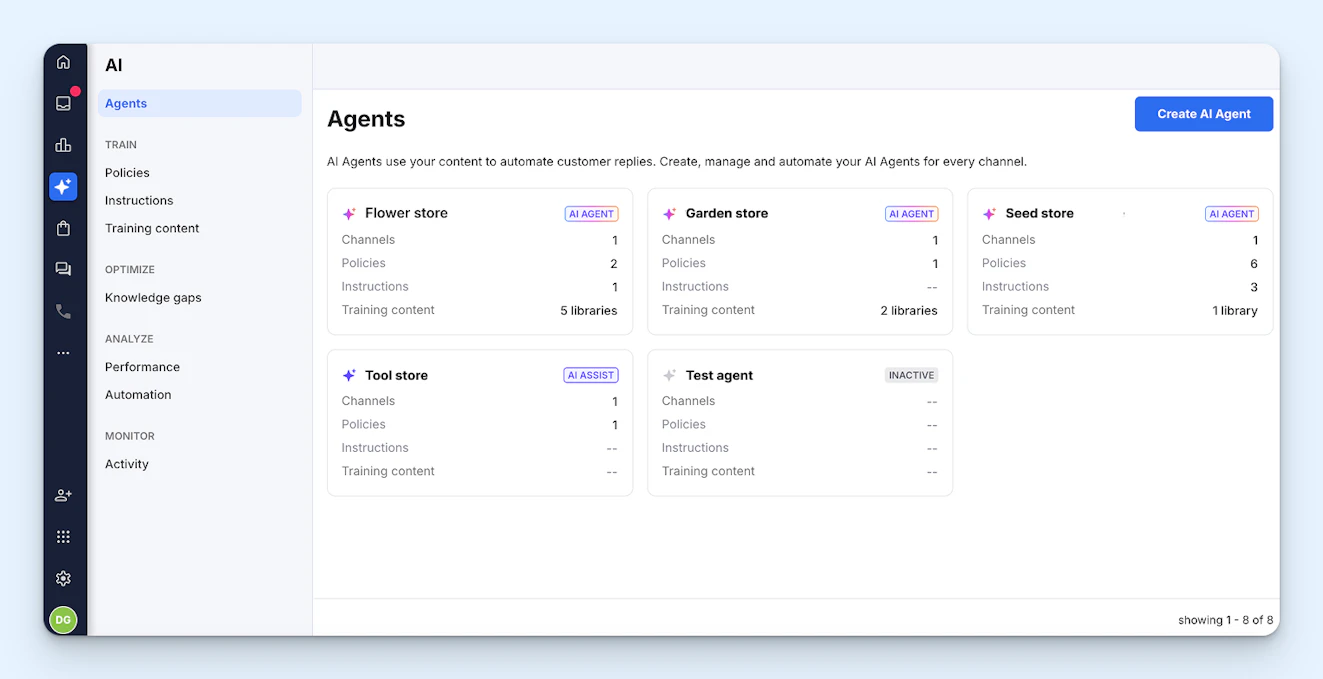
eDesk is a help desk that's exclusively focused on ecommerce support. In addition to integrating with all of the most popular ecommerce platforms (including Shopify, BigCommerce, WooCommerce, and Magento), it also integrates with marketplaces like Amazon, eBay, and Walmart. The integrations pull requests from those systems into eDesk, and its AI agent can reply to requests for you from any of those channels.
You can create one or multiple AI agents in eDesk. Creating multiple agents is helpful if you're using the system to support multiple brands; each agent can have a different set of training data. While the agent can learn over time based on your interactions with customers, during setup, you'll need to provide it with training content, policies, and instructions that guide it on how to reply to customers.
Once you have your AI agents set up, you can launch them in your system. Each agent can be configured to either auto-reply or generate a preview. When it's set to auto-reply, the agent will only send the reply if it's confident it can answer the question. If it's not confident, it will instead write a draft and leave it for your team to review and send.
There are also a few settings that help you control auto-replies. You can set it to delay sending the reply for a specific amount of time to make the reply seem like it came from a human, tell it not to reply to customers who have multiple tickets open, or tell it not to reply to any requests where negative sentiment is detected. Send delay is also helpful if you want your reps to review responses before they're sent.
If you set your agents to preview instead of auto-reply, they will write draft replies that your team has to review and send. All tickets with drafts created for them by the AI agent will get "Preview" tags applied to them so they're easy to identify in the queue. Preview is a good option if you're not ready to fully hand the reins off to AI or if you want to test its accuracy before letting it reply to customers automatically.
Finally, in addition to answering questions from customers, eDesk also lets you launch a chatbot in a widget on your website to answer questions from site visitors while they're shopping. And if you only want the chatbot to reply when no one on your team is available to answer shoppers' questions, you can create a schedule for when the chatbot will be active and inactive.
Pricing
Free trial available. View eDesk's current pricing.
Recommended Reading

6. Dialpad – Best for call centers


If you're operating a call center or only offering phone support, none of the other tools on this list are likely to be a perfect fit for your company. Intercom does offer phone support and voice AI, but it's more of an add-on to its help desk than a specialty. Dialpad is call center software designed for teams focused on phone support, and its AI agents can be used to deliver automated support over voice.
Dialpad integrates with several industry-specific systems like Shopify (ecommerce), Epic (healthcare), Jack Henry (financial services), and more. These integrations let your voice agents take actions. You can set them up to handle specific types of requests (e.g., provide an order status update, reschedule an appointment, or freeze a credit card), and the agent will perform the action and notify the customer.
You can build the agents iteratively rather than launching them for everything all at once. You might start with a single process that takes a lot of your team's time but doesn't need human involvement, and then build additional processes into the agent once you're confident that the first one is working as intended. You do this by creating skills and guardrails that specify what the agent can and can't do.
If you're not sure where to deploy your AI voice agents first, you can use Dialpad's Skill Mining feature. It analyzes your past conversations to identify where your biggest opportunities are for automation. You build your agents in Agent Studio using conversational prompts, then you can test them in Proving Ground before launching them to interact with real customers.
Dialpad also offers several add-on AI features that assist your human support reps when they're handling calls (such as AI coaches) and help your managers analyze performance (such as AI grading). And as a full contact center platform, you'll also get access to more traditional features like an IVR system, in-queue callbacks, and call recordings and transcriptions.
Pricing
View the current pricing for Dialpad's contact center platform, or contact its sales team for AI agent pricing.
7. Chatwoot – Best for teams that want to self-host


Chatwoot is an open-source help desk that can be cloud- or self-hosted. While you can use the self-hosted Community version of the product for free, to get access to Chatwoot's AI agent, Captain AI, you have to be subscribed to either the Premium Support or Enterprise Edition self-hosted plans.
As a help desk, Chatwoot can be used to create a knowledge base and deliver support via email, chat, SMS, voice, and several social media sites and messaging apps. Its AI agent uses information from your Chatwoot knowledge base and responses to previous customer conversations to answer customers' questions on any of the channels you've enabled in the platform.
One interesting aspect of using Captain AI is that it can help you identify gaps in your knowledge base. If it often gets questions from customers that it's unable to respond to because no information is available, it will alert you to the issue so you can create a knowledge base article that helps it answer that question in the future.
There's also a memory feature that captures key details from customer conversations and saves them as notes so both it and your support reps can use that data. This can be helpful, for example, if someone is reporting a bug that you can't replicate. You can ask Chatwoot's copilot if the issue has ever been reported before, and it can use its memory to answer the question (and possibly suggest a resolution).
Beyond the AI agent, Chatwoot's copilot feature can also write draft replies for your support reps, translate incoming and outgoing messages into different languages, and clean up spelling, grammar, and other copy issues in the messages your team writes themselves.
Unlike the other tools on this list, you won't pay Chatwoot directly for AI sessions when using its AI agent on the self-hosted version of the platform. Instead, you bring your own API key from OpenAI to use the feature. Chatwoot will not charge any usage fees itself, but you may incur usage-based charges through your OpenAI account.
Pricing
A free trial of Chatwoot's AI agent is available on paid cloud-hosted plans; no free trial is available for self-hosted plans. View Chatwoot's current pricing for cloud-hosted plans or self-hosted plans.
Understanding varying AI chatbot and agent costs
One thing to keep in mind when shopping for AI chatbots and agents is that while most AI systems have usage-based pricing, what counts as "usage" varies across platforms, and understanding "usage" is the key to evaluating potential costs across different systems.
The most generous platforms offer resolution-based pricing, which means you're only charged if the AI fully resolves the request for you. Resolution-based pricing aligns very closely with cost reduction: If AI was able to resolve the request, it means that your human agents didn't have to spend time on it.
Ticket-, credit-, and session-based pricing leave more room for you to have to pay for scenarios where the AI didn't actually save your team any time. If a customer engages with AI, the AI can't help them, and it has to send the request to a human for assistance, you still have to pay for the AI interaction.
Additionally, keep in mind that some tools have usage-based fees for different types of AI actions. For example, you may pay a specific fee for each request that AI resolves and a different fee for each request that AI routes to a human agent.
The variable pricing models can make it more difficult to estimate how usage fees will compare across tools, so it's worth taking extra time upfront to understand how AI usage fees are determined for any platforms you've added to your shortlist.
Neal Travis
Neal is a curious learner and builder of customer experiences in scale-ups. He is the Head of Customer Experience at the Academy to Innovate HR (AIHR) and Host of Growth Support.
Jessica Greene
Jessica Greene is a Help Scout alum, where we make excellent customer service achievable for companies of all sizes. Connect with her on LinkedIn or through her website.


