The Beginner's Guide to Customer Service Automation in 2026


Customer service automation has been around for years.
The phone tree you navigate when calling your internet service provider, the chatbot that walks you through paying your bill, and the canned response you get after submitting a new support request are all examples of customer service automation in real life.
But with the rapid advancement of AI in the last few years, customer service automation has undergone a significant transformation.
While there remains a perception gap around AI, and while there are plenty of examples of automation gone wrong out there, customer service automation is empowering an increasing number of support teams to respond to tickets more quickly and giving more customers the help they need faster than used to be possible.
Whether you’re a large enterprise company or a small family-owned business, customer service automation can help you take better care of customers with less effort. Let’s look at how it works, the challenges and benefits of using automation and AI in customer service, and key best practices for implementing automation in customer support.
What is customer service automation?
Customer service automation is the practice of using technology to handle customer support tasks without human intervention. It takes many different shapes, ranging from something as simple as sending an auto-reply email to something as complex as automatically analyzing the sentiment of every customer conversation.
The common denominator is that customer service automation relies on using technology to streamline support processes. By automating common, easy, or repetitive tasks, you’re able to free up your human team members to focus on the most impactful parts of their jobs.
Given the wide range of ways to automate customer service, there’s a good chance you’ve already implemented some kind of automation in your business.
Recommended Reading

The benefits of customer service automation
Customer service automation offers many benefits for both businesses and their customers.
Quick, accurate responses
Customers want (and expect) answers quickly, and automation often enables quicker responses to customer questions. Decreasing response time can be an important part of improving customer satisfaction and reducing frustration.
Plus, since many AI features are trained on your help center documentation, you can be confident that customers are receiving accurate answers as well.
Cost-effective, 24/7 support
Small companies and brands have often struggled with offering global support in the past. Hiring agents to work overnight shifts is expensive and hard to sustain, and while outsourcing customer service can work, it comes with risks.
Automated customer service is a great way to overcome these challenges. AI features like customer service chatbots can be scaled up nearly infinitely and can provide support in virtually every language on the planet.
With AI translation tools, chatbots, and self-service tools, even the smallest support teams (with the smallest budgets) can provide basic support around the clock, saving their customers time and their companies money.
Deeper customer insights
The sheer amount of data involved in customer support can be overwhelming. Not analyzing and not acting on that data means you’re missing out on opportunities to improve your product, upsell customers, and fix issues proactively.
This is especially true for high-volume support teams; manually analyzing thousands of inquiries per week simply isn’t feasible.
But having a machine working quietly behind the scenes to uncover those insights can bring great value to your team, company, and customers.
With AI tools, qualitative and quantitative data can be analyzed in near real time, providing strategic insights on how efficiently your teams are working and how happy your customers are with your product. Taken together, this helps leadership teams make critical decisions to improve service experiences.
Empowered customers
Many customers don’t want to interact with support. They want to solve their problems independently, and automation tools allow them to do that. Automated self-service resources like natural-language chatbots and proactive in-app help widgets give these customers the information they need at the right place and time, on their own terms.
Happier customer service teams
Customer service automation doesn’t just empower customers; it also helps support teams. If your team members are spending tons of time on repetitive or basic tasks (like minor account updates or password resets), automation can easily handle those items.
This frees up support agents to spend less time in the ticket queue and more time on meaningful, valuable work, reducing their stress and the risk of burnout.
Challenges of customer service automation
Advancements in automation technology have the potential to improve your customer experience and scale your support operations, but as with any technology, there are potential downsides you should be aware of.
Less customer connection
The biggest challenge with automating customer support is losing the personal touch that a human can provide. Automation is improving rapidly, but it isn’t the same as connecting with a real, empathetic person when you need help.
Moreover, some customers just want to talk to a human, and if you force automation on them, they might feel undervalued and frustrated.
To offset this risk, always make it easy for customers to get human help if needed or preferred, and try prioritizing automating more straightforward and repetitive tasks that automation can easily accomplish.
Lack of emotional intelligence
Although AI tools can be trained to detect customer sentiment and adapt their tone accordingly, these tools are limited. No amount of programming can fully replicate a support agent’s emotional judgment.
Automated systems inherently lack empathy and emotional intelligence, so there’s always a risk that customers will feel misunderstood when interacting with a machine.
To overcome this challenge, focus on automating requests that are less emotionally-charged. When empathy and understanding are critical, make sure humans are involved.
Technical issues
Relying on automation means relying on more technology, which takes time and effort to configure and maintain. Automated systems are also susceptible to bugs and technical glitches. Errors in an automated system, such as incorrect responses or a system-wide outage, could leave customers frustrated and lead to a poor customer experience.
To offset this risk, make sure you’re working with trustworthy AI platforms that offer great support. Regularly review customer conversations that AI handled, and continually tweak your workflows to eliminate bottlenecks and inaccurate replies.
Cultural resistance
Support agents might resist adopting automated tools for fear of losing their jobs, and customers might simply prefer traditional customer service methods or struggle with learning new ones. Overcoming this kind of resistance can be challenging for companies, and it highlights the importance of knowing your customers and your team.
Overcoming this challenge is often very unique to your circumstances, but you can prioritize being thoughtful about implementing AI and automation. Automation is never a requirement (although it can bring many benefits). Start small, build trust, and scale your automation efforts as people grow more comfortable.
10 ways to automate your customer service (with examples)
From very basic macros to the most complex of chatbots, here are ten handy ways to automate your customer service.
1. Use saved replies
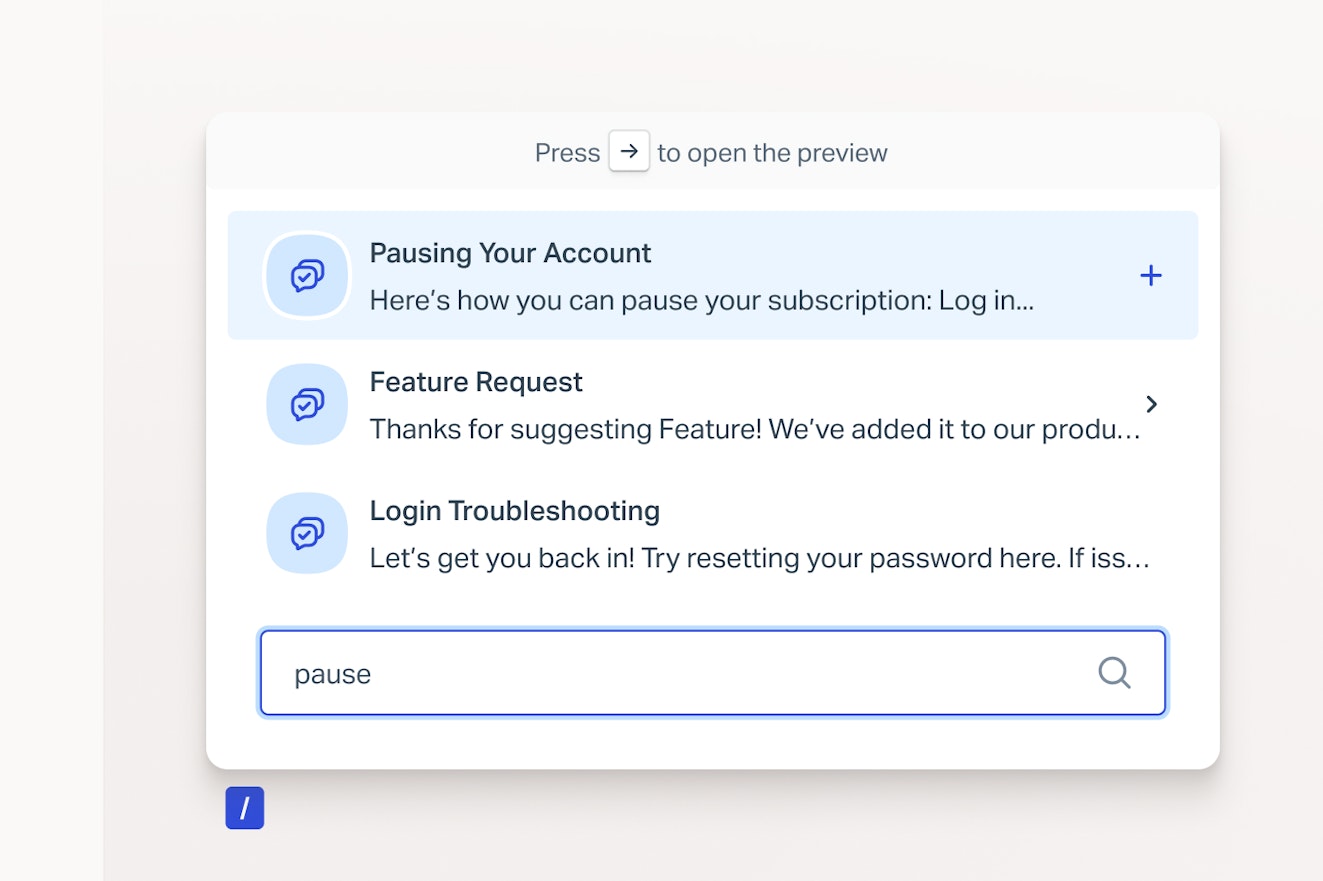
Having to manually respond to the same routine and repetitive questions every single day is a huge drain on support agents. Thankfully, this problem has a simple solution: saved replies.
With a couple of clicks or a keyboard shortcut, Help Scout (and many other help desk tools) lets you leverage saved replies to provide quick answers to common questions. Creating a saved reply for every common text snippet or paragraph your team types goes a long way toward making a more efficient support operation.

2. Use AI to summarize conversations
Some customer conversations involve a lot of back-and-forth messages. Multiple team members may need to read through the conversation to understand what’s happening, which can be a slow and tedious process, especially if an issue is urgent.
Having AI summarize the activity and conversation in a thread is a great way to ensure a quick, effective handoff to the next support agent, so no time or meaning is lost. For instance, Help Scout's AI Summarize generates a summary of the conversation in seconds with the click of a single button.


3. Understand your customer service metrics
Pretty much every major help desk platform offers customer service metrics and reporting, with some dashboards more advanced than others. It’s the place to find data on how fast your team is getting back to customers and resolving issues, what customers are writing in about, and how satisfied customers are with your service.
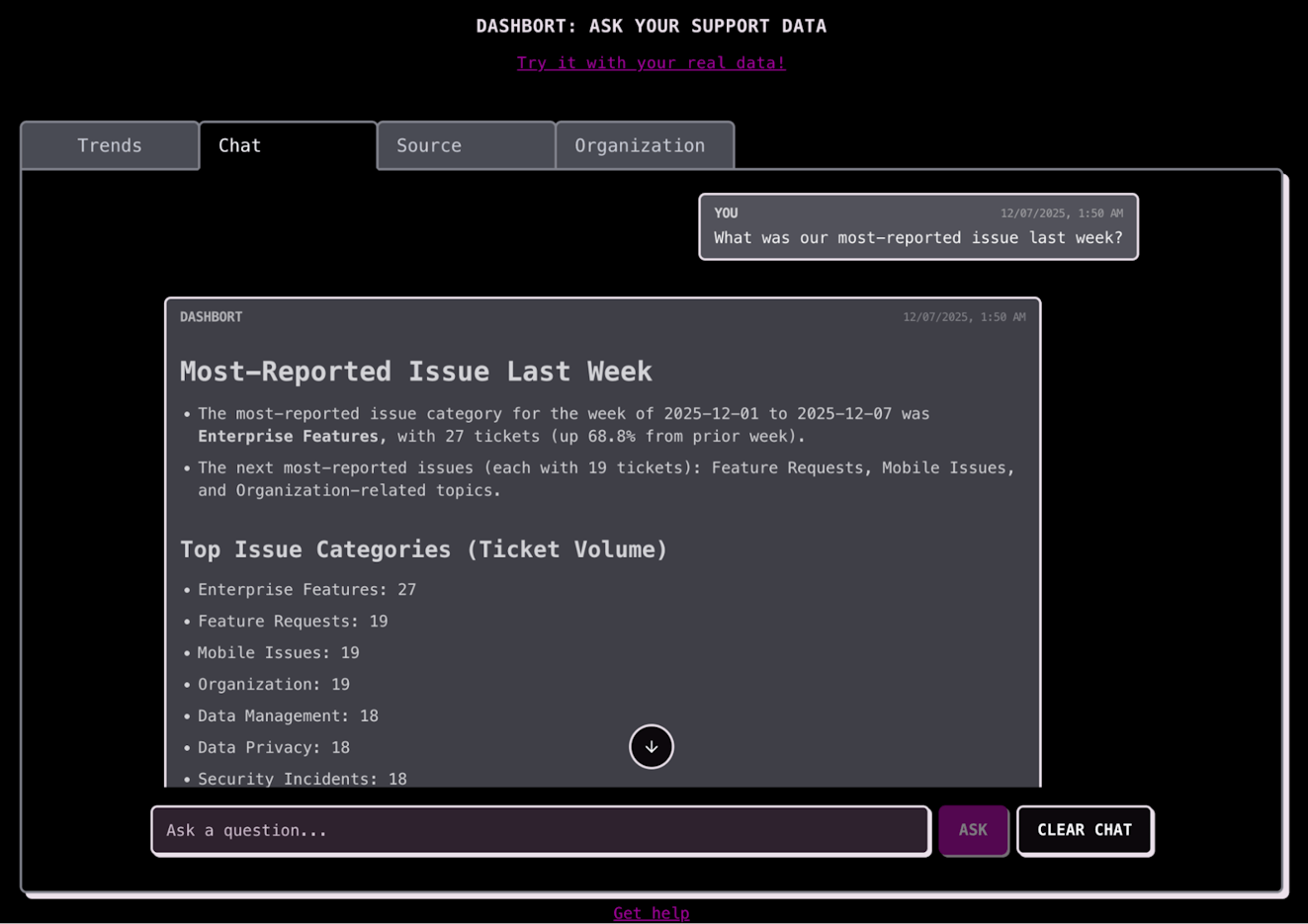
AI has led to advances in how support and company leadership engage with, understand, and draw conclusions from their data. Yetto, for instance, allows support teams to ask their reporting dashboard questions and receive answers in natural language, making it easier (and faster) for them to interpret support metrics and customer trends.

4. Leverage AI to improve your customer conversations
Talking to customers can be challenging. Writing a stellar response that’s accurate, thorough, and matches both the customer’s tone and the company’s voice is the goal of every support interaction.
But it’s also brainy, time-consuming work. When your inbox is blowing up and customers are waiting, having an AI tool can make your team way more efficient.
Tools like Help Scout's AI Assist make it simple for support teams to write better responses and create help center articles faster. You can use it to adjust the tone and length of the response, proofread it, and even translate it into a different language.


5. Set up automated workflows
Workflows are a great way to automate the routing, categorization, and initial handling of incoming customer conversations. Rather than having a human agent read, triage, and reply to every new message, workflows can be programmed to detect the subject and category of a message so it ends up in the right place (and to send a quick response to the customer so they know their issue is being worked on).
Help Scout’s Workflows allow you to organize and prioritize your customer conversations. Driven by “if/then” logic, Workflows can be built based on event conditions and actions. For example, if a conversation's subject line starts with “Order Confirmation,” workflows can automatically add the tag “order-confirmation” to it. From there, it’s easy to set up an inbox view to see all of those conversations in one place.


6. Automatically draft replies to customers
Confronting a blank page can be overwhelming, especially when the pressure’s on to get a serious issue resolved or keep a high-value customer happy. A tool that can draft a response that an agent can then edit to perfection is a great addition to any support team’s toolkit.
Now imagine jumping into the support queue with a head start on responding to customer questions. Tools like Help Scout's AI Drafts can get your agents started by automatically drafting replies using knowledge from your help center, website, and responses to previous support requests. Your team members just need to review, revise (if needed), and click send.


7. Uncover customer insights and feedback
Customer service teams are usually very close with customers; they can spot day-to-day trends in customer opinions and needs that can make or break the customer experience (and sometimes the product, too). However, this kind of feedback and sentiment analysis is mostly informal, anecdotal, and individual, especially as a company’s customer base grows.
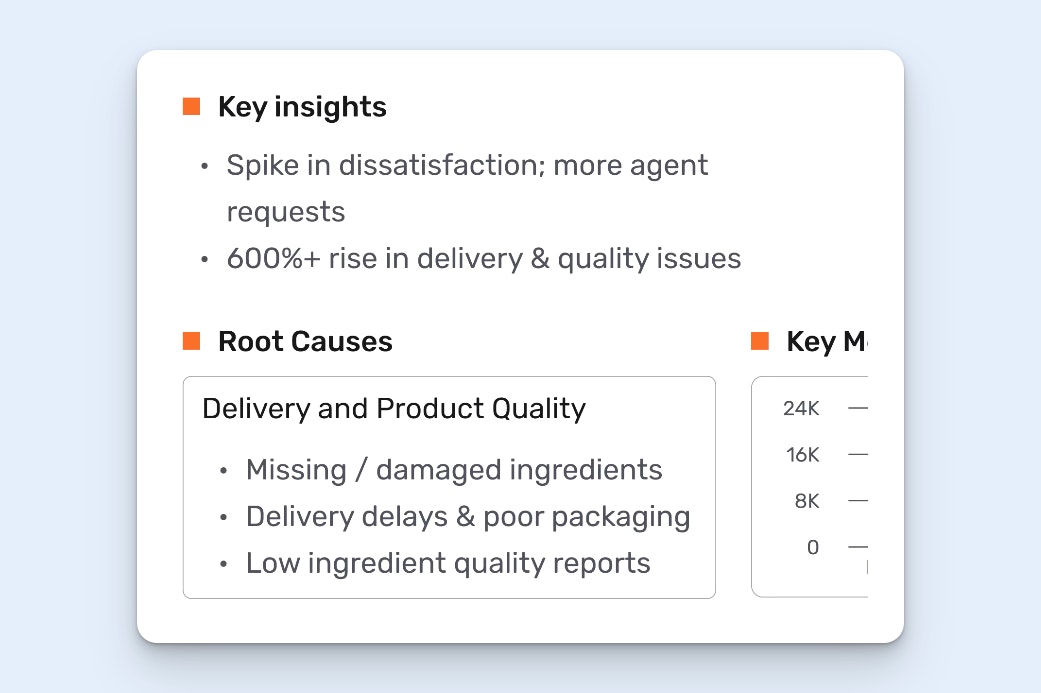
Automating customer feedback and sentiment analysis can yield vital, data-backed insights into how customers use and feel about a product or service, which leadership can then use to hone their marketing, plan their product roadmap, and address gaps in the customer experience.
AI-powered tools like SentiSum can identify trends before they become a problem and provide actionable information on customer sentiment at a scale that is simply impossible to achieve with human review.
8. Create and maintain your knowledge base
Customer support teams love knowledge – finding it, sharing it, saving it. However, as much as we love knowledge, it’s also one of the hardest things for support teams to actually put down on proverbial paper.
First, because agents are so busy helping customers, they often simply can’t find the time to sit down and write a knowledge base article (let alone keep it updated over time). Secondly, not every support agent has the expertise to write effective help content, so the documentation that does exist is not always consistent in quality or voice.
Happily, AI can help with this. Brainfish, for instance, is an AI tool that turns all of a company’s knowledge sources – Slack messages, product pages, demo videos, and customer tickets, just to name a few – into a comprehensive knowledge base that's ready for customer use (and keeps it up to date as those sources change).
Recommended Reading

9. Automate screenshot captures and updates
Knowledge creation doesn’t just involve writing things down; it also involves taking pictures of a product so customers know what it’s supposed to look like. This can be a particularly tough ask for support teams whose products are rapidly evolving.
LaunchBrightly is another automated knowledge management tool, but it specializes in automatically capturing product screenshots and then refreshing them when the product changes.
All LaunchBrightly requires is its own account for your product, which it will then log into to systematically capture screenshots based on the instructions you provide. It will then periodically compare the existing screenshots in your help center with your actual product and replace any that are out of date.
10. Implement an AI chatbot
AI chatbots are a powerful way to bring customers automated help in real time, and that’s why they’re probably the quintessential thing people think of when imagining customer service automation.
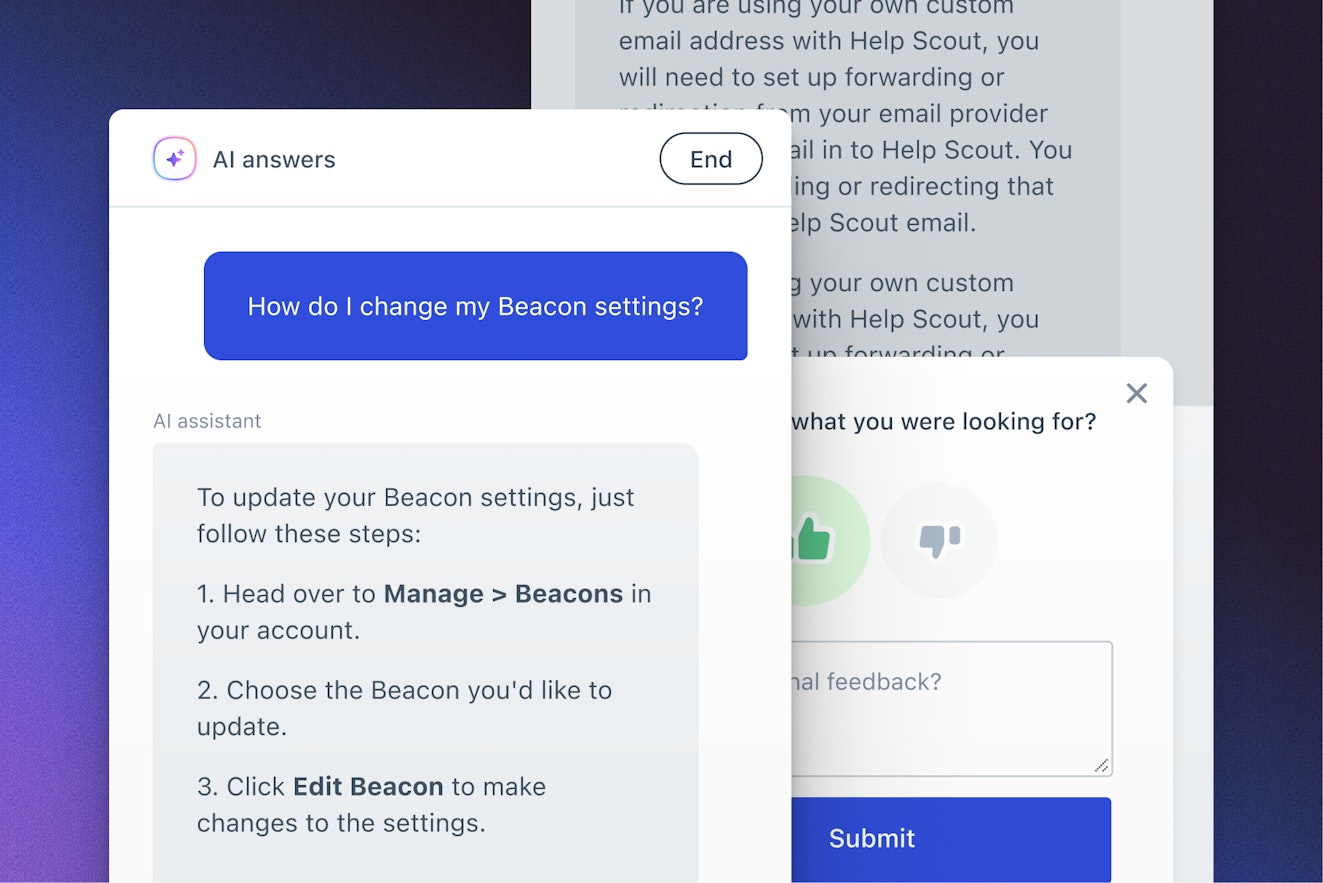
With AI chatbots (or AI agents), customers can have genuine back-and-forth conversations in real time with AI trained on your knowledge base and other relevant sources like your company’s website.
Help Scout’s AI Answers is one great example: It can turn your help content into conversations in dozens of languages, removing the burden of searching through your Docs from your customer’s plate. With any great chatbot implementation, customers are never far from a human — they can simply click a button to connect with a real person.

When to automate and when not to automate
Automation is an excellent tool in many situations and an annoying obstruction in others. It’s important to use your judgment when deciding whether or not to use automation, so we recommend considering the kind of task you’d be automating when evaluating it for your specific business needs.
When to use automation
For high-volume, simple, and repetitive tasks.
For auto responses and greeting customers.
When collecting customer data, like order numbers and account numbers.
When verifying user accounts.
For routing tickets to the right team or agent.
For simple troubleshooting scenarios.
When changing ticket statuses.
When NOT to use automation
When handling complex technical issues.
When compliance or legal considerations are involved.
When empathy is required.
When discussing sensitive information.
When it’s the only option (always provide a path to a human).
Best practices for automating customer service
Customer service automation can be controversial or concerning to agents and customers when they first encounter it. It’s likely they don’t understand the automation’s capabilities, don’t trust its output, and are concerned about its impact on their work or consumer experience. Their first impression is also likely to be their lasting impression — so it’s imperative that you get it right.
That’s why it’s important to understand your unique use case for automation, research your tooling options, involve your team in the selection process, and carefully plan its implementation so their transition to using it is smooth and positive.
Define your strategy and goals
Start with a clear strategy for adopting automation. Define your objectives and goals for automating customer support, and ensure these align with your overall business strategy and company values.
Understand customer needs
Blindly rolling out automation without understanding your customers is a big risk. Talk to customers and get their feedback. Talk to your support team for their opinions on where automation might be useful. Look at support metrics, and dive deep into your data to help you understand your pain points and where automation can improve things.
Evaluate tools
There are more AI customer service tools than ever before. This is a hot market, and new products are constantly being introduced. Look for tools that integrate with your existing systems, and consider flexibility and scalability for when your needs change.
If you’ve already invested in tools like a help desk or knowledge base, review your current usage to make sure you’re taking advantage of any existing automation features that make sense for your team and customers.
Conduct thorough testing
Take time to test the automation so you can roll it out confidently. You don’t want to introduce automation to your customers only to find that it’s not performing as expected. Test the new systems thoroughly, and put yourself in the customer’s shoes. Select a small subset of customers to pilot it, and get their feedback before making it available to everyone.
Ask for feedback
Get customer feedback regularly to determine whether the automated systems are performing well. In many ways, it helps to evaluate your automated customer conversations just like you would evaluate a human agent’s interactions. Was the issue correctly identified? Was it solved promptly and easily? Did it match the tone you’re aiming for?
Monitor CSAT and NPS scores to determine whether automation impacts customers negatively or positively, and act on that feedback promptly to address any issues.
Recommended Reading

Provide an easy route to human help
Automated support is a big change from human-driven support. Some customers will like it; some will be frustrated. Machines can only handle so much, and they might not be able to help a customer. Sometimes, a customer might simply prefer to talk to a human.
Whatever the case, provide a way for customers to reach a human agent if needed.
How to determine if your automations are working
Like with humans, evaluating the performance of any customer service automation is an important part of getting things right.
The data you evaluate will depend on the automation’s purpose and your own goals. However, portions of your evaluation may be more nebulous and will deal more with your team’s and customers’ thoughts on the automation.
Here are some more specific suggestions for measuring performance.
Go back to your goals and objectives for the tool
Is the automaton meeting those measures? In what areas is it falling short, and in what areas is it exceeding your expectations? Not all measures are created equal, so you need to determine whether the tool is performing to your most important metrics.
Use the automation’s baseline metrics to compare them with the tool’s actual performance
For instance, Help Scout's AI Answers feature has a 70% average resolution rate. Assuming the bot has been fully trained, you should ask whether AI Answers resolved, on average, at least 70% of the conversations it handles.
If not, you might consider if there are any ways to get closer to that number. For instance, updating documentation, implementing setting changes, or adding improvements, etc. may help get you closer to that 70% threshold.
Check in with your support team
For example, what percentage of your support team is using automation? Do they now have more time for special projects or complex cases? Are they experiencing less stress and burnout? Are they expressing positive or negative feedback about automation? Some of these answers will be easily measurable; others may not.
Getting customer service automation right
Customer service automation tools simplify the support process and can provide a competitive advantage. However, customer service automation shouldn’t be seen as a way to replace human support agents. Just like the power drill didn’t replace construction workers — it just made them better and more efficient at their jobs.
Implementing customer service automation should be done thoughtfully and carefully. Work with your customers and your support team to tackle the right problems at the right time using automation, and your team and customers will remain happy.
Like what you see? Share with a friend.
Steph Lundberg
Steph is a writer and fractional Customer Support leader and consultant. When she’s not screaming into the void for catharsis, you can find her crafting, hanging with her kids, or spending entirely too much time on Tumblr.
Jake Bartlett
Jake Bartlett is a writer for tech companies and customer-centric businesses. He has 13 years of experience working in customer support and success, across various roles. You can find out more about Jake on his website.


