Getting Started with AI Customer Service in Financial Services


If you’re running support for a bank, insurer, lender, fintech, or other financial services provider, you’ve probably felt pulled in two directions this year. Everyone wants you to “do something with AI,” yet nobody wants to be the team responsible for letting a hallucinated answer go out in an industry with such heavy regulations.
This tension is one of the biggest challenges that customer service leaders in financial services are facing with AI adoption.
A retailer can let a chatbot get a return policy slightly wrong and fix it with an apology and a refund. But if an investment firm’s bot missteps with a fee disclosure or fraud response, you’re looking at the potential of costing someone enormous sums of money, a federal compliance review, and maybe a lawsuit.
The good news is that this doesn’t mean you need to avoid AI. It simply means you need to be careful with sequencing and implementing it. Start with the AI applications that carry almost no risk; build trust with your team, your compliance folks, and yourself; and then only move toward customer-facing stuff when you’re certain the AI can handle it.
At Help Scout, we only publish deeply researched, human-written content. If you find our content to be as helpful as we strive to make it be, you can set us as a preferred source in Google so you'll see our content surfaced more often when you're searching.
The benefits of using AI in financial services
Before we get into the how, here’s why it’s worth the effort to invest in AI in financial services customer service:
Faster resolution on repetitive customer work like balance questions, statement requests, and fee explanations — the things that eat up agent time despite not really requiring a human brain.
More capacity and less burnout for agents (since AI can absorb the repetitive work).
Real 24/7 coverage without staffing a large 24/7 human team.
More consistent answers across the board, from products to processes.
There are clear and real benefits to using AI in financial services, but they need to be balanced carefully with the risks of what happens when AI gets things wrong.
I recommend starting with AI use cases that carry very minimal risk, then building up from there. That’s the order our list below follows.
6 ways to start using AI in financial services customer service
Start with the lowest-risk option and build toward the ones that need more trust in the tools and the process behind them.
1. Start with AI that never touches a customer


Way back in 2021, I was leading a team of support agents at a growing startup. We were spread across the globe, from the Philippines to South America and a lot of places in between.
Because of our staggered start times, we were able to each take on the monotonous task of sorting through the support queue to help ensure everything was tagged in an appropriate way so that workflows could kick in based on the tags.
While many help desks can automatically tag conversations using keyword detection, our system didn’t offer such a thing. So instead, each of my agents and I spent at least an hour every day sorting through the queue tagging things. With ten people sorting, that’s ten hours a day tagging tickets — more than a full-time employee.
But even when keyword-based tagging is available, there are limitations. Keyword rules rely on matching specific words rather than understanding the meaning behind a customer’s request. They also require you to predict every category you want to track and build rules around those categories.
Help Scout’s Topics feature is a great example of AI that solves this problem. It reads every incoming message and automatically identifies themes based on the content and context of the conversation. So when someone writes in about being charged after canceling their account and wanting their money back, Topics can recognize that the underlying issue is a refund request rather than simply matching on the words “charged” or “cancel.”
When you turn Topics on, it even backfills the last 30 days of conversations, providing useful data immediately so you don’t have to wait weeks to accumulate enough tagged conversations to spot patterns. With this data, Topics can then report back to you on what people are actually contacting support about and at what volume without relying on your team to tag things consistently.
In financial services, this is more than just a nice efficiency gain. A conversation mentioning an unauthorized charge or a lost debit card gets tagged the moment it lands in your inbox, then your workflows can route it straight to the team that handles it. No one has to notice it and flag it by hand, reducing the delay and the odds of negative outcomes.
This is probably the lowest-risk way to bring AI into your support operations: by using it to understand and categorize the conversations you already have. There’s nothing customer-facing and nothing that can’t be undone — just AI reading your existing conversations and telling you something useful about them.
2. Use AI to assist agents, not replace them


Once AI is helping you make sense of your tickets, the next logical step is to let it help draft replies to customer inquiries — with agents reviewing each reply before it goes out.
This is a meaningfully different risk profile than having AI interacting directly with your banking customers. Since AI is familiar with all of your tickets and can see all past responses and your knowledge base, it can easily generate a solid starting point for customer replies. The more data you feed it, the better the responses will be.
An alternative — or simultaneous — second step to implementing AI is to let your AI improve the replies written by your human team members. Many AI assistant tools offer this functionality, whether it’s adjusting the tone or making an email more succinct before it’s sent.
For a bank or lender, that might mean catching an agent’s reply that implies a guaranteed rate or a phrase that reads a little too close to investment advice. Small wording choices carry more weight in banking than they do for most industries, and it’s an easy thing for a tired team member to miss at 4 p.m. on a Friday.
3. Automate conversation summarization for handoffs
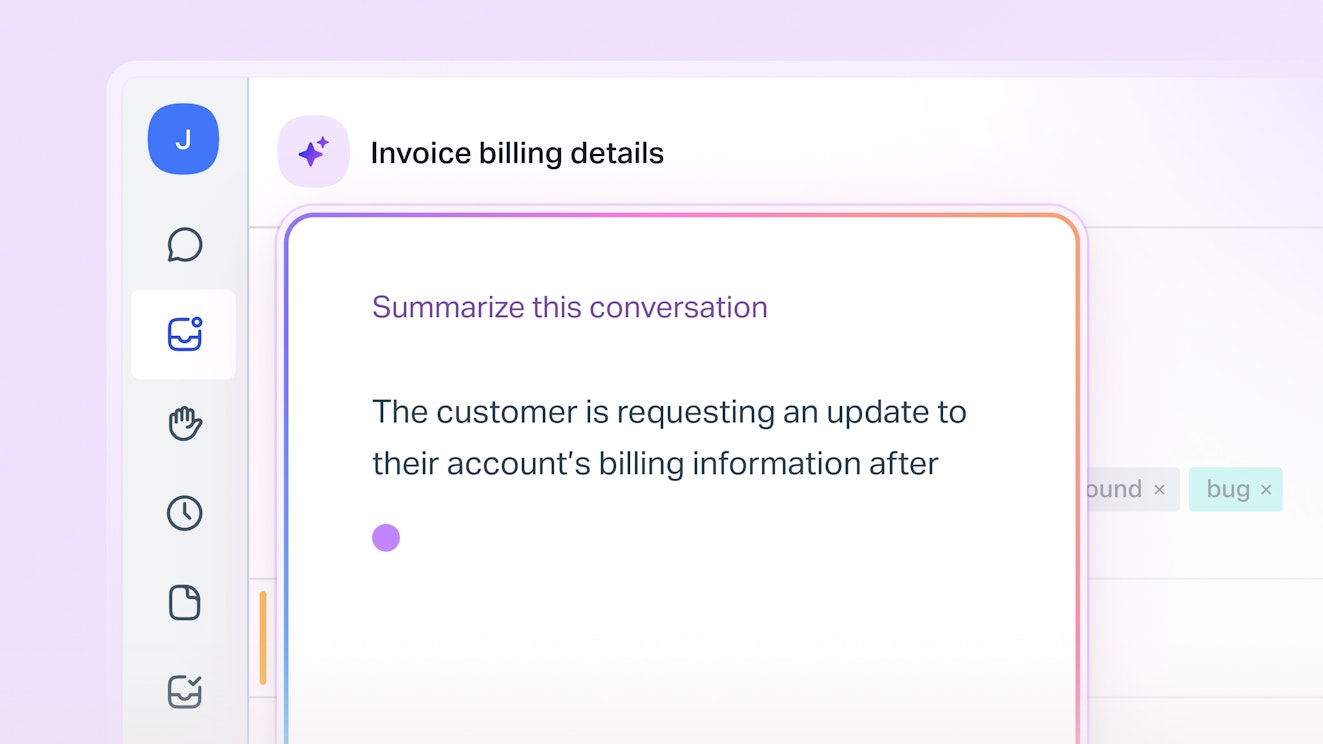
We’ve all seen customer email threads that grow really long. If that’s a common occurrence for your support team, the next easy win is to use AI to summarize conversation history. These summaries are particularly useful for handoffs between departments or agents — a major point of customer friction. They help the new agent or team get up to speed quickly so they can focus on helping the customer sooner.
It can take some time to build trust since you’ll be relying on the AI to accurately understand a long conversation. The risk here is low, but not zero: if the AI missed something in a nuanced conversation, that misinformation can follow the ticket until it’s resolved.
While there’s no way to completely eliminate that possibility, AI is getting better and better at analyzing and summarizing tickets. The more data and tickets you give your AI access to, the more accurate it should become at understanding what data points are worth flagging in a summary.
4. Add multilingual support via AI translation
Before AI translation showed up, options for providing multilingual customer service were pretty slim and very costly: either hire multilingual staff for every language your customer base speaks (rarely practical), or copy every message into Google Translate and paste the result back into the conversation.
Neither scaled efficiently, making it hard for global financial services companies to provide excellent international support.
AI-powered translation tools fold that step directly into your workflows and support tools, enabling your team to respond in a customer's preferred language even if nobody on staff speaks it.
Here are a few tips to make translated replies work better based on my experience living for years in a country where I don’t speak the native language with proficiency:
Write your reply in English first (the way you'd naturally write it), then simplify it. Don't say "We can waive this fee, provided the account has remained in good standing over the past two statement cycles." Instead, try "We will review your last two account statements. If the account is in good standing, we will waive the fee." Short, single idea sentences translate more reliably than long ones with stacked clauses.
Don't let the tool translate industry-specific terms. Words like "APR," "escrow," or "overdraft" can get mistranslated into something that changes the meaning entirely. “Notary” is a great example: it translates directly in a lot of languages, but what a notary actually does varies enormously by country, so a literal translation can leave the customer with the wrong idea of what you’re asking them to do. When in doubt, leave the term in your native language and link to an explanation, or add a quick one-line description of what you mean by it.
Watch for idioms and phrases that don't translate literally. HSBC learned this the expensive way in 2009 when its U.S. marketing tagline, "Assume Nothing," translated in several markets as "Do Nothing," the opposite of what the bank meant. As Campaign reported, HSBC spent $10 million switching to a tagline that translates more reliably.
Always include the original language text and note that it was translated. Translation quality degrades the more times text gets converted. Maybe your customer can read the original language better than you expected, or they have someone on hand who can read it for them. If they run your translated reply back through a translator to double-check the intention, they can end up with something noticeably different than what you meant.
If you're using AI to translate customer conversations, you might also want to make your knowledge base available in your customers’ preferred language(s). Many help desks have AI tools to handle article translation in a couple of clicks. However, to avoid any confusion (or frustration), be sure to specify in your articles whether or not your product is also offered in those languages.
5. Automate high-volume, low-complexity customer-facing questions
This is the first place in your AI implementation where AI starts talking to customers directly.
When AI is connected to your support help desk and your knowledge base, it should have all of the info and context it needs to handle low-complexity questions from customers. That means tools like AI chatbots or automated self-service become a possibility.
Unfortunately, this is often where AI horror stories occur, whether that’s exploitable compliance issues with chatbots or customers filing complaints with the CFPB about chatbot doom loops.
So the key to getting this right is to prioritize using AI to help with straightforward requests. Stuff like:
When does my statement post?
How do I update my mailing address?
What does this recurring fee mean?
How do I reset my online password?
This works because the answer space is clear, easily documented, and doesn’t leave a lot of room for error.
A good line to draw here is distinguishing between "informational" and "actionable." Explaining what a fee is: fine. Waiving that fee, adjusting an account, or confirming eligibility for something: not fine. Those require decisions rather than just information, so they're higher risk. Depending on your institution’s risk profile and the type of question, that may mean those questions belong with a human.
Some financial institutions are further along this path than what we’re describing here, using AI that pulls a customer's live account data mid-conversation or takes limited actions directly, like updating a mailing address or confirming a payment status without a human touching it first.
That's a real and growing use case, but it comes with a heavier compliance lift: real-time data access, stricter audit trails, and often industry-specific certifications behind the scenes.
Set clear escalation paths for anything the AI isn't confident about, and start by preventing AI from handling anything touching fraud, disputes, or account security. Confidence thresholds matter more in banking than in most industries, so if your AI tool lets you configure a confidence threshold that hands off to a human below a certain score, use it.
It's better to start small and expand slowly than to see an AI implementation blow up in your face.
Recommended Reading
6. Let AI take action, not just answer
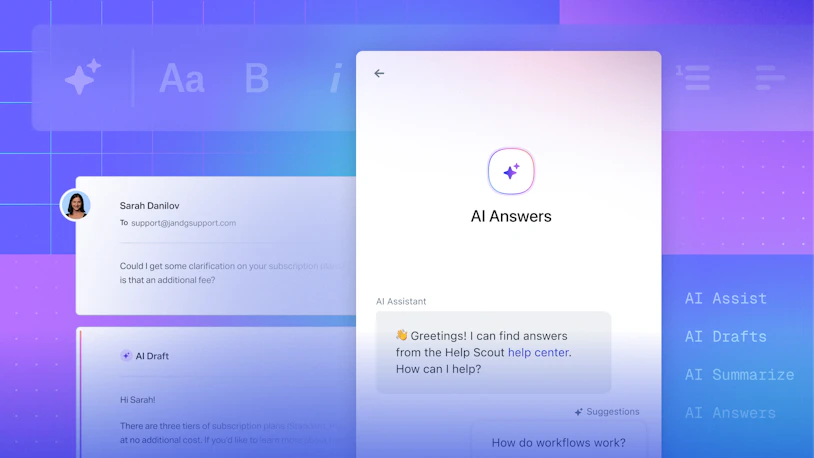
The last step on this list — and the most complex use cases for AI in financial services — is when AI actually begins doing things: initiating disputes, updating account details, processing refunds, and so on.
It can feel like the promised land: fully automated, always available, infinitely scalable customer service.
But it’s also where the trust bar and the risk level is highest, so it’s not something to rush toward recklessly. It’s also worth considering your customer demographics and preferences:
Do your customers want fully automated customer service?
How highly do they value the ability to easily get in touch with a human?
What’s the cost if AI makes mistakes?
Plenty of financial institutions have made expensive miscalculations here. For instance, Commonwealth Bank of Australia (CBA) made headlines when they let go of 45 customer service agents because an AI voice agent supposedly made their roles redundant. Call volumes and overtime increased, leadership scrambled, and the union ended up bringing the situation before a workplace relations tribunal. CBA issued a public apology and even offered to reinstate the employees.
I don’t have a detailed playbook for you here, as so much of getting this right depends on your customers, your tech stack, and your compliance needs. Consider this the most advanced implementation of AI in banking and related industries, and remember that while some companies may be seeing success here, it’s not worth taking shortcuts to get there.
Recommended Reading

Best practices for implementing AI in financial services
You may have picked up on these intuitively, but there are a few things worth calling out before you implement AI in your institution:
Loop in compliance and security early, not after you've picked a tool. Data residency, PCI and SOC 2 compliance, and internal audit requirements all vary based on what data you handle and where you’re located. It’s much easier to bring these teams in early, long before you've committed to a tool or vendor.
Decide what always escalates to a human and don’t compromise. Fraud prevention, disputes, and anything sensitive are good things to always escalate. Make it a rule, not a judgment call each time.
Tell customers when they're talking to AI. It's the right thing to do, and in some jurisdictions it's becoming a legal requirement, too. Being up front about AI reduces confusion and frustration.
Always keep human support within reach. If you get to a point where you’re using customer-facing AI to automate certain support requests, that’s awesome. But things can (and will) go wrong. Always make it easy for customers to switch to human support when needed.
Expand slowly. Nail one AI use case, measure the impact, then move to the next. Trying to automate everything on day one is how you end up rolling all of it back.
It’s also worth noting that AI is showing up in adjacent, document-heavy processes at financial institutions like Know Your Customer (KYC) checks during onboarding, loan application intake, and more. While this post doesn’t touch on those use cases, it’s worth keeping in mind that all of those things are part of your customer experience, too. Different teams may be responsible for them, but if you want to deliver a consistently excellent experience, you’ll need to work cross-functionally to make sure best practices are followed and appropriate guardrails are implemented.
Start small, build trust, then scale AI across your institution
AI isn't replacing your support team. It’s a great tool, but it’s just a tool. While it holds great potential for making your team more efficient and scalable, human customer service will always be a valuable and important part of financial services customer service.
Get started by using AI in low-risk but impactful ways, then scale it carefully based on your customers’ needs and your company’s compliance requirements.
Like what you see? Share with a friend.
Anne-Marie Traas
Anne-Marie is a Fractional Head of Customer Success focused on providing an optimal customer experience in every interaction. She specializes in driving process and product improvements, creating thorough and easy-to-understand product documentation, and teaching others how to communicate more effectively through the written word. You can find her on her website.
Ready to go?

