The Right (and Wrong) Way to Automate Client Communications


Client questions are going unanswered for days. Critical renewal meetings are trapped in endless rounds of scheduling emails. The phone is ringing and no one is available to answer.
Someone on your team suggests “maybe we can automate this?” It sounds nice, but maybe you’re afraid because you’ve seen automation go wrong before.
This is a common predicament for busy professional services organizations. They know their workflows can be more efficient and that better communication is critical to client retention, but automating client communication feels risky.
I regularly work with teams who are afraid that if clients find out they're using automation to gain efficiency, they'll think less of them. I get that fear. But I think it’s because the word “automation” conjures the worst-case scenarios:
Cheerful but unhelpful chatbots.
Doom loops you can’t escape.
Templated emails missing the recipient's name (Hello {{first.name}}!).
The simple truth is that clients hate bad experiences, whether they’re automated or not. Avoiding automation because it feels risky misses out on an even more pressing risk: damaging client relationships because of inefficient and unreliable processes.
The key to successfully automating client communications is knowing what not to automate — not avoiding automation altogether. Intentionally building the right automations is a great way to create the seamless experiences your clients expect.
At Help Scout, we only publish deeply researched, human-written content. If you find our content to be as helpful as we strive to make it be, you can set us as a preferred source in Google so you'll see our content surfaced more often when you're searching.
Why bad automation damages client relationships
I’ve spent years helping organizations big and small increase their productivity by turning business processes into automations. In that time, I’ve seen more bad automations than most people. I’m talking about the kinds of automations that risk damaging your reputation and increasing client churn.
The good news is that the worst automations all follow common and avoidable patterns.
Automating the wrong moment
A client has an ongoing thread with your partner, working through a laundry list of requirements for their next renewal. It’s been a contentious process, and it’s about to get worse. An automation system sends a cheerful reminder of their upcoming renewal, haplessly singing praises of the services you’ve offered and unintentionally setting off a firestorm with your client.
That’s the wrong moment for automation if you’re a professional service firm. Renewals and contracts are important relational touchpoints that deserve human judgment.
Dead ends
“Connect to agent. Please connect to agent. TALK TO HUMAN!”
Everyone’s been trapped in an automated dead end. Whether it’s a chatbot that won’t escalate, a phone tree that never ends with a human, or a generic reply that closes a ticket that isn’t resolved, automated dead ends are obviously frustrating. But they’re also easily avoidable.
Customer-facing automations must never be a dead end. Each one should always have a path to a person.
Getting caught pretending
Organizations nervous about automating client communications often try to disguise their automated messaging as genuine human communications. But your clients are smarter than that.
The classic email that’s "just looking to get this message to the top of your inbox," signed with the name of your client’s account manager, isn’t sneaky. Your customers know, and they think worse of it than something that just says what it is — an automated nudge.
You don’t need to be afraid of good automation that provides a helpful experience to your customers. You should be afraid of reputational damage when your clients can tell you’re lying or being impersonal.
Identifying what to automate: the annoyance test
When I worked at Zapier, I was often asked, “Thomas, how do I know what to automate first?” Over the years I’ve developed an answer that’s battle-tested. It’s a simple approach that helps you figure out where to start.
Ask yourself: "What annoys you most?"
Start automating the things that annoy you. This includes tasks that feel like busywork (because they are) and things that steal your focus from more important client work.
Highly annoying tasks are usually good indicators that the work is logistical in nature, not something sensitive that requires your best judgment and full attention.
If it’s annoying, it’s a prime candidate for automation.
Climbing the automated client communication ladder
The organizations that realize the benefits of automations are those that take an ordered approach to their implementation. They start with the tasks that are safest — the ones least likely to negatively impact a customer if something goes wrong — and use the experience gained from each step to inform the building of the next.
1. Laying a foundation for automation


Many teams struggle to build out effective automations. In my experience, the number-one culprit is foundational but frequent: the operational design of their inbox. Teams that lack useful metadata from external systems, don't have categories that reflect customer requests, or work from a single shared inbox are making automations harder for themselves.
Everything about automating your client communications is made easier by having a strong foundation. Before we place our ladder, let’s clear the ground.
Automations need reliable triggers and clear data to act on. Efficiencies like “when a billing question comes in, route it to the billing team” are only possible when every conversation lives in one system and that system is set up to parse and capture information like client, topic, or request type. Systems without well-structured data result in unreliable automations.
There are two pieces to solving this problem: understanding your workflow and then choosing the system that enables you to deliver it.
Start with your workflow. What are the most common types of client requests? Who handles them? What information is required to solve them? Use your answers to build out a map for these interactions that can be used to inform the design of your operations and the types of features you need to achieve it. This will help you zero in on the right platform and structure.
Then it’s time to decide on your system. Making the right choice of platform not only helps your communications flow more smoothly, it also sets the ceiling on future automations down the road. When choosing your software, it helps to come up with some questions that reflect what’s important for you like:
Does the software have AI features? If so, which ones?
Can it route and triage issues for you?
What integrations does it support?
Does it support automated workflows, and if so, what are the features of its workflow system?
While these questions may not matter for your first simple automation, they will determine how high you can climb the rest of this ladder.
Set up a good foundation with Help Scout
Client communication systems like Help Scout are the foundation of strong customer relationships. Create multiple inboxes — organized by client, engagement type, or department — route requests automatically, take advantage of thoughtfully designed AI features, integrate with more than 100 third-party systems, and much more.
2. Simple and clear automations


The first rung on the automated client communication ladder should encompass the most concrete and clear processes your team can identify. You’re looking for the processes that are straightforward from end to end.
Common examples include things like appointment scheduling, reminders, document collection, and account access requests.
Scheduling and reminders
Clients are accustomed to booking services like Calendly because using an automated tool makes scheduling more convenient for everyone. No one wants to spend a week of back-and-forth emails to find a time that works.
Pair up automated scheduling with automated reminders, and you’re able to eliminate friction and reduce no-shows. That’s a better experience for you and your clients.
Document collection
Chasing down signatures, intake forms, or missing paperwork can be a full-time job. An automated system that tracks what’s missing and nudges clients with reminders clears those bottlenecks without anyone having to think about it.
This one passes the annoyance test easily; it’s pure client logistics. Without these items, you can’t effectively serve your client, so making this process easier is a win-win.
Account and access requests
Most professional service firms use software to enable their operations. But anytime a client has a login, that opens the door to password resets and login issues. You can automate the communication around both account setup and troubleshooting access issues — just make it easy for a client to escalate to a human if the automated system can’t solve it on the first pass.
If you can successfully automate enough of these simple communication processes, you’ll find there’s a measurable impact on reducing the burden for your team without creating any meaningful risk.
3. Advanced automation workflows


This rung builds on top of the previous one, allowing you to automate slightly more complex communication scenarios.
The best filter to use at this step is to think about your most common “IF/THEN” scenarios. Examples include multi-step business processes like invoice reminders, open request follow-ups, or automated onboarding sequences.
Automated workflows are deterministic, meaning they follow set paths built by a human to complete a task through a defined process. Most client communications platforms include robust workflow engines that make setting these up straightforward. Examples include:
Invoice and payment automations: IF an invoice goes unpaid for 7 days, THEN send a friendly reminder. IF it's still unpaid after 14 days, THEN escalate to a second reminder with different messaging — or flag it for a human to make a personal call. This is a workflow, not a single email: each step depends on the outcome of the last, and the tone can escalate appropriately as time passes.
Open request follow-ups: IF a client's request has been open for three days without a reply, THEN send an email alert to the assigned team member. IF it's still open after five days, THEN notify their manager. This keeps things from quietly falling through the cracks without anyone having to remember to check a report.
Onboarding sequences: IF a new client signs a contract, THEN launch a defined sequence: send a welcome message, request needed documents, and invite them to schedule the kickoff call. Each is triggered by the completion of the step before it.
Auto-tagging and routing: IF an incoming request mentions an invoice, THEN apply a "billing" tag and assign it to the right inbox. Tags enable you to keep accurate reporting without anyone having to do the manual data entry. They also make it easy to zero in on, or build automations around, specific segments of client requests.
Workflows aren’t limited to your shared inbox software, either. Tools like Zapier or Make offer no-code configurations that connect to hundreds of tools and services, enabling you to automate workflows across many different platforms.
What’s most important to remember at this stage is that automating a workflow requires a clear understanding of the entire process. Once you’ve mapped out the whole process and each step and decision point, you’re able to better assess the complexity, the nuances, and the risk of introducing automation.
Recommended Reading
4. Introducing internal AI-powered features
The best way to begin rolling out AI across your firm is to start with internal-facing AI features. They can dramatically speed up your communication and internal processes, but since they aren’t customer-facing, they bring far less risk into the equation.
Here are four common scenarios where I’ve seen agencies and other professional service firms see real value.
Use AI to summarize conversations

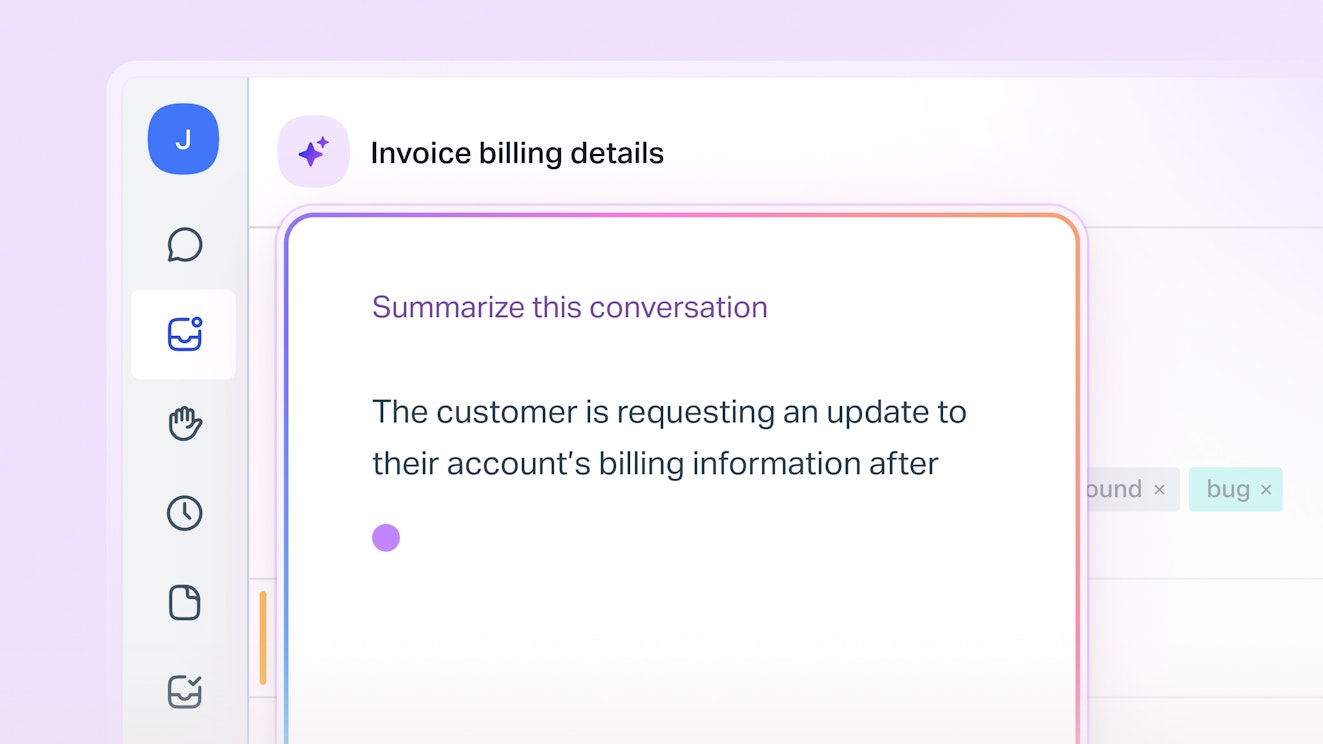
Ever had a colleague ask for help only to realize it requires catching up on a week-long email thread with dozens of messages? Your urge might be to read the last message and wing it because you’ve got things to do. Don’t. There’s a better way.
AI tools can quickly summarize an entire conversation, helping you understand even the most thorny conversations in seconds. When you’re passing requests between different teams or escalating a complicated client request, an AI-powered summary makes each handoff more efficient and reliable.
Use AI to categorize requests


Categorization is as important as it is overlooked, largely because the efforts to capture conversation categories require laborious manual processes or complicated deterministic workflows that don’t adapt well to changes in customer behavior.
Tools offering AI categorization offer a more flexible option. They’re able to assess a conversation and, using training or guidance from you, apply a category or topic that captures the intent of the requester. This not only allows you to capture increasingly accurate categories about client requests but also lets you do so more quickly.
Where a human might balk at having to choose between too many options, an AI is happy to do so, letting you home in on your reporting.
Use AI to take notes during client calls
You’ve probably seen AI notetakers joining your remote meetings. They can be incredibly helpful as they allow you to focus on the conversation you’re having rather than worrying about the process of writing down key points. And while AI-generated notes should always be reviewed for accuracy — especially if you intend to share them externally — it’s hard to argue that these tools capture a much fuller picture of a meeting’s content.
Meeting notes or transcripts can also save your team time and effort when prepping for future calls or client work. For instance, AI tools like Claude can process notes across multiple meetings, allowing you to ask questions (“What was the target for the project with that client?”) or quickly make updates across systems based on the content of a meeting. Action items can become Linear issues, changes in rollout dates can make their way directly to Salesforce, etc.
What note-taking software should you use?
Choosing the right AI notetaker can depend a lot on your existing tech stack and workflows. That’s because so many popular work tools include some version of it, each focused on a different aspect of the task.
For example, Zoom's AI Companion doesn't require a notetaker bot to join your call. Notion's agent reads your calendar and automatically asks to join your calls. You can also purchase specific AI note-taking tools like Granola, which uses AI to enhance notes you took yourself.
Use AI to draft and improve your emails

If you’re using a communication platform like Help Scout, AI can also learn from your past conversations and your help center to generate draft replies to client emails with one click. That’s a massive timesaver, and it gives you the opportunity to review the draft before it's sent to a client.
AI is also great at coming alongside your human team members to improve their communication skills. AI copilots can do everything from checking for grammar or spelling errors to adjusting the tone of an email or making a message more succinct. If you serve a global client base, you can also translate messages with the click of a button.
These internal-facing AI features don’t always get the same spotlight as a flashy chatbot, but they’re far less risky, and they enable your team to serve far more clients in the same amount of time.
5. AI-powered answers for clients

In many industries, being able to automatically answer every question for a client instantaneously feels like a nice dream.
I’ve worked in customer experience long enough to realize that’s not always possible — or even the right end state. Some clients prefer a human touch, and some moments in a client’s journey deserve human attention.
All that being said, odds are there are a fair number of client questions and interactions you can automate safely. When done well, this can also create a better client experience because it removes delays and enables them to get back to their work immediately.
The inescapable requirement for getting self-service right is to start by building a great knowledge base for your clients. AI can’t answer questions if it doesn’t have the right answers, after all. By documenting your standard processes, frequently asked questions, and common issues clients face throughout an engagement, you’re creating the building blocks for customer-facing AI.
Tools like AI Agents use that documentation — from your help center, your website, blog posts, and more — to provide real-time help to your clients 24/7. You’re able to control the tone and voice, translate answers into virtually any language, and provide feedback on AI responses to make future responses even better.
You also stay in control of the AI's scope by setting up rules for the types of requests that your AI is allowed to handle, as well as other rules to prevent it from touching the ones that it shouldn't.


While I wouldn’t recommend starting with customer-facing automations, once you have a solid foundation of knowledge for it to draw from, using AI to answer more straightforward questions is a key component in scaling your ability to serve more clients.
Recommended Reading

Guardrails that keep automation from backfiring
While the automation ladder helps get you off the ground, it’s important to establish clear internal policies that guide your efforts to automate client communications.
What works best will vary across industries and companies, but here are the best practices I suggest to ensure every automation is helpful for both your firm and your clients:
Always build an escape hatch. Every customer-facing automation must always allow the customer to reach a human easily. Make this an unbreakable requirement. To ensure it's being enforced, regularly review automations that route conversations or reply to customers, to ensure conversations aren't getting trapped by mistake.
Be up front about your automations. If you use a chatbot, introduce your chatbot as an AI agent from the get-go. If you’re automating invoice reminders and something goes awry, acknowledge it. Trust is easy to lose and hard to earn. Don’t burn it by trying to be sneaky.
Never automate judgment. Machines are good at many things, but they lack human judgment. If a situation requires real judgment or nuanced decision-making, it should not be automated. Humans should be accountable for decisions.
Automations should sound like your team. Whether it's a saved reply to a common question or a fully implemented chatbot, your automations need to be on-brand. If needed, create a brand voice guide and use it as the basis for all automated communication.
Build through continuous improvement. Automations are not set-it-and-forget-it. You must build routines of review and improvement. Iteration is the key to ongoing success. For each new automation, I typically recommend a minimum of a quarterly review cadence that looks at where it’s succeeding and where it’s failing.
Recommended Reading

Good automation is an investment, not a shortcut
Automating client communications in a sustainable way takes work. Busy teams often want to take shortcuts or get so wrapped up in the details of serving clients that they never make time to think about automation.
Both are recipes for failure: you’re introducing unnecessary risk for your organization, or you’re hurting your ability to operate and scale efficiently.
Good automations are an investment that pays dividends in improving client communications and reducing busywork for busy teams. The best organizations know this, and they make the time to build and review automations regularly.
Like what you see? Share with a friend.
Thomas Hils
Thomas is a 10+ year veteran of the customer support space at companies like Zapier, Coda, CoinTracker, and Replo. He’s also the founder of CX consultancy Common Support and is Head of Support and AI Customer Experience at Wingspan.
Ready to go?

