The 7 Best Patient Communication Software in 2026


Today’s patients expect healthcare organizations to make it easy to book appointments, reschedule visits, ask questions, receive reminders, complete forms, and get follow-up instructions through the channels they already use. From MyChart to text messages to live chat, it’s far more than just phone calls and front desk conversations.
For one practice, the priority may be appointment reminders and two-way texting. For another, it may be secure messaging, digital intake forms, patient portals, and EHR integrations.
That’s why there is no single best platform for every healthcare organization. The right choice depends on your team size, care model, patient communication preferences, existing systems, budget, and whether or not you need your platform to be HIPAA compliant.
To help you find the right fit for your team, we've compiled this list of the seven best patient communication software. Below, you'll find our detailed reviews covering which types of healthcare practices and use cases each platform is best for.
1. Help Scout – Best for managing patient email communications


Many healthcare organizations try to use tools like Gmail and Outlook to manage patient email communications. However, this leads to a lot of issues as your practice — and email volume — grows. No one knows what requests they're responsible for, it's difficult to determine what needs to be done and what's complete, and there are no safeguards for protecting PHI.
If your practice is struggling to manage email in Gmail or Outlook, Help Scout is a significant upgrade. It's a help desk platform that can be configured to be HIPAA compliant, and it comes with lots of features that simplify collaboration, clarify accountability, and expedite replying.
Organization starts with making sure emails are getting to the right people. In Help Scout, you can set up teams (e.g., clinical support, billing and insurance, front desk), then automatically route incoming emails to the right team. However, if you don't want other teams to be able to see the emails sent to clinical support, for example, you can set up multiple mailboxes.
Once your teams or mailboxes are set up, you can create workflows that automatically assign requests sent to a specific email address (e.g., records@), that contain specific words (e.g., "insurance" or "bill"), or that come from specific individuals (e.g., the insurance providers you're contracted with) to the team responsible for responding.
When you have your teams and workflows set up, it's time to start responding to emails. Features like collision detection ensure no one's ever replying to the same email at the same time, internal notes let you @mention coworkers to collaborate privately before responding, and saved replies let you create a library of pre-written answers to frequently asked questions.
You can also lower your email volume by creating a help center where patients can find the answers they need on their own, or you can offer real-time support via live chat. Finally, you can control what people can see and do in the platform with advanced permissions, and you'll get access to detailed reports showing request volume trends, team performance, and more.
Pricing
Free plan and trial available. View Help Scout's current pricing.
Learn more about Help Scout:
2. Medchat – Best for offering live chat support to patients

Medchat is a HIPAA-compliant live chat platform that's built for healthcare providers, specialty pharmacies, and life sciences companies that want to make patient communication faster and less dependent on manual staff follow-up.
The platform supports patient communication via live chat and SMS, and it also offers an internal team chat so staff can collaborate behind the scenes before responding. Patients can access live chat through secure links sent by SMS, email, or even phone call prompts, making it easier for them to get help without waiting on hold or navigating a complicated portal.
Medchat’s main strength is its AI-powered workflow automation. The visual builder enables admins to create chatbots and automated forms for common patient interactions like collecting symptom information and providing next steps, automating appointment scheduling, gathering patient details before a visit, or guiding patients through pre-appointment checklists.
The platform comes with automatic translation available in more than 30 languages, which makes it especially useful for organizations serving diverse patient populations or teams that need to make live chat more accessible without adding multilingual employees.
Medchat also includes analytics for monitoring live chat operations. You'll be able to see the number of patients waiting to connect with an agent, the most common questions or conversation topics, overall chat volume, average chat duration, and agent response times.
Pricing
No free trial offered. Contact Medchat for pricing.
Recommended Reading

3. ModMed – Best for patient engagement


ModMed is a good fit for practices that want patient communication connected to the full visit lifecycle. Rather than functioning only as patient communication software, ModMed offers a broader platform that can also support EHR, practice management, billing, payments, and specialty-specific workflows.
Teams can use ModMed to schedule appointments, send appointment reminders, collect forms before the visit, share pre-visit instructions, verify insurance eligibility, confirm and update patient demographics during check-in, and give patients the option to check in online.
ModMed is also helpful after the appointment. Instead of requiring manual lookups, it suggests ICD-10 codes based on clinical documentation and specialty-specific findings. Additionally, providers can send follow-up recommendations, test results, billing information, and patient satisfaction surveys.
The biggest benefit of ModMed is that instead of relying on separate tools for reminders, forms, payments, clinical follow-up, and reviews, you can manage all of that in a central system. It's more than what you need if you're just looking for simple patient communications over email, chat, phone, or SMS, but if you want full lifecycle support, it's an ideal choice.
Pricing
No free trial offered. Contact ModMed for pricing.
4. OhMD – Best for automated text and phone call support

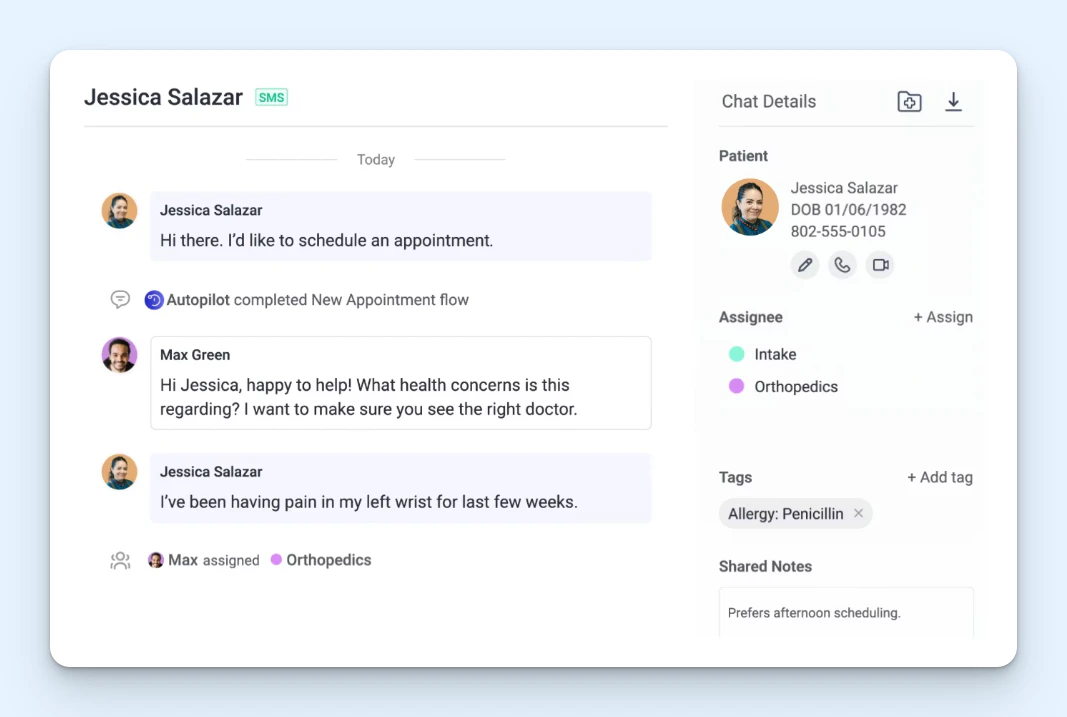
OhMD is a strong fit for independent practices that rely heavily on phone calls, SMS, and website chat to communicate with patients. It is designed to help medical teams manage everyday patient interactions more efficiently with secure website chat, HIPAA-compliant texting, and AI agents that can automate common call-based workflows.
With OhMD, practices can text-enable their existing landline phone numbers, allowing patients to send text messages to the same main number they already know, while staff can manage SMS conversations directly in OhMD instead of switching between phones, voicemail, and separate messaging tools.
OhMD is also useful for practices that want to reduce the burden of routine phone calls. Its AI agents can help answer common calls related to appointment scheduling, prescription refills, and patient referrals. If a conversation needs human attention, the team can review the call transcript and step in while the patient is speaking with the AI agent.
Another standout feature is OhMD’s EHR integrations. The platform connects with more than 80 EHR systems, allowing staff to view patient information and appointment details while managing conversations. OhMD can also be configured to send chat or call details to the patient’s EHR record once a conversation is completed.
OhMD may not be the best fit for organizations looking for a broader all-in-one practice management system like ModMed or a more advanced chatbot builder like Medchat, but it is a strong option for independent practices that want to modernize phone and text communication without overcomplicating the workflow.
Pricing
No free trial offered. View OhMD's current pricing.
5. Relatient – Best for large healthcare organizations


Relatient’s Dash system brings together several parts of the patient journey, including scheduling, engagement, messaging, and intake. It stands out for organizations that need those tools to work together across more complex scheduling workflows.
For instance, rather than offering a simple appointment calendar, it uses a rules-based scheduling engine to match patients with the right provider based on location, visit reason, appointment type, and other factors.
For larger practices, hospitals, and health systems, that level of logic is important because scheduling is rarely as simple as just finding an available slot on a calendar. Appointments often involve multiple constraints, and mistakes create downstream issues.
Also, to streamline the intake process, practices can automatically assign different forms based on the appointment type, specialty, or care setting. Patients can complete their medical history, insurance information, consent forms, and electronic signatures online before the visit.
Pricing
No free trial offered. Contact Relatient for pricing.
6. Phreesia – Best for simplifying the pre-visit experience


Phreesia is best for healthcare organizations that want to make the pre-visit experience easier for patients and less manual for staff. It's especially strong around digital intake, registration, scheduling, and payment collection.
The platform helps patients complete key steps on their own device, including check-in, registration and consent forms, clinical history, and insurance information. Similar to Relatient, Phreesia allows admins to customize intake workflows based on factors like appointment type, provider, location, patient demographics, or visit timing.
Patients can also schedule appointments online, receive automated reminders, confirm visits, reschedule when needed, and complete payment steps before, during, or after the appointment. Phreesia supports flexible payment options, including Apple and Google Pay, card payments, and payment plans, which helps practices collect more payments at the time of service.
Pricing
No free trial offered. Contact Phreesia for pricing.
7. NexHealth – Best for automating front office tasks


NexHealth is a good fit for practices that want to automate repetitive front-office tasks. It brings together online scheduling, digital forms, payments, insurance verification, reminders, texts, and email communication, giving teams a lightweight way to manage the patient experience.
One of NexHealth’s strongest use cases is helping practices keep the schedule full. Patients can book appointments online, while automated waitlist tools help fill last-minute cancellations.
NexHealth also offers one-click booking links, which make it easier for patients to schedule follow-ups from an SMS or email without logging into a patient portal.
Similar to some other tools on this list, patients can complete consent forms, medical history forms, payment information, and other paperwork from their own device before the appointment. NexHealth can then automatically sync that information into your EHR.
Pricing
No free trial offered. Contact NexHealth for pricing.
Choosing the best patient communication software for your team
By now, you've hopefully selected a few platforms that are worth a closer look. To narrow your list down further, start with the problem you're actually trying to solve. The best tool for your team is the one that takes your biggest daily headaches off your plate.
A few things to weigh as you compare your options:
Start with your most painful workflow: If your team is drowning in emails, look for a help desk tool. If the front desk is buried in phone calls, prioritize two-way texting, AI phone agents, voicemail transcription, or live chat. If check-in is where everything backs up, focus on digital intake, reminders, insurance verification, and payment collection.
Match the channels your patients actually use: It doesn't matter how good a platform is at live chat if your patients would rather text, call, or email you. The right fit is the one that meets patients where they already are and fits how your staff already works.
Look for reporting that tells you something useful: Strong reporting shows you where patients get stuck, which questions come up over and over, and where a bit of automation or self-service content could save your team time.
Confirm the compliance basics: This one isn't optional in healthcare. Before you sign anything, make sure the vendor supports HIPAA compliance, will sign a BAA, offers the access controls you need, and gives your team a secure way to handle PHI across every communication channel.
There's no single best patient communication platform. A small therapy practice, a busy dental office, and a sprawling hospital network all have very different needs. The goal isn't to find the tool with the longest feature list; it's to solve your most pressing communication problems now, with enough room to keep supporting patients effectively as you grow.
Like what you see? Share with a friend.
Maryna Paryvai
Maryna is a results-driven CX executive passionate about efficient processes and human-centric customer support. With a track record of scaling ecommerce support operations, she firmly believes that exceptional customer experiences lie at the heart of every successful business.
Ready to go?

