The 9 Best Zendesk Alternatives in 2026: Detailed Reviews


If you're looking to replace Zendesk, this list of the nine best Zendesk alternatives will help you find the perfect fit. We've reviewed each platform in great detail, sharing what types of teams and businesses they're best suited for and looking at how their features and pricing compare to Zendesk’s.
Below, you'll find a side-by-side comparison of the primary differences between each of the Zendesk alternatives we review later in this post. For pricing, we're showing the price of each platform's lowest-cost plan that includes features for managing email, self-service, live chat, and social media support to give you a better sense of how similar plans compare in price.
At Help Scout, we only publish deeply researched, human-written content. If you find our content to be as helpful as we strive to make it be, you can set us as a preferred source in Google so you'll see our content surfaced more often when you're searching.
| Software | Overview | G2 Rating | Free Trial | Multichannel Pricing |
|---|---|---|---|---|
Help Scout | Help Scout offers all of the power of Zendesk without the complexity, and its pricing is a fraction of the cost. | 15 days | $25/user/month | |
Intercom | Intercom has built AI into nearly every feature of its platform and is great for support teams looking to automate as much as possible. | 14 days | $85/seat/month | |
Freshdesk Omni | Freshdesk offers more than 700 integrations and is great for teams that need to connect their help desk to niche third-party tools. | 14 days | $29/agent/month | |
Zoho Desk | Zoho Desk is an affordable option that comes with a feature for building community forums, which is rare to find in help desk tools. | 15 days | $14/user/month | |
Kustomer | Kustomer caters to large retail businesses and provides full omnichannel support across email, chat, phone, and social. | Not available | $89/seat/month | |
Gorgias | Gorgias' highlight is its deep Shopify integration that allows its AI agents to answer questions and update order information. | 7 days | $10/month (includes 50 tickets) | |
HubSpot Service Hub | HubSpot Service Hub is ideal for customer success teams that need a deep CRM integration and customer health scores. | Not available | $90/seat/month | |
Dynamics 365 Customer Service | Dynamics 365 Customer Service is deeply integrated with Microsoft's ecosystem and built for complex enterprise use cases. | 30 days | $50/user/month | |
Dixa | Dixa is a good one-to-one replacement for Zendesk with powerful routing features and extensive collaboration tools. | Not available | $89/agent/month |
1. Help Scout – Best for growing teams that need a sophisticated support platform at an affordable price

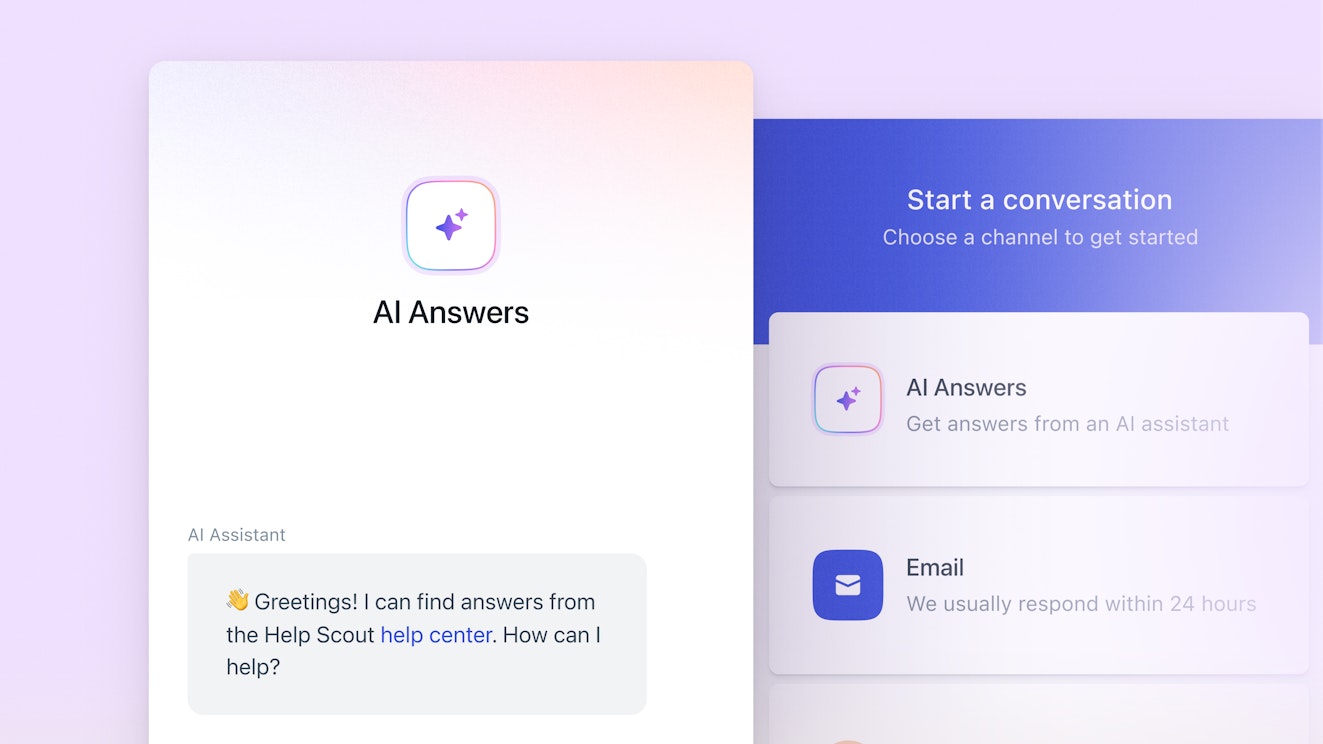
With Help Scout, you get access to the same powerful features you'll find in Zendesk but without the complexity and high price tag. Help Scout's intuitive interface makes it easy to set up, simple to use, and effortless to train new agents on, and its pricing is only a fraction of what you'll pay for Zendesk and many of the other Zendesk alternatives on this list.
How Help Scout compares to Zendesk
Help Scout's multichannel support plans are between $30 and $94/user per month less than Zendesk's, and Help Scout also offers a free plan for small businesses that's similar to Zendesk's $19/user per month Starter plan. Additionally, Help Scout's AI Answers are half the per-resolution cost of Zendesk's.
Help Scout is much easier to set up and use than Zendesk. You can also automatically migrate your data from Zendesk to Help Scout using Import2, a service that's free for most customers.
Help Scout only offers phone and SMS support via integrations with other tools, where Zendesk has phone and SMS support built into the platform natively.
Help Scout doesn't offer a few of the features you'll find in Zendesk, such as community forums, skill-based routing, and custom data explorations, so it may not be the best fit for enterprise teams with deep customization needs.
Help Scout lets you create one or more team inboxes to manage your customer conversations across all channels: email, live chat, and social (through Facebook Messenger, Instagram, and WhatsApp). You get powerful features for collaborating as a team and keeping your inbox organized, including private notes, collision detection, round-robin and load-based routing, SLAs, customizable inbox views, and tags.
Help Scout also offers several ways to get replies to customers faster. You can create a library of saved replies and build automated workflows quickly using in/then statements. AI Drafts writes custom responses using knowledge from your previous support conversations, help center, and website, and AI Assist works as a copilot that can translate, shorten, expand, and edit responses that you write yourself.
Build a knowledge base using Docs to enable self-service support. Customers can search for answers on your help center, or you can embed a Beacon — Help Scout's web widget — on your website or in your app to give customers access to your help center from wherever they're working. Beacon is also where customers can request live chat support (if someone on your team is available) or interact with AI Answers.
AI Answers is an AI-powered chatbot that replies to customers for you. It forms its answers using knowledge from your help center and any website you add as a source, ensuring the answers it provides are accurate and on brand. When it can't find the right answer, customers can easily send the question to a human member of your team from the same interface.
Beacon also lets you reach out to customers proactively. Launch a chat window or surface a help doc during tricky places in the customer journey, place a banner on your site to announce a new feature, or even send out a survey to capture customer feedback. It’s all possible using Beacon’s targeting features, which allow you to dial in on your audience using events like URL visited, time on page, and more.
Recommended Reading
Pricing
Free plan and trial available. View Help Scout's current pricing.
Learn more about Help Scout:
2. Intercom – Best for teams that want to use AI to automate everything

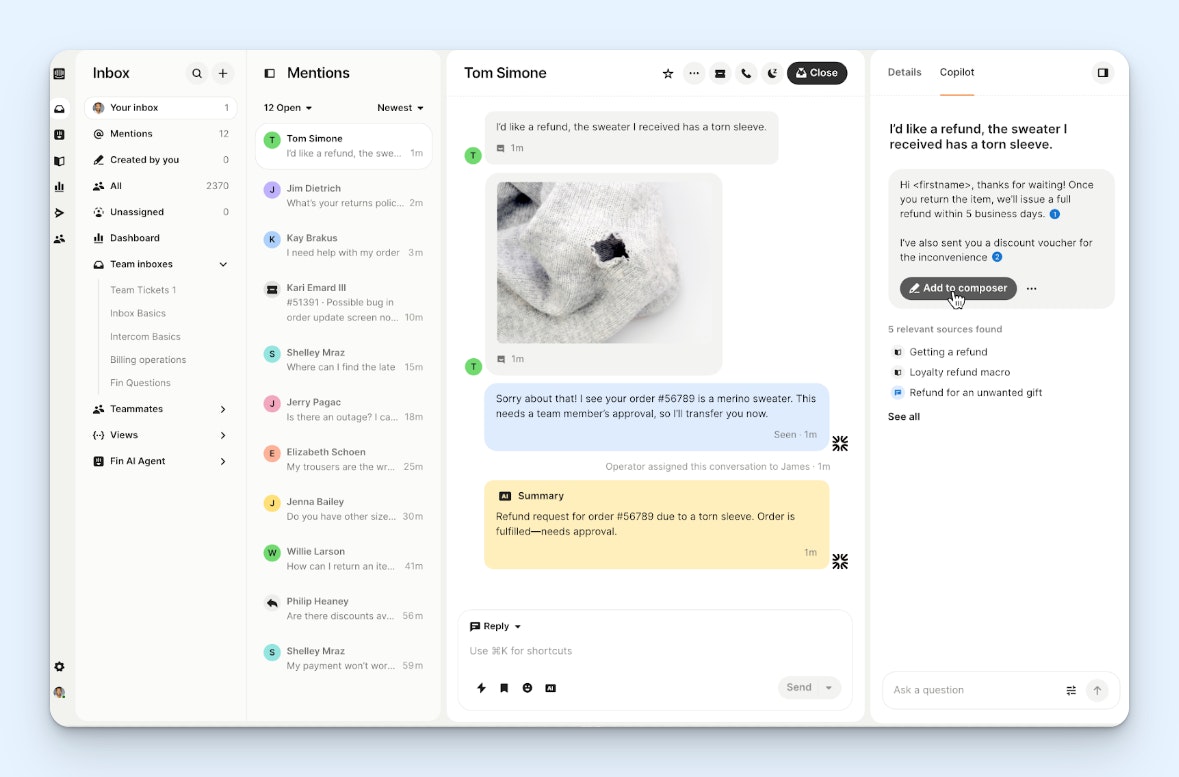
Intercom is the market leader when it comes to AI customer service software. The platform is full of AI features that answer customers' questions automatically, help agents write replies, update data in integrated systems, provide CSAT ratings on all support interactions, and much more.
How Intercom compares to Zendesk
Intercom is unique in that you can use its AI chatbot, Fin, as a stand-alone product. It even integrates with Zendesk if you like the standard features of Zendesk's support platform but aren't thrilled with its AI agents.
Whether Intercom is more affordable or more expensive than Zendesk really depends on the size of your team. For small teams looking for more standard support software features, Zendesk's base plans have lower per-user costs. But for large and enterprise teams needing advanced features, Intercom's highest-cost plans are priced lower than Zendesk's.
Both Intercom and Zendesk let you deliver support across all channels natively. Both also offer social media support integrations with Facebook, Instagram, and WhatsApp, but only Zendesk offers an X integration.
Both platforms are similar in their AI feature offerings, but Intercom doesn't have a feature that's comparable to Zendesk's AI-powered scheduling add-on.
Intercom's AI agent, Fin, answers customers' questions automatically and can be used on conversations received over email, chat, social, and SMS. You can also purchase add-ons to use Fin to answer questions received over the phone, on Slack, or through other systems you've connected using Intercom's API. It's trained on content from your website, knowledge base, and support tickets.
Intercom's AI copilot helps your team draft replies quickly. It pulls knowledge from your help center and from previous conversations your team has had with customers to compose replies in seconds, and it also shows you the sources it used so you can fact-check if necessary.
Other AI features you'll find in Intercom do things like update data in third-party systems when necessary to help customers, predict and add CSAT scores to all conversations even when customers didn't complete a survey themselves, and provide insights that show instances where the support a customer received didn't meet their expectations.
Keep in mind that all of this automation comes at a cost. Fin is priced per-resolution (its per-resolution costs are lower than Zendesk's, but none of Intercom's plans include free resolutions), and most of the other AI features we mentioned are sold as add-on products on top of the platform's base per-user fees.
Pricing
Free trial available. View Intercom's current pricing.
Recommended Reading

3. Freshdesk Omni – Best for teams that need to integrate their support software with niche third-party systems


One of the big advantages of Zendesk is that it integrates with nearly 2,000 other tools. The only other customer service platform on the market that comes close is Freshdesk, which offers nearly 700 integrations through its app marketplace. If integrating your customer support software with other niche tools your company uses is a must-have, Freshdesk is likely the right choice for your team.
How Freshdesk compares to Zendesk
While Zendesk offers a bigger selection of integrations, Freshdesk's large integrations marketplace may also have what you need if you're looking to move away from Zendesk but need niche integrations that you won't find in most other support tools.
Freshdesk's ecosystem makes it more customizable than Zendesk’s. If you only need to deliver email support, you can subscribe to Freshdesk. If you only need to deliver phone support, you can subscribe to Freshcaller. This can make your total cost much lower if you don't need a platform that works across all channels.
Freshdesk Omni doesn't have quite as many AI features as Zendesk — offering only AI agents, copilots, and an AI reporting insights tool — but its AI chatbot's per-resolution costs are significantly lower than what you'll pay for Zendesk's.
Like Zendesk, Freshdesk Omni lets you deliver support via email, chat, social, and phone, and you can also use Freshdesk to publish a knowledge base, create a community forum, and build individual customer portals. However, SMS support is only available on Freshdesk via integration.
Freshdesk Omni is Freshworks' omnichannel support platform. It allows teams to deliver support over email, chat, and social; native phone support capabilities are available through its Freshcaller add-on; and you can even use Freshdesk's AI voicebot to automatically answer customers' questions over the phone.
Other AI features you'll find in Freshdesk include an AI chatbot that automatically replies to customers' questions via email and messaging apps, an AI copilot that will draft replies to conversations or create knowledge base articles for you, automatic sentiment detection tools that help you prioritize requests, and a conversational AI analysis tool that helps you analyze your data more easily.
Beyond these features, you'll get access to the same channels and tools you'll find in any help desk: a shared inbox, a knowledge base, workflow automation, round-robin ticket routing, and mobile apps. Other, more niche features that not all help desks have but that are available in Freshdesk Omni include the ability to create community forums and the ability to build customer portals for individual customers.
Pricing
Free trial available. View Freshdesk Omni's current pricing.
Recommended Reading

4. Zoho Desk – Best Zendesk alternative for small businesses

Zoho Desk is one of the lowest-cost support platforms on the market, making it a great fit for small businesses with small budgets. Plus, taking advantage of its low cost doesn't mean you have to sacrifice on features. You'll likely see a significant price reduction when switching from Zendesk to Zoho Desk without losing much of the functionality you had available to you in Zendesk.
How Zoho Desk compares to Zendesk
Zoho Desk is significantly less expensive than Zendesk. In fact, Zoho Desk's highest-cost plan costs less per user than Zendesk's lowest-cost Suite plan.
Both platforms let you deliver support via email, chat, phone, and social (Facebook, Instagram, X, and WhatsApp). However, SMS support is available natively in Zendesk but only available via integration in Zoho Desk.
Both platforms let you build customer portals and community forums.
Zoho Desk is less customizable than Zendesk. It's a better fit for smaller businesses, where Zendesk caters more to large and enterprise companies.
One feature you'll find in Zendesk that isn't very common in help desks is community forums. Freshdesk Omni has them, but only on its higher-tier plans. Zoho Desk offers its forums feature in plans that are much less expensive than both Zendesk and Freshdesk.
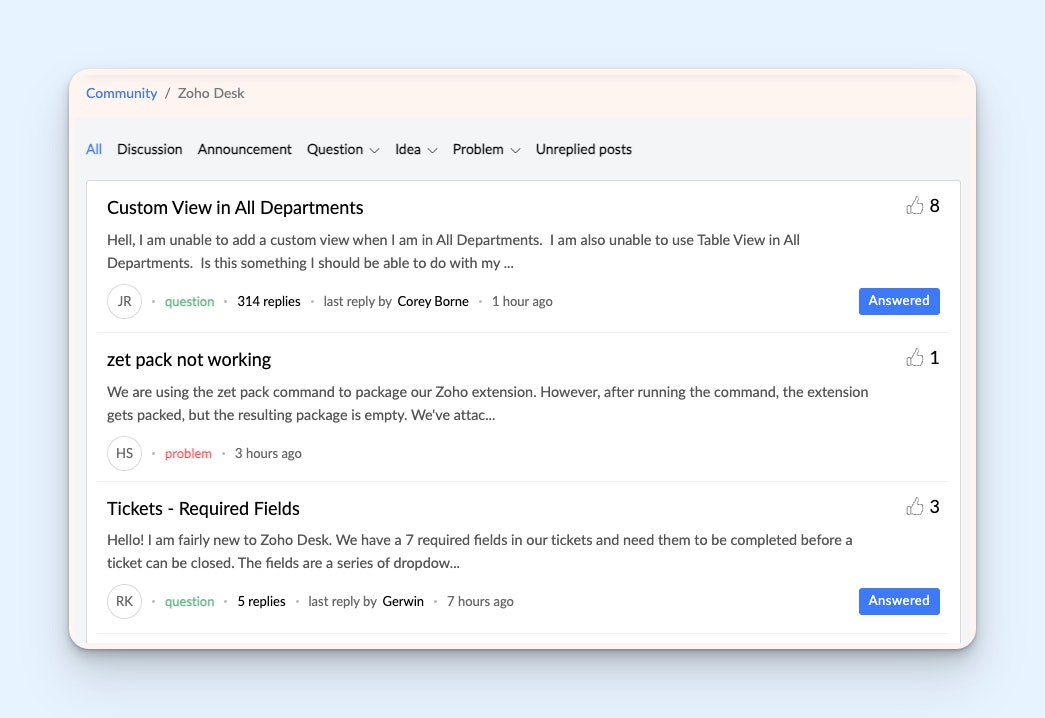
With Zoho's community forums, your customers can ask their own questions and answer those asked by other customers. Community members can upvote conversations to show support for things like feature requests. Agents can answer questions and bump their replies to the top. Finally, everything can be indexed by search engines to provide another way for customers to find the answers they're looking for quickly.
Zoho also offers its own entire ecosystem of business apps, so it can be a good choice if you're looking to replace several of the tools in your tech stack. It has a CRM, a business intelligence tool, a project management platform, and HR software among many others. A complete Zoho migration can get all of your business systems under one integrated platform.
Finally, Zoho Desk has a unique time tracking feature that you won't find in other support platforms. Your agents can track the time they spend on specific tickets or types of tasks, giving you helpful data on individual performance and ticket complexity. On higher-cost plans, you can even set up automatic time tracking so agents don't need to remember to start and stop timers.
Pricing
Free plan and trial available. View Zoho Desk's current pricing.
Recommended Reading

5. Kustomer – Best for large retail businesses that need to deliver omnichannel support


Kustomer is an ideal Zendesk alternative for large retail and ecommerce businesses. In addition to integrating with all of the popular ecommerce platforms, it has AI that can automatically reply to requests over chat, email, phone, and SMS. It also has integrations with Facebook, WhatsApp, X, and Instagram — key social channels for ecommerce and retail customer support teams.
How Kustomer compares to Zendesk
Kustomer is more custom-built for ecommerce and retail businesses than Zendesk, which is designed to cater to the needs of every industry.
Both platforms let you deliver support via email, chat, phone, and social (Facebook, Instagram, and WhatsApp). However, SMS support is available natively in Zendesk but only available via integration in Kustomer, and Kustomer does not have an integration with X.
Pricing for the two platforms is comparable, though Zendesk does offer more affordable base plans than Kustomer. It's also worth noting that the per-seat costs listed on Kustomer's pricing page assumes you've added at least eight seats; pricing for fewer than eight seats can only be obtained from Kustomer's sales team. Zendesk does not have any minimum seat requirements.
Kustomer's AI chatbots cost less than half of the per-resolution price of Zendesk's. However, Zendesk includes some free resolutions in all of its plans, while Kustomer does not.
Kustomer stands out due to its variety of integrations with the tools that retail and ecommerce support teams use. It integrates with systems like Shopify, BigCommerce, LoyaltyLion, Adobe Commerce (Magento), Recharge, and more to make it easy for you to access the customer and transaction data you need to deliver quick and personalized support.
Its Shopify integration shows all of your Shopify data in a sidebar — transactions, tracking numbers, order numbers, and shipping addresses. Additionally, you can do things like process refunds and cancel orders without leaving the Kustomer interface.
The data from your integrated systems is also used to power Kustomer's AI agents, which can answer customers' questions, process refunds, update orders, and provide details on when shipped products will arrive. You can build multiple AI agents to handle different types of tasks, and the agents can be used to respond to requests from all platforms — email, chat, social, messaging, and even voice.
Kustomer is also one of only a few truly omnichannel support platforms on the market. Because it's a combined support platform and CRM, it can connect requests to customers regardless of which channel they reach out on, which means customers can switch channels mid-conversation without you losing any context. Additionally, Kustomer's timeline view makes it easy to see a complete history of interactions a customer has had with your company.
Pricing
No free trial offered. View Kustomer's current pricing.
6. Gorgias – Best for small ecommerce teams using Shopify


If you're looking for a help desk for a small ecommerce shop, another option to consider is Gorgias. Gorgias is designed exclusively for ecommerce teams, offering deep integrations with platforms like Shopify, BigCommerce, Magento, WooCommerce, and PrestaShop. However, its Shopify integration is really the highlight of the platform, and its usage-based pricing makes it affordable for small online stores.
How Gorgias compares to Zendesk
While Zendesk caters to support teams in all industries, Gorgias is designed exclusively for ecommerce businesses, so its features are optimized for the unique demands of online merchants.
Gorgias' pricing is usage based, meaning you'll pay more as you respond to more customers. Zendesk's is user-based, meaning you'll pay more as you grow your support team.
Both Zendesk and Gorgias let you deliver support across all channels natively: email, chat, voice, SMS, and social. Both also have Facebook, Instagram, WhatsApp, and TikTok Shop integrations, but Gorgias does not offer an integration with X like Zendesk does.
Gorgias' Shopify integration is more robust than Zendesk's, offering unique features like the ability to browse your entire product catalogue and see remaining inventory without leaving Gorgias. Gorgias' AI agents can even create discount codes in Shopify to encourage users to buy products.
Gorgias integrates deeply with Shopify, allowing you to see, edit, duplicate, cancel, or refund orders directly from the Gorgias interface. Additionally, you can browse your product catalogue inside of Gorgias and see available inventory, which is helpful for responding to customers quickly.
Gorgias' AI features also use data from Shopify to automatically answer routine support requests. If a customer writes in asking for an update on their order, the AI can access the order details in Shopify and respond to the customer with the information they need. AI agents can also perform actions for you, such as canceling, refunding, or making updates to orders.
One unique feature in Gorgias that you won't find in other support platforms is its revenue statistics. This gives you data on the amount of revenue generated by customers who interacted with your support team during their buying journey, giving you insight into support's impact on revenue.
Gorgias is also one of only a handful of support platforms that has usage-based pricing rather than user-based pricing. For teams with more members doing support but lower request volumes — such as companies that have people from multiple teams providing all-hands support — this can save you a lot of money. However, it can also make your costs less predictable and lead to a large increase in costs at busy times.
Pricing
Free trial available. View Gorgias' current pricing.
Recommended Reading

7. HubSpot Service Hub – Best for customer success teams


HubSpot Service Hub is a great option for sales-led companies that delegate the responsibility of delivering customer support to a customer success team. Few other support platforms offer features that not only help you manage and reply to customer inquiries but also measure the health and churn risk of customers, making it ideal for teams focused on both support and retention.
How HubSpot Service Hub compares to Zendesk
HubSpot Service Hub integrates deeply with HubSpot's industry-leading CRM, making it easy for customer success and sales teams to stay aligned. While Zendesk also offers a CRM (Zendesk Sell), the company no longer actively promotes it.
The pricing for both products is more catered to mid-sized and enterprise teams. While both offer lower-cost plans for small businesses, the features included in those plans are severely limited. However, HubSpot's startup plan can be an affordable choice for growing SaaS businesses.
HubSpot offers more features that cater to the needs of customer success teams, such as customizable customer health scores, renewal pipeline metrics, and sales activity notifications.
Both Zendesk and Service Hub are powerhouses when it comes to reporting, allowing you to build deeply customized reports and dashboards using any data the platforms collect.
HubSpot Service Hub stands out with its features for customer success teams. Its connection with HubSpot's CRM and marketing products makes it easy to collaborate with sales and product marketing on cross-sell, upsell, and renewal campaigns. You'll be able to see all interactions sales and marketing have had with your customers alongside details like renewal dates and contracts in each customer's profile.
HubSpot also has a customer success workspace that shows you your entire book of business in a single view. You can set up customer health scores that factor in specific interactions you specify. For example, positive customer feedback might add points while requesting customer support might deduct points. The health scores are color-coded and provide you with an easy way to identify churn risks.
HubSpot also lets you create individual portals for specific customers, set SLAs for response times, and send pre-built Net Promoter Score, customer effort score, and CSAT surveys.
Beyond the features it offers specifically for customer success teams, HubSpot Service Hub also includes most of the standard help desk features: a shared inbox, a live chat widget, a knowledge base builder, AI chatbots, workflows, and reporting dashboards to track performance.
Pricing
Free plan and trial available. View HubSpot's current pricing.
Recommended Reading

8. Dynamics 365 Customer Service – Best for enterprise companies


Microsoft Dynamics 365 Customer Service is a great ticketing system for enterprise-level companies because of its strong security features and its ability to integrate with other enterprise-focused tools like SAP and Oracle. It's also ideal for companies that are already using other tools in the Microsoft ecosystem thanks to its native integrations with other Microsoft platforms.
How Dynamics 365 Customer Service compares to Zendesk
Zendesk is built specifically for customer support teams while Dynamics 365 customer service is one component of a massive CRM and ERP suite designed to connect every department in your company.
Both tools are highly customizable, making them ideal for large and enterprise teams. However, this also leads to lengthy onboarding timelines and means more complexity in training new and existing team members.
Dynamics 365's out-of-the-box integrations with other Microsoft tools makes it ideal for companies that are already deeply embedded in Microsoft's app ecosystem, while Zendesk's nearly 2,000 integrations with third-party apps makes it more accommodating for teams using software from a variety of companies.
While Zendesk offers highly customizable reporting for support teams, Dynamics 365 leverages Power BI for deep, cross-departmental reporting and analysis.
Dynamics 365's built-in AI is powered by Microsoft's Copilot — an industry-leading AI tool — and its native integration with Microsoft Teams makes it easy to collaborate on tickets in your chat app.
Copilot connects to your knowledge base to answer customers' questions automatically. It can also route customers with more complex inquiries to a support agent, using AI to determine the best person to reply to the ticket based on their expertise, skillset, and workload. When routing a ticket, the AI summarizes the request so agents can get up to speed quickly.
If text-based questions and answers aren't working for resolving an issue, agents can quickly create a link to invite the customer onto a Teams video chat. They can also start a chat in Teams with other agents who handled similar queries in the past to get help solving problems they don't know how to solve.
When an agent arrives to work for the day, Copilot provides them with a summary of all of the cases that have been assigned to them. Finally, Copilot is also built into the system's reporting features, providing managers with AI-driven insights on topics to address and metrics to look into more deeply.
Pricing
Free trial available. View Dynamics 365 Customer Service's current pricing.
9. Dixa – Best for cross-team collaboration


Dixa is a good option for companies where delivering customer support is a cross-team effort. It lets you collaborate easily not only with other teams inside of your company but also with external vendors, suppliers, and other third-parties, making it ideal for complex inquiries that require input from multiple individuals to resolve.
How Dixa compares to Zendesk
Pricing for Dixa and Zendesk is comparable, though Zendesk does offer more affordable base plans than Dixa. However, the per-resolution cost of Dixa's AI chatbot is less than a third of Zendesk's, making Dixa a more appealing option for teams using AI support extensively.
All of Dixa's plans have a seven-seat minimum. Zendesk does not have minimum seat requirements, so it can be a more affordable option for smaller teams.
Zendesk caters to cross-team collaboration with light users: a type of user with limited permissions. Dixa lets you bring anyone into customer conversations using only their email address — a Dixa user account is not required.
Both platforms offer skill-based routing, accommodating large support teams that have tiered roles (e.g., tier 1 support, tier 2 support, etc.) or specialists with specific skill sets (e.g., fluency in a specific language, technical troubleshooting proficiency, etc.).
Dixa's side conversations expand on the private notes feature of other help desks by allowing you to not only tag internal colleagues but also send an email to individuals who aren't Dixa users in your organization (e.g., vendors, partners, or other third parties). The side conversation and all replies can be created and viewed alongside the customer's original ticket.
Dixa also has sophisticated automatic routing rules. Instead of putting all of your requests into a single shared inbox for your team to cherry-pick, it automatically assigns new tickets to the person who's best equipped to respond to the request. It does this by evaluating priority, skill sets, and availability.
Finally, Dixa offers a drag-and-drop, no-code builder that lets you create your ideal workflows without any IT support. You can specify what types of requests are automatically routed, create smart rules to specify what's answered by AI and what goes into the queue, and even automatically close spam or irrelevant requests.
Beyond these features, Dixa has the same help desk features you'll find in all of the products on this list: email, live chat, phone, social, and self-service support. As far as AI, you can create a summary of previous support interactions for any customers, automatically translate replies, draft AI replies, and use its chatbot to provide instant answers.
Pricing
No free trial offered. View Dixa's current pricing.
Choosing the right Zendesk alternative for your business
At the beginning of this post, we provided some guidance on building a shortlist of tools to consider by looking at feature and channel availability and pricing. Hopefully, that will help you identify which of the tools on this list to consider more deeply, and you can narrow your list down to two or three final options.
From there, you'll want to get demos and/or start free trials of each. Demos let you get answers to the questions you can't find on your own, and hands-on experience in a free trial will help you learn what works best in a real-world environment.
Also, since multiple types of roles — agents, managers, other teams, etc. — will use the tool, it’s good to have people from each level of your support team test the final contenders. This ensures the option you choose will work well for everyone.
Finally, beyond the software's features and functionality, be sure to check out other aspects of each platform. Visit each tool’s help center, and send an email to their support team to evaluate how they handle customer interactions. The quality of support you receive when you need it can be a big differentiator, especially if all other things are equal.
Like what you see? Share with a friend.
Jessica Greene
Jessica Greene is a Help Scout alum, where we make excellent customer service achievable for companies of all sizes. Connect with her on LinkedIn or through her website.


