The 5 Best Customer Support Issue Tracking Software in 2026



It’s Monday morning. You’ve logged into your support software of choice and are settling in for your first customer conversation of the day. You were hoping for a softball, but you quickly realize that this isn’t one. In fact, everything is broken and you feel like that meme with the dog and the burning house.
OK, OK. It’s not that bad, but you’re going to need to loop in your development team to figure out what’s going on.
While there are many ways for support, development, and product teams to communicate when there’s a bug, a feature request, or customer feedback to discuss, the most reliable way is going to be issue tracking software.
In this post, we’re going to talk about how issue tracking software is used, share a few software recommendations, and explain how integrating them with a support platform like Help Scout can improve the issue tracking experience for both customers and employees alike.
At Help Scout, we only publish deeply researched, human-written content. If you find our content to be as helpful as we strive to make it be, you can set us as a preferred source in Google so you'll see our content surfaced more often when you're searching.
How does issue tracking software work?
Though the specific user experience will vary depending on the type of tool you choose, issue tracking software at its core usually works the same way:
A customer or user submits an issue via a channel like email or chat.
The issue is documented in a ticket or task within the tracking system.
The ticket or task moves through the development team’s issue resolution process, each step captured in the tracking software.
Once the issue is resolved, the ticket or task is closed, and the responsible party reaches out to the person who reported the issue and lets them know the end result.
Throughout the process above, the status of the issue is visible to everyone on the team, making it easy for folks to step in and ease bottlenecks or provide customer updates along the way.
What is issue tracking software used for?
While the introduction to this post — or even just the word "issue" — might make you think of something negative, that isn’t necessarily the case when it comes to customer service or software development.
Support and development teams need to monitor all feedback, be it good or bad, so that they can take action on the information. Issue tracking software makes sure that valuable information can be organized and addressed and not lost in the shuffle of daily work.
Below are some of the ways issue tracking software can help teams monitor both positive and negative user reports.
For tracking the bad: Outage and bug tracking
Although a large-scale outage in your product would announce itself quite quickly and clearly, smaller software bugs might not be so obvious, especially if you have multiple people hearing from customers about them.
If your team doesn't have a central place to create bug reports, it’s harder to recognize if a particular issue goes beyond, say, one customer’s browser settings.
Bug tracking systems and issue management tools help customer service teams:
Understand how many people are experiencing an issue.
Share and fix product bugs.
Monitor progress and communicate updates to customers.
Every company experiences product or service outages. Great issue tracking software helps you identify, prioritize, and fix those outages so you can retain customers for the long haul.
Recommended Reading

For tracking the good: Feature requests and customer feedback
While resolving a customer’s negative issue can take them back to a baseline level of customer satisfaction, implementing a feature they’ve asked for can carry them above the baseline.
Without aggregating requests, however, it can be hard to tell the difference between one person’s desire for ultra-specific functionality and something that would improve the app for a majority of your target audience. Tracking feature requests empowers you to help your product team prioritize and plan your future product roadmap.
Don’t forget: Tracking customer requests enables you to share the good news with your customers when you implement features they’ve requested. Releasing a new feature doesn’t do you — or them — much good if they don’t even know it’s available.
The last thing you want is for them to jump ship to another product for a feature that you actually have.
Recommended Reading

Types of issue tracking software
There are a number of different software approaches to issue tracking:
Dedicated issue and bug tracking tools: Some products are built specifically for issue tracking. Their specialized feature sets can be great, but you’ll also need to expand your tech stack and rely more heavily on integrations.
Issue management as part of a multifunctional tool: If you’re already using a project management, code management, or “all-in-one” tool, you might also be able to use it for tracking customer issues. This approach shortens learning curves and centralizes everything in one place.
Customer support platforms that integrate with issue management software: Your engineers may need the features included in the products above, but the support team members are probably the ones identifying the bulk of customer issues. It often makes sense to use issue tracking software that integrates tightly with your customer service software so that everyone has what they need to deliver a positive customer experience.
How Help Scout helps with issue tracking
One or two reports of a weird behavior happening with your product or app may just be a fluke, but if it’s happening regularly, it’s a sign that you have a bug on your hands.
While it’s tempting to rely on “vibes” when it comes to raising an issue to the rest of the business, product owners want numbers, which is where Help Scout can come in handy.
Help Scout is a powerful and intuitive customer support platform with all the features you’d expect to see, like a shared inbox and knowledge base functionality. Help Scout can also be an essential piece of your issue tracking system.
Identify and track issues


When your support team uses a tool like Help Scout as its customer communications platform, it’s easier for them to identify issues, track them, and keep customers informed along the way.
For example, let’s say a customer writes in about a bug in your mobile app. They can’t seem to change their password through the regular flow. The agent on the case escalates the issue to your dev team and tags the Help Scout ticket with “mobile-password-bug” before asking the rest of your team to be on the lookout for similar cases.
Your support agents then tag every related conversation that comes through with the same issue. Once your engineers have squashed that bug, your customer support team can run a Help Scout workflow that:
Targets all conversations with that tag.
Replies to let those customers know that the issue is resolved.
Closes the conversations so they’re out of your queue.
That kind of workflow isn’t only good for appeasing customers — it can also delight them. Imagine releasing a highly requested feature and being able to spread the word to each and every customer who asked for it!


Aid in prioritization and road map planning


Help Scout can also help you identify the prevalence of bugs or feature requests to help you make the case for their prioritization. Reports can be filtered by tags and custom fields so you can get a full picture of an issue or feature request’s impact.
Keep all of your internal teams in sync


Help Scout integrates with popular software used by product and development teams. Imagine how much faster and more effective your feedback loop would be if it looked like this:
Customer support agents create or link to existing issues directly from the Help Scout conversation window and can jump to those tickets in the issue tracking software with just one click.
Product and engineering can see, in their own tools, how many customers have reported a bug or requested a feature, thanks to the support team linking conversations to those issues.
Help Scout alerts the support team when an issue is resolved or a feature is released, and they can, in turn, quickly update customers.
Your customer support platform should help close the loop between customers, your product, and the teams supporting both, thereby increasing customer satisfaction, loyalty, and retention. Help Scout does just that.
Learn more about Help Scout:
The 5 best customer support issue tracking software
Now that you understand the importance of issue tracking in customer support, let’s take a look at five issue tracking software platforms. We’ll examine both their project management and issue tracking abilities, as well as how they integrate with customer support systems.
1. Linear – Best for teams that live in Slack


Linear is a project management and issue tracking system designed to support the entire project lifecycle. Since it aims to be your start-to-finish tool, it has a little something for everybody on your team.
Product teams will enjoy the ability to write and edit product specs and documentation collaboratively. You can leave inline comments on these docs which can be handy when hashing out the details of a new project, and there’s even a text-to-issue command that can turn your planning docs into concrete tasks.
Linear also has analytics to help see how different projects connect and fit into your company’s overall strategy. It’s easy to combine insights and create custom dashboards that measure things like issue count, triage time, effort, and cycle time. While dev teams will appreciate analytics and a centralized spot for project resources, they’re likely to be more excited about the issue management features.
There are the obvious things like the ability to assign issues to the right person or team, tag tasks to stay organized, and assign priority levels so everyone knows what to work on next. But there are also quality of life features like a keyboard-first design, an integration with GitHub for automating pull requests, and an assortment of AI-powered features.
The AI can automatically triage and label issues based on historical data as well as find duplicate tasks to avoid extra work, and the Pulse feature can summarize project and initiative information so you always know where everything stands. There are also AI Agents that can help you further automate work — prebuilt ones for things like Cursor, Git Copilot, and Codex, as well as the ability to build your own.
Lastly, Linear has a great Slack integration. Its Asks feature allows teams to easily submit issues from Slack. This is great when someone internally notices a problem and needs a quick way to escalate it to the right team.
Support software integrations
Linear has integrations for several help desk platforms including Zendesk, Intercom, Front, Salesforce, and Help Scout.


The Help Scout integration allows support teams to create, link to, and review Linear issues from the conversation sidebar. This helps agents escalate feature requests and technical issues, monitor them as they move through the development process, and keep customers in the loop, all without having to switch tools.
Linked Help Scout conversations are listed in the associated Linear tasks so that product and engineering teams can easily click through to Help Scout to read the customer’s original message, leave notes for the support team, or ask follow-up questions.
In addition, if your company uses Linear’s customer requests feature, Help Scout conversations will automatically group by company. This is helpful for product and leadership teams, as they can view company information, add notes, or request details to help prioritize work based on customer demand.
Pricing
Free plan available. View Linear’s current pricing. The Help Scout integration is available to anyone on a Plus or Pro Help Scout plan.
2. Jira – Best for teams focused on AI


Jira is one of the most well-established players in the issue management game. Because it’s been around for a while and has kept its focus on issue and project management, Jira has tons of robust features.
There are the basics like the ability to assign issues and view them as timelines or kanban boards, custom fields to track items specific to your organization, and reports — all of which help your engineering team stay on top of their work and identify any dependencies or blockers that stand in their way.
Collaboration is also easy with Jira. You can make custom forms to simplify the process of submitting requests to your team, and it’s possible to share content calendars, release announcements, and project documentation so that everyone is always on the same page.
Jira also has a lot of ways to use AI to automate tasks and help you work more efficiently. Their AI component, Rovo, can do a lot. It can identify risks and trends, break down your work into more manageable tasks, provide project summaries, define jargon for folks who may be new, and even check your work before you submit it, ensuring that it’s ready to go.
Rovo chat is another feature that essentially behaves like a copilot. You can ask the bot questions or use it to build automated workflows through natural language prompts. If you choose to integrate with other titles in your tech stack, it can also use those connections as data sources to provide more detailed and nuanced answers.
Support software integrations
Speaking of integrations, as one of the most well-known issue tracking platforms out there, Jira integrates with plenty of support platforms, including Help Scout, Zendesk, Intercom, Front, and Freshdesk to name a few.


The Help Scout integration allows your team to view, create, and link to Jira issues from any customer conversation. Just like with the Linear integration, the Jira cases are shown in the right sidebar. If you need to deep dive, clicking the linked issue will take you to the ticket in Jira.
You can also set up the integration so that any time a Jira case is marked as closed, it will automatically reactivate any linked Help Scout conversations, making it easy to reply to affected customers and let them know that their issue has been resolved.
From the Jira side of things, you can see all Help Scout conversations that are linked to an issue. Clicking on linked conversations launches Help Scout so that developers and product managers can easily review the original conversation, ask follow-up questions, or leave private notes for your team.
Pricing
Free plan and trial available. View Jira's current pricing. The Help Scout integration is available to anyone on a Plus or Pro Help Scout plan.
3. GitHub Issues – Best for technical teams


Bugs require your engineering team to dig into product code, so it can certainly make sense to house your issues and your code right next to each other. You can do that using GitHub Issues, a feature included in all GitHub accounts.
GitHub is known for its version control, and it enables developers to directly link between issues and the code changes that resolved them, creating a digital trail for anyone to follow in the future. GitHub’s continued improvements in project management features are also making it easier for other teams to do more of their work alongside the engineering team.
A lot of the specific features in Issues are very similar to what we’ve already discussed with Linear and Jira. You can create issues, break them down into sub-issues, and assign either type to specific people on your team. You can view issues as a list, board, table, or roadmap, and you can even create and save custom views.
Collaboration in GitHub is really easy. You can tag people in comments, add attachments, and see important events — commits, pull requests, releases, and deploys — all in a single timeline. You can also access issues from just about anywhere (including a terminal window) and use either WYSIWYG controls or GitHub Flavored Markdown, whichever best suits your workflow.
In terms of automation and insights, GitHub has workflows and reporting dashboards. It’s a snap to set up simple if/then rules to help move issues through the resolution process, and you’re able to create reporting dashboards that let you glean insights by interaction, cycle, milestone, or custom field.
To be clear, GitHub still feels very much like a tool for development teams. Less technical teams might take a while to feel comfortable with the interface, terminology, and processes. On the other hand, knowing one’s way around GitHub can only add value in the tech world, especially for support team members interested in moving into more technical roles.
Support software integrations
Since just about every developer and company uses GitHub in some capacity, many help desks offer integrations. Help Scout, Zendesk, Freshdesk, HappyFox, and Intercom all have them.

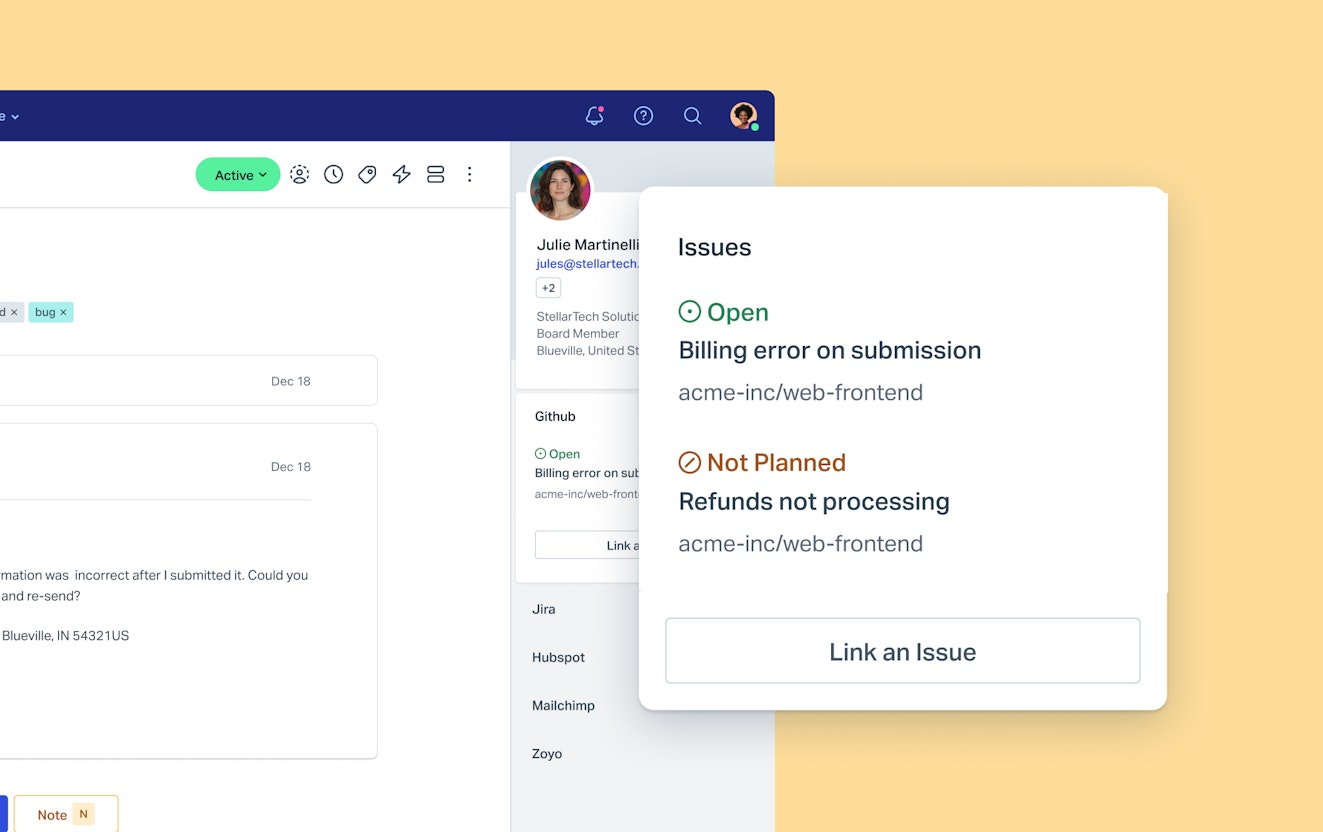
The Help Scout integration allows you to link conversations to existing GitHub issues or create new ones from the Help Scout sidebar. You can also click through into GitHub to review the issue in more detail.
Within GitHub, you’ll be able to see which Help Scout conversations are linked to a specific case.
Pricing
Free plan available. View GitHub’s current pricing. The Help Scout integration is available to anyone on a Plus or Pro Help Scout plan.
4. Zoho BugTracker – Best for collaboration

Zoho might be best known for its CRM and support tool (Zoho Desk), but its bug tracking software certainly has its fans, too. Zoho BugTracker has a tight focus on issue tracking, which means it’s built from the ground up with features specific to that purpose.
The default views and fields in BugTracker are helpful out of the box, and you can customize them further to meet your team’s needs. Automations can ensure nothing gets left behind and you meet your service level agreements with your customers.
BugTracker’s collaboration features are particularly interesting. With forums and chat embedded right in the tool, you can keep communication about your issues in context.
There are some additional nice touches, like time tracking that integrates with Zoho Invoice, so you can easily bill your clients for your work. If you’re intrigued by the inclusion of discussion forums for collaboration or you’re already in the Zoho ecosystem, BugTracker might be the perfect tool for you.
Support software integrations
While BugTracker does offer a Zendesk integration, its big draw is that it seamlessly integrates with Zoho’s customer service software, Zoho Desk.


From any Zoho Desk ticket, you can link to an existing bug, file a new one, or see any bugs that have already been linked to the case. From within BugTracker, engineers can see which tickets have been linked.
One nice feature of this integration is that whenever a linked support or bug ticket is updated, the comment is pushed to the other platform. For example, if a customer wrote in to report that they’re having trouble logging in and you created a BugTracker issue for it, if the customer writes in again with additional details or screenshots, the info will be pushed to BugTracker so your development team can review.
Likewise, if your engineers have questions for the customer, they can ask them from BugTracker, and they’ll be pushed into Zoho Desk as a private note so your team can reach out to the customer for the additional information.
Pricing
Free plan available. View Zoho BugTracker's current pricing.
5. Bugzilla – Best open source option


Bugzilla is an old school bug tracking software — it’s actually been around since 1998! It was one of Mozilla’s first products, and in 2026, it still remains a popular choice for those who prefer to go the open source route.
As you can probably imagine, Bugzilla has many of the same features as the other tools we’ve discussed. You can:
Create issues (in tool or by email) and assign them to a developer.
Create custom fields to capture information unique to your organization.
Change the standard development workflow to better meet your needs with custom statuses.
Create reports to monitor progress.
There are unique features, too. You can view bugs in an iCal view or access the bug list in Atom so that you can subscribe to an issue search like it’s a feed. You can also schedule reports to hit your email inbox as often as every fifteen minutes, so you don’t have to check the system for status updates.
There’s a time tracking feature that can estimate how long it should take to fix a bug, track your time spent, or set a deadline for when the work must be completed.
Probably one of the more unusual features is the ability to “watch” someone in Bugzilla. When the feature is activated, you receive every email they do. That may sound creepy, but it can actually be pretty handy when covering teammates who are out of office, ensuring that nothing falls through the cracks.
Similar to GitHub, Bugzilla is not going to be the right choice for non-technical teams. It has to be self-hosted and requires development know-how to implement, use, and maintain. Still, for developers who like simplicity and independence along with a lean price tag (free), Bugzilla may be the right choice.
Support software integrations
Though a couple of third-party companies have created connectors for tools like ServiceNow and other ITSMs, there really aren’t very many plug and play integrations for support platforms.
However, if you want to use Bugzilla with your help desk, you should be able to use the APIs for Bugzilla and your chosen help desk to create a similar kind of connection as the other titles on this list offer.
Pricing
Free
Issue tracking software is essential, but it’s only part of the puzzle
Tools like the ones we’ve talked about are really helpful when it comes to managing issues from customer reports through to resolutions. But in addition to the software, you need to have good processes in place to get the most from it.
Here are a few best practices when it comes to issue management in support:
Before escalating, do your due diligence. It can be easy to see a tough case in your assigned queue and panic escalate to your nearest developer. However, you should always do your best to resolve the case on your own. Dig into all available resources like knowledge base articles and saved replies for troubleshooting ideas. And don’t forget to check out past conversations to see if this has happened before and, if so, how the issue was resolved.

Set up your team for success. Of course, some problems are new. If you need to escalate to engineering, give the team a head start by including as many details as possible when opening a ticket. For a case like our mobile app bug, providing the operating system, device model, and app version would be really helpful. Also detail everything you tried on your end, including whether or not you were able to replicate the behavior.
Don’t leave your customers hanging. When it comes to keeping customers happy, communication is key. Once the issue is passed off to the other team, let your customer know that the issue has been escalated and that you will follow up with them as soon as you hear back. If possible, provide a timeline for when they can expect an update.
Keep outstanding issues on your radar. Sometimes teams can get busy, and issues that aren't urgent can get pushed to the back burner. Create a workflow (or use a feature like snooze) to periodically change outstanding case statuses to open. If there’s no update from the dev team, click into the ticket in your issue tracking software and ask them for one.
Always close the loop. Once a bug is fixed or a requested feature has been launched, always reach back out to the customers who reported the issue or requested the functionality. The onus should never be on the customer to check your app’s status page or send you another email. Following up with customers builds trust, and it’s just the right thing to do.
One more thing to keep in mind is that issue tracking in customer service is a group project. Engineers may be the ones that ultimately fix the customer’s problem, but you’re going to be right there with them, gathering details, asking follow-up questions, and reporting back to the customer once the problem is solved.
As such, the last piece of advice we have is to work with your engineering and product teams to align on the right escalation process. All of you know what you need to do your best work, so make sure that the process in place respects all of your needs while keeping customer experience at the center of whatever you choose.
With the right tools and a good escalation system in place, you’ll be able to deliver the high level of service your customers expect, all while being a good partner to the colleagues that help you make it happen.
Like what you see? Share with a friend.
BethAnne Freund
BethAnne likes helping people, but she loves helping people help themselves. She’s spent years working in customer support and knowledge management. You can connect with her on LinkedIn.
Alexa Ahrens
Alexa is a content strategist at Help Scout, where she writes and helps other authors tell stories about customer experience, technology, and company culture. Before working in support and content creation, she worked at a wax museum — an experience that prepared her surprisingly well for a life of storytelling. Connect with her on LinkedIn.
Ready to go?

