The 10 Best SaaS Knowledge Base Software in 2026


What do you do when you have a question about a product or service? If you’re like most people, you look to a company’s customer service portal or knowledge base for answers.
In fact, studies have found that 91% of customers say they would use a knowledge base if it were available and tailored to meet their needs.
If you’re interested in learning more about what goes into creating a knowledge base, this post covers what a knowledge base is, discusses how a SaaS solution differs from a traditional one, explains what makes a great knowledge base, and reviews the best SaaS knowledge base software for building internal or external help centers.
Want the TL;DR? Here is a high-level summary of all of the tools we cover in this post:
Help Scout: A complete customer service platform that includes a knowledge base product (Docs) as well as tools for email, live chat, and social media support management. Docs features an intuitive WYSIWYG editor with AI Assist, versioning, autosave, and a robust reporting feature for content optimization.
Papyrs: Best for creating an internal company intranet to centralize internal communications, documentation, and discussions. It integrates with Google Workspace, Slack, and Zapier, and its generous base plan makes it ideal for small businesses needing an intranet and client portals.
Helpjuice: A stand-alone knowledge base tool built for collaboration, with real-time editing, in-line comments, and a WYSIWYG editor. Its higher-tier plans unlock AI features for drafting, editing, spotting content gaps, and powering the Swifty AI chatbot.
Docsie: A stand-alone knowledge base tool with a standout AI feature that converts videos — like Zoom or Loom recordings — into structured documentation. AI writing, search, and chat tools are included, but usage is credit-based, which can make costs hard to predict.
Zendesk: A robust, full-service customer support platform for enterprise-level teams, managing support across nearly every channel with extensive customization and integration options. Its knowledge base, Zendesk Knowledge, offers user forums and AI capabilities for writing, translation, gap identification, and powering AI agents.
Confluence: Atlassian's internal knowledge management solution that blends a traditional help center with collaborative tools like real-time page editing, virtual whiteboards, and database creation. It features the AI agent Rovo to assist with content, smart search, and creating customized agents, and it offers a generous free plan for small teams.
Tettra: An information management platform that centralizes internal knowledge, featuring a unique Q&A tool that captures team discussions to create permanent knowledge base content. Its strong Slack integration allows the AI agent Kai to provide instant answers, summarize threads, and suggest valuable information to save.
Slite: An intranet-style documentation tool with a familiar, collaborative interface that supports drag-and-drop and markdown editing. You can create sketches directly within articles, and its AI offers editing help, instant answers, and performance improvements based on reader feedback.
Stonly: A self-service platform for building interactive guides that walk customers through step-by-step resolution paths. It also includes a help center builder and AI chatbot powered by those guides, but core features like AI Answers and help desk integrations are limited to higher-tier plans.
KnowledgeOwl: A stand-alone knowledge base tool known for its powerful, customizable search. Features include automatic indexing, typo tolerance, and synonym libraries. It also offers AI tools for instant answers and content creation. The base plan includes just one author and one knowledge base, with add-ons available at an extra cost.
What is a knowledge base?
A knowledge base is a centralized location for a person, team, or organization to store information for later reference. The information can come in many formats; written how-tos, videos, images, product documentation, and the answers to FAQs are all resources you might find stored within a knowledge base.
The process of creating a knowledge base can be as simple as making a shared Google Drive or Dropbox folder, or it can be as complicated as creating a custom-built knowledge management system that is search engine optimized and maintained by a dedicated internal team.
Most people, however, opt for something in the middle — they use SaaS knowledge base software to create help centers that are easy to publish and update.
What is a SaaS knowledge base?
A SaaS knowledge base is a knowledge base you create, host, and maintain using software and a platform offered by a third-party company.
As with all software as a service (SaaS) products, those who choose to use a SaaS knowledge base tool will typically pay a subscription fee for access to both the software and the web hosting services associated with publishing their knowledge base online.
While choosing a SaaS knowledge base tool may have some downsides over using a self-hosted or on-premise solution (e.g., less control over your data, etc.), in most cases, the pros outweigh the cons.
The benefits of using a SaaS platform to build a knowledge base
SaaS knowledge bases are:
Accessible from anywhere: While some self-hosted solutions might require you to use a VPN or be physically on site to access your knowledge base, you can access SaaS solutions from anywhere as long as you have an internet connection.
Easier to maintain: Developing your own knowledge base platform or purchasing software for on-premise use can be very labor intensive. SaaS knowledge bases don’t typically require in-house development help and come with access to support resources if you run into problems.
Frequently updated: Software built in-house often stalls at the MVP level in favor of customer-facing work. With a SaaS knowledge base, you are the customer! This means that there is a dedicated team whose job is to develop bug fixes and features that will ultimately improve your experience with the software.
The 10 best SaaS knowledge base software in 2026
Ready to get started? Here are 10 SaaS knowledge base platforms that will help you share resources with your customers, staff, and community.
1. Help Scout – Best for growing customer support teams

Help Scout is a complete customer service platform that's ideal for growing organizations. It's a powerful product, offering all of the features that support teams need to do their work, and it's available at a fraction of the cost of other comparable platforms.
In addition to its knowledge base product, Docs, Help Scout offers several other tools and features that enable teams large and small to deliver outstanding customer support.
An intuitive authoring experience

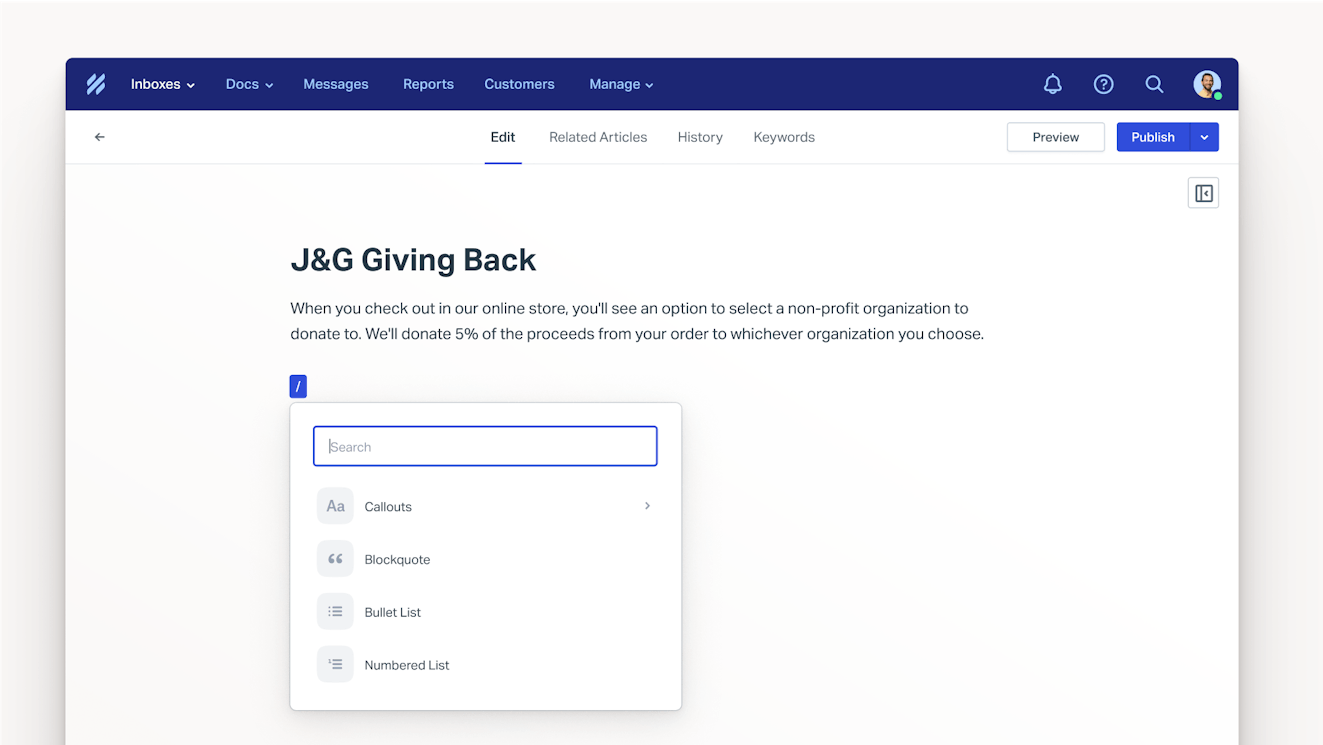
Docs utilizes a WYSIWYG editor, which makes composing a new article as easy as creating a Google or Word document. For those who work better in other formats, we’ve got you covered — teams can also upload documents composed in HTML, markdown, or plain text.
The editor’s shortcut menu makes adding additional media to your article quick and easy. Add tables, callouts, block quotes, images, and videos to build better customer resources quickly. Versioning and auto-save are also built in, so you won’t lose your work, even mid-edit.
Docs' editor also comes equipped with Help Scout's AI Assist feature. AI Assist can help you publish better content more quickly by correcting spelling and grammar mistakes, adjusting copy for length or tone, or translating your content into another language.
Easy to navigate, simple to customize

Docs’ organization hierarchy makes it easier for your audience to navigate to the information they need without excess clicking. For users who prefer search, Help Scout lets you add keywords to individual articles, helping readers find what they’re looking for even when they use alternative search terms.
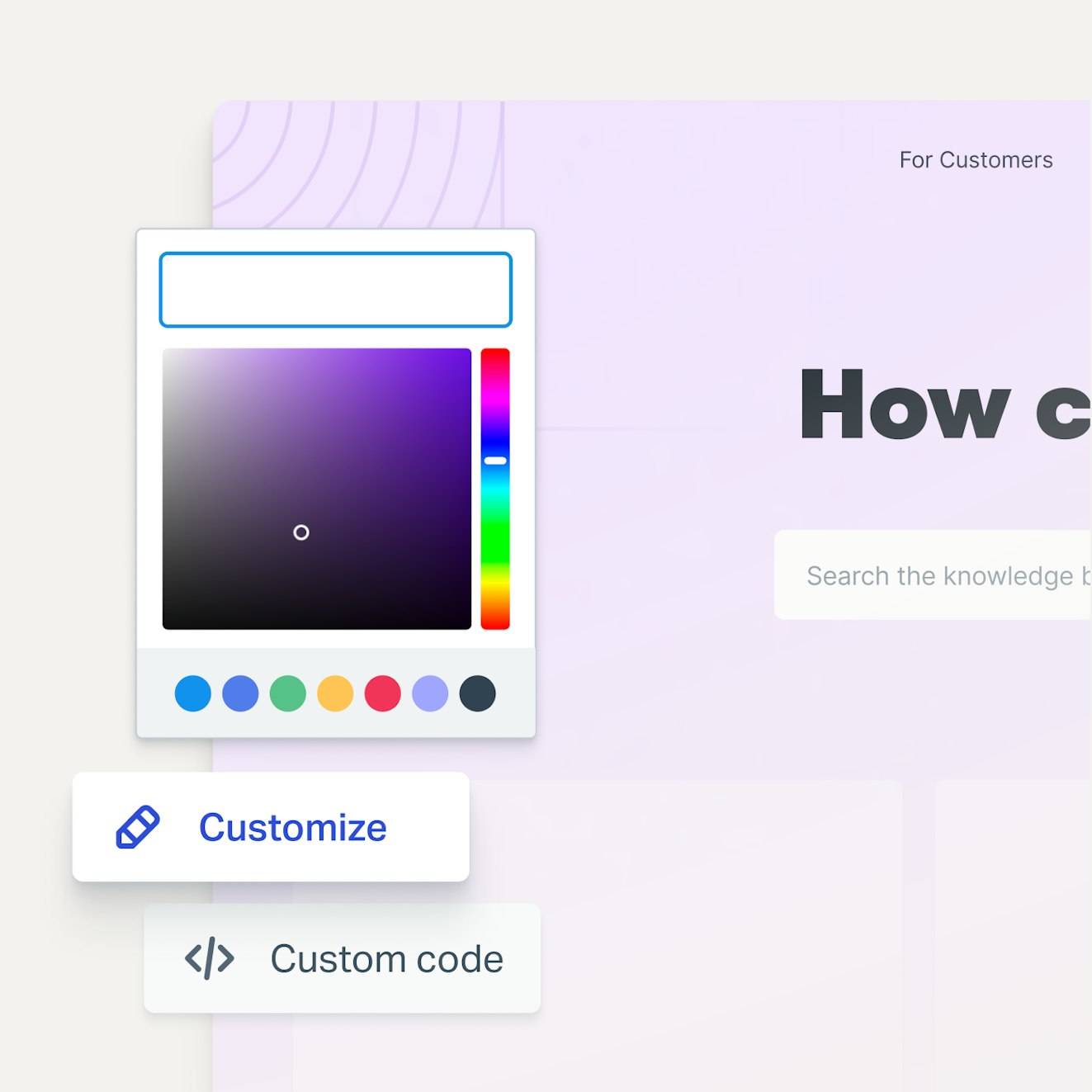
Docs looks sleek right out of the box, but it also offers opportunities for customization. Select your brand colors, add a logo, and fill out your site information — no coding necessary. Or if you want to make a Docs site your own, you can put your CSS skills to use and make custom style sheets.
Contextual, proactive support

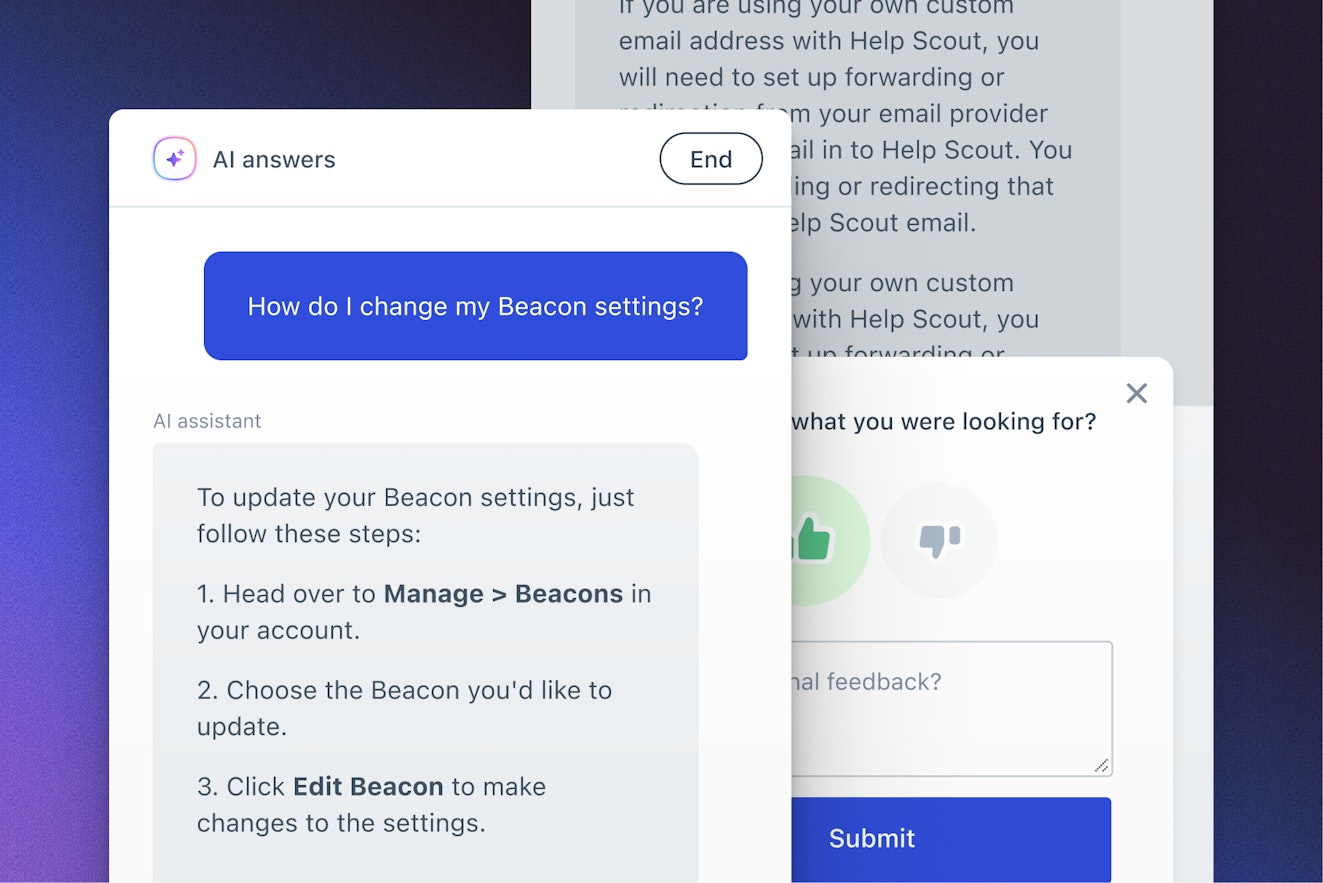
Help Scout’s web widget, Beacon, brings Docs content directly to your audience, whether on your website, in your product, or within your mobile app. Customers can search for content themselves, or your team can suggest relevant articles during sticky points in the customer journey with Help Scout’s proactive messaging feature.
Beacon is also the home of AI Answers, Help Scout’s chatbot. Your customers can ask questions in natural language, and AI Answers provides instant answers that are based on your knowledge base and other relevant source data like your company’s website. The chatbot answers in your company’s voice and tone and only provides answers when it's sure of their accuracy.
However, if it ever misses the mark, it's easy to implement improvements. Plus, there are no doom loops with AI Answers. We make it easy for customers to connect with your team if they need further assistance.
Centralized communications
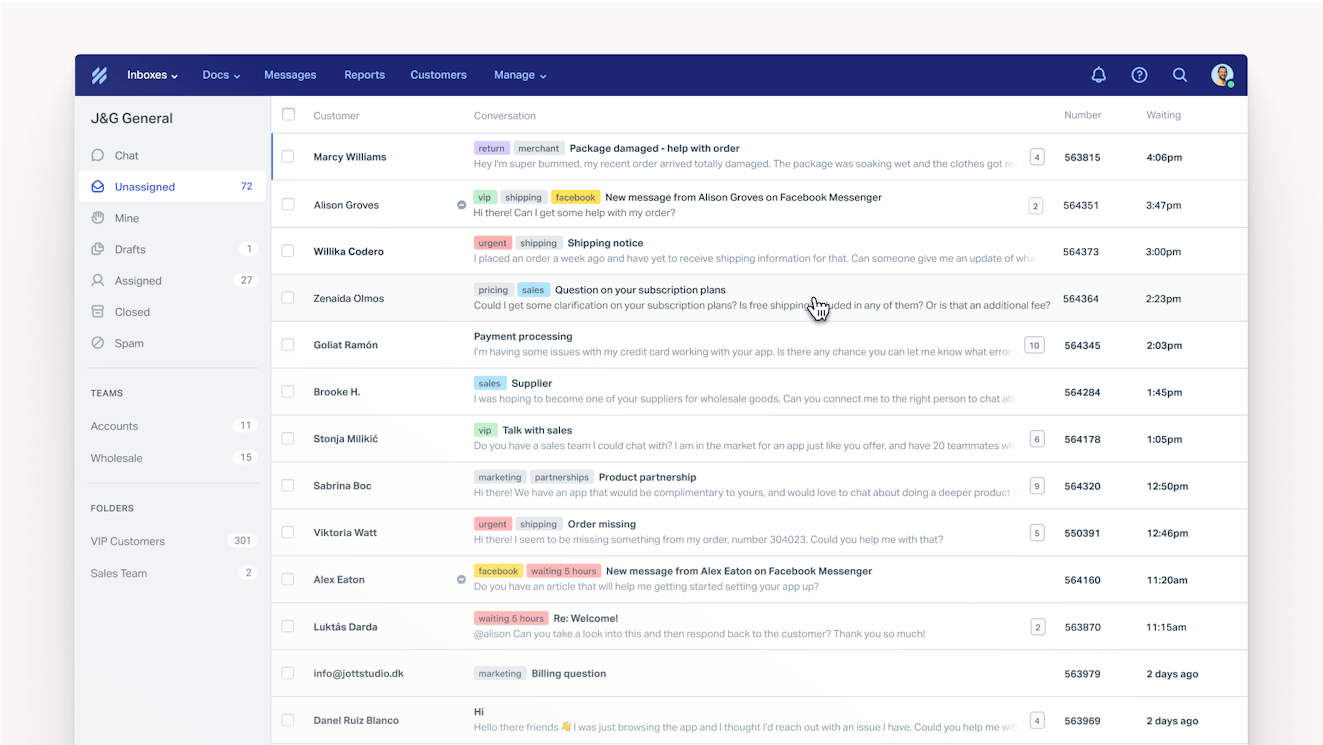
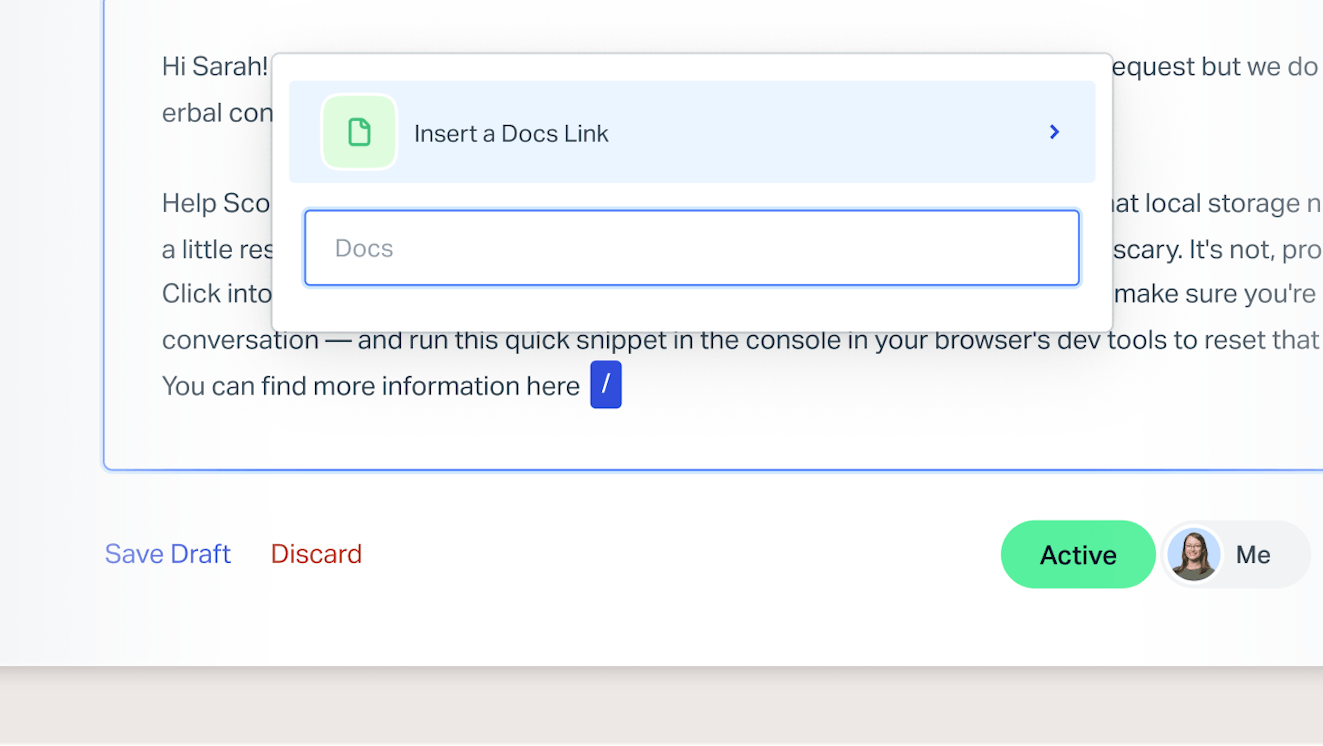
Beyond Docs, Help Scout has a lot of other great features that customer-focused teams will love. Use Help Scout’s shared inbox to bring all of your communications (email, live chat, and social) together in one place. Agents can even search your Docs site from within conversation windows and easily add links to relevant articles to their replies.

Faster, more efficient workflows


There are also several automation and time-saving features in Help Scout that can take busywork off your teams’ hands, giving them time to focus on more valuable tasks:
Saved replies: Create a library of text snippets that correspond to all of your most frequently asked questions and insert them into any reply with just two clicks.
Workflows: Automate repetitive tasks like issue tagging using if/then criteria that you select.
AI Summarize: Summarize long conversation threads so you can get up to speed more quickly.
AI Drafts: Use AI to generate draft responses to incoming email requests, edit if necessary, and then hit send.
Round-robin and load-based routing: Automatically assign incoming conversations to distribute work evenly amongst your team.
Integrations: Get the context you need to provide your customers with the best support by integrating Help Scout with other software in your tech stack like ecommerce platforms, CRMs, and project management software.
Better self-service through data
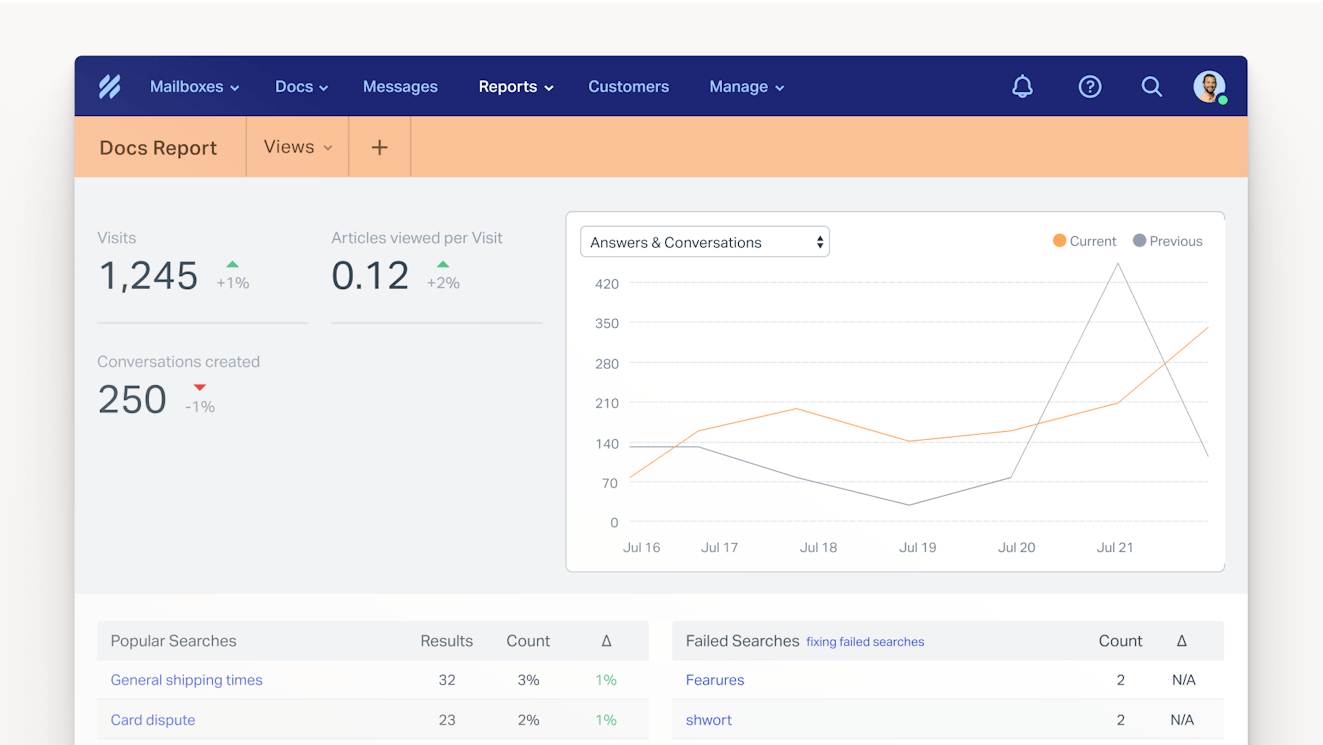
Help Scout’s reporting feature keeps track of all the metrics needed to maintain a knowledge base. See which articles are getting the most views, learn how people access your documentation, and discover how your readers rate your content.
Reporting can also show what your knowledge base is missing. Use the failed searches table to identify content gaps, optimize keywords, and get inspiration not only for new knowledge base articles but also for other types of content like blog posts, product videos, and webinars.
There are also reports for your other service channels, so no matter whether someone reaches out to you via email, live chat, or social or looks for answers on their own, your team will know how your service is stacking up.
Price: Free plan and trial available. View Help Scout's current pricing.
Learn more about Help Scout:
2. Papyrs – Best for creating an internal knowledge base


If you’re looking for a SaaS answer to the company intranet, Papyrs is worth checking out. The platform lets your team keep all of your company’s internal communications — product documentation, employee handbook and directory, project scopes, and internal discussions — in a single location.
Papyrs utilizes a simple drag-and-drop editing interface, authors can compose in either plain text or markdown, and there is a widget for just about any feature you need — images, polls, videos, embeds, calendars, and more. The software allows you to view your version history, set permissions on who can access your documentation, view page activity reports, and create as many pages as you want or need.
When it comes to integrations, Papyrs only directly integrates with Google Workspace, Slack, and Zapier, but that last one is powerful. With Zapier you can connect your account to hundreds of other services. If you can’t find a zap to fit the occasion and you have dev resources to spare, Papyrs also allows you to create your own integration using their API.
While a solid platform, there are a couple of things to think about when considering Papyrs as your knowledge base solution. First, there are no AI features. Since almost every tool has AI, this can actually be a good thing for teams that may have strict data protection policies or just aren’t interested in the tech. However, for scaling teams that need a lot of automation, this may be problematic.
In addition, if you’re looking to create a standard, customer-facing help center, it’s probably not the best option for you. It doesn’t have a direct integration with any help desk platforms, and while you can build Zaps with support tools, the actions aren’t necessarily that helpful.
That said, you can add external parties to your instance, making it easy to collaborate with those outside of your company securely. With a generous base plan — 20 users, 20 subsites, and no storage restrictions — Papyrs could be a great choice for small businesses that need an intranet and external client portals.
Price: Free trial available. View Papyrs' current pricing.
3. Helpjuice – Best for collaboration


Helpjuice is a stand-alone knowledge base product ideal for teams that need to create an internal or external help center but don’t need to manage additional communication channels like email or live chat.
Helpjuice’s editor offers a WYSIWYG experience, but for those who prefer to compose in their favorite word processing app, you can copy and paste from a Word or Google Doc while retaining the document’s formatting. Beyond easy article creation, Helpjuice has excellent features: article versioning, decision tree-based troubleshooting, multi-language support, an in-app widget, documentation analytics, and integrations with many popular software platforms.
Collaboration is easily where this platform outshines its competition. Team members can edit an article in real time and leave in-line article comments, making Helpjuice a great choice for organizations that have larger technical writing or documentation teams.
Helpjuice also has a suite of AI features that cross the entire spectrum of knowledge base management. There is a writing tool to help you draft, edit, and improve your content, and the AI can spot gaps in your help center and suggest and write new articles to fill them. The platform’s AI can also suggest keywords to add to your articles, and there is AI-powered search and a chatbot (coined Swifty AI) to help get your audience answers more quickly.
One of the more interesting AI features available via Helpjuice is Wizardshot, the platform’s instant tutorial builder. There’s not a ton of info about the feature on the site or via their help center, but it’s supposed to use AI to instantly create step-by-step tutorials based on existing content, which can be pretty handy for onboarding and tough troubleshooting situations.
All in all, the AI functionality in Helpjuice is good, but potential customers should be aware that it comes at a price — almost none of the AI features are available on the platform’s base plan. You’ll need to upgrade to the AI knowledge base option, which, at the time of this writing, is $449 per month. This higher price tag may make Helpjuice cost prohibitive for smaller teams that need AI to scale their self-service offerings.
Price: Free trial available. View Helpjuice's current pricing.
Recommended Reading

4. Docsie – Best for teams that need AI-powered video processing


Docsie is another option for teams seeking a stand-alone knowledge base tool. The platform lets you create either internal or external documentation, has a straightforward text editor, allows file storage for images and videos, and includes features for gathering actionable feedback from your audience.
Docsie has a lot of the same AI features you’ll find in the other tools in this list. It has an AI writing assistant that can help you draft, edit, and translate your documentation. It also has AI-powered search and a chatbot to make finding information super easy for your audience. However, its most standout AI feature is the ability to ingest video content.
Docsie quickly turns everything from Zoom and Loom recordings to training sessions to simple screen recordings into well-structured, easily digestible knowledge base content. It’s so easy for information to get lost when relegated to a recording, but when you turn it into documentation, it becomes source material for your AI agents (chatbots), which in turn makes the information more accessible to everyone.
One downside to the AI, however, is the cost. Docsie plans all include a certain amount of monthly AI credits, and each AI task — video processing, AI chat, writing assistance, etc. — costs a different amount of credits. For instance, video processing costs 1,000 credits per minute and the base subscription plan includes 300,000 credits. This means that you could process approximately five hours of video each month.
That doesn’t sound bad, but when you stop and think about how many meetings you probably have each week, you quickly realize that it’s not much to split up across an entire team. Plus, that would only account for video processing; other AI tasks also require credits. The next subscription tier is more than four times the price of the first, so it’s pretty cost prohibitive. You can buy credit packs separately to bridge the gap, but it can make costs unpredictable.
Docsie is a great tool, but due to the AI cost, it’s probably best for either small teams that aren’t overly reliant on AI or enterprise teams that have a larger budget to put toward knowledge management.
Price: Free trial available. View Docsie's current pricing.
Recommended Reading

5. Zendesk – Best for enterprise-level customer support teams


If you are looking for a full-service customer support platform for your enterprise company, Zendesk is the obvious choice. It is a robust customer service platform capable of managing support across any channel (email, voice, chat, social, self-service, etc.), it integrates with thousands of popular software titles, and it can be customized to accommodate just about any use case.
Its knowledge base solution, Zendesk Knowledge (formerly Zendesk Guide), is easy to use and comes with all the basics offered by the other tools on this list. In addition to typical knowledge base functionality, Guide also comes with a user forums tool. This can help with community building and provide a space for users to crowdsource answers, potentially lowering your support team’s request volume even more than what you would see from a help center alone.
There are also AI capabilities baked in throughout the platform. When it comes to knowledge, Zendesk provides AI-powered features that can help you write and edit your content, translate it into any language, identify gaps, and help you measure its performance.
Zendesk also offers AI agents, which base their answers on your knowledge base content. The agents can provide customers with instant answers and also suggest solutions to your agents in real time as they work through your ticket queue.
One downside to Zendesk is that the learning curve can be steep if you’re a first time user, and a lot of the customizations that make the platform so appealing often require development support. This makes Zendesk a great choice for enterprise teams, but it’s not the best for companies with fewer resources or employees that lack prior Zendesk experience.
Price: Free trial available. View Zendesk's current pricing.
6. Confluence – Best free option

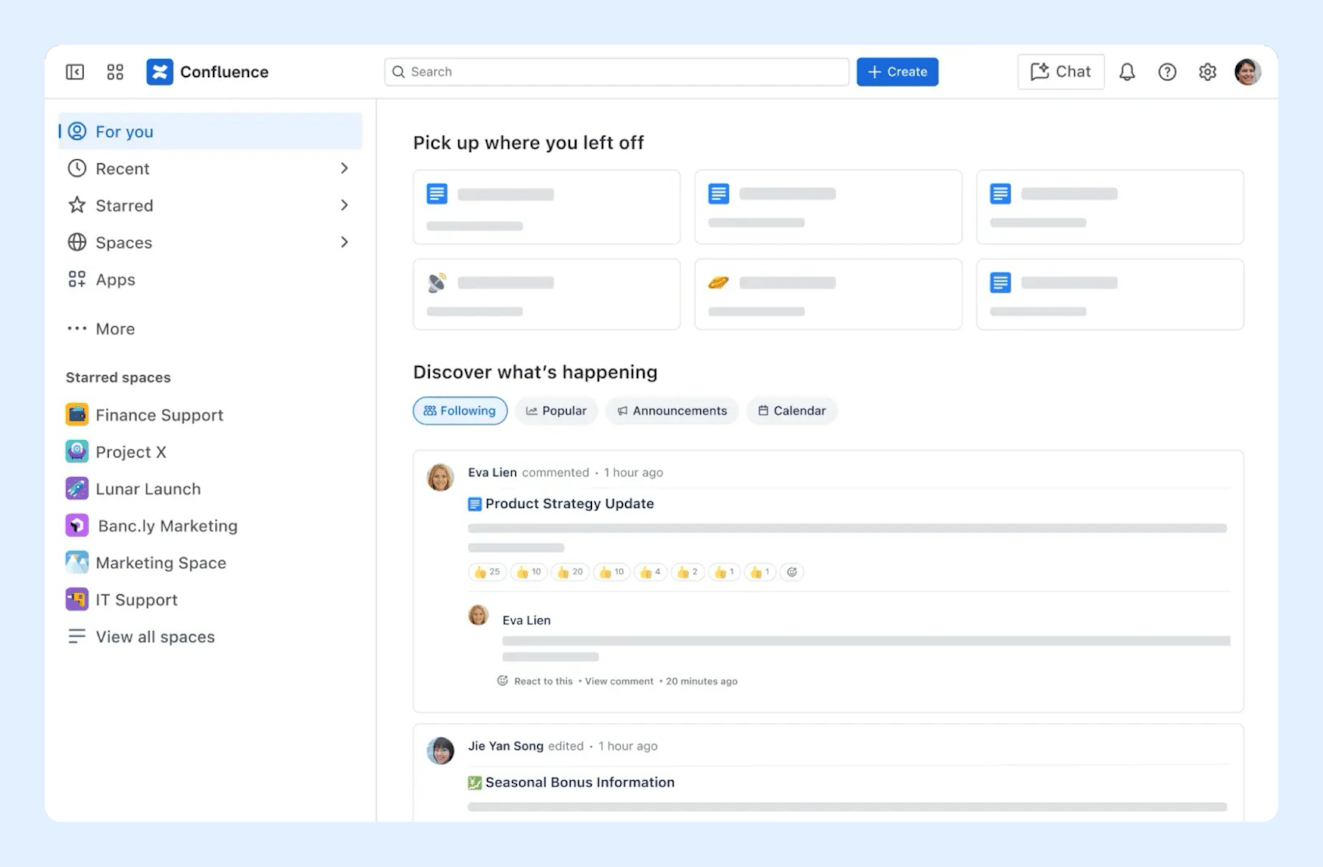
Confluence is an internal knowledge management solution from Atlassian. It combines the traditional help center with collaborative tools and automation to create a single source of truth for individual teams or even entire companies.
Using Confluence, teams can create individual knowledge base articles, which are called pages. The platform has a rich text editor that makes it easy to create formatted documents that can include visual elements like images and videos. Teams can create and edit pages together in real time as well as comment and react to content on the page. You can also tag teammates on pages when you need their input or when they are assigned a task.
Keeping with the collaborative theme, teams can also use Confluence to create virtual whiteboards for brainstorming sessions, retrospectives, or even just to document a flow or roadmap. Type, draw, and add stickers to the board to visualize ideas, and if you use Jira, Atlassian’s project management tool, you can seamlessly turn the results of your brainstorm into assigned tasks.
Another popular way to use Confluence is to create databases so that you can visualize your work more easily. Confluence integrates with tons of popular business apps, letting you embed information from other platforms easily. Plus, Confluence syncs automatically, so as work is completed, your database will stay up to date.
When it comes to time savers and automation, Confluence has a few features worth mentioning. It has a large library of templates so teams don’t need to start from scratch when creating pages, whiteboards, or databases. The platform also supports workflows based on if/then parameters. Workflows can help get rid of busywork like initiating approval processes or updating teammates when pages are updated or published.
Confluence also has an AI agent called Rovo. Rovo can help you create and improve content and act as a smart search assistant. The AI can define company jargon so that you’re never left staring blankly at an acronym, catch you up on anything you missed with meeting note summaries, and be a brainstorming partner when you’re feeling stuck. You can even use Rovo Studio to create customized agents tailored to a specific job or function.
While probably most used by development teams, Confluence could be a good option for any small team that is looking for a free tool. The free plan includes one site, unlimited pages and spaces, databases, up to three whiteboards per user, access to the template library, and up to 10 workflow runs per month. There’s no AI in the free plan, but the entry level paid plan includes them and is really reasonably priced if it’s a must-have for your team.
Price: Free plan and trial available. View Confluence's current pricing.
7. Tettra - Best option for teams that use Slack


Tettra is an information management platform that makes it easy to gather all of your team’s internal knowledge in one place. It has the standard knowledge base features that most tools do, like the ability to create articles (Tettra refers to them as pages), keep track of version history, and provide access control with roles and permissions, plus it has a lot of other features that go beyond the basics.
One pretty cool feature is their Q&A tool. While most of us ask our teammates questions every day, many of these answers get locked away in DMs or archived team channels. Tettra has created a centralized location where teams can ask, answer, and discuss questions. Once the question is answered, it becomes part of your company’s knowledge base where it’ll be easily accessible in the future.
The platform’s AI agent, Kai, also has several features to help make knowledge creation and discovery easier for your audience. Kai can generate FAQs from a page and suggest answers for them that will show up in the Q&A section so that those answers can be surfaced more easily. Kai can also automatically suggest tags for pages and answer your team’s questions in natural language.
Tettra integrates with Slack, Google Docs, and GitHub, allowing you to do things like reference files in-line or even embed documents directly into Tettra so folks can edit them without having to context switch. The platform also supports Zapier, so you can automate tasks between Tettra and the rest of the software your team uses.
The Slack integration is particularly handy, as it allows your team to interact with Kai in both channels and DMs to get quick access to information. In addition to simply providing links to Tettra pages and instant AI-powered answers to your team’s questions, Kai can also summarize Slack threads and create a page documenting the conversation. The AI can also scan your Slack instance and suggest that you save threads that it views as valuable.
Price: Free trial available. View Tettra’s current pricing.
8. Slite - Best option for visual documentation


Slite is another example of an intranet-esque SaaS tool, and if you’ve ever used Notion or Confluence, the UI and experience will feel familiar.
Slite’s editor supports drag-and-drop article creation but can also handle markdown. Working together to craft knowledge base articles is made easier through collaborative cursors, in-line comments, document sharing, and the ability to create discussions. You can even create sketches and include them in your articles, removing the need to move brainstorming sessions over to a tool like Figma or Miro.
Slite is great for publishing employee handbooks, operating documents, and project management information. There are article templates and the ability to create recurring documents so that you don’t have to start at zero each time you create a page. In addition, you can set verification statuses for your docs to help your audience know whether they are seeing the most up-to-date information.
Slite has AI features that can help you edit content and get instant answers to your questions either in-app or via Slack. The software also has an AI improvement feature called Ask Insights. If a reader marks an article as bad, it can be escalated to a teammate for review where they can provide the correct answer so that the AI will be able to handle the question better in the future.
At the time of writing, Slite integrates with more than 40 popular apps, allowing your team to keep information in sync across all of your software systems. Slite also provides ways for you to stay connected from anywhere on almost any device. Use the desktop apps for Mac and Windows or the Android and iOS apps when you’re on the go.
Price: Free trial available. View Slite's current pricing.
9. Stonly - Best for interactive guides


Stonly is a self-service option that is a bit more interactive than your traditional help center. Instead of static, one-size-fits-all support articles, companies can choose to create interactive guides that walk customers through the best resolution processes for their unique situations.
You can embed Guides into a knowledge base article or any web page or even surface them in web or mobile apps via simple no-code triggers. Guides replace frustrating help center experiences where users have to wade through walls of text, instead guiding them through a customized path that your team has created, leading to fewer support tickets and a greater rate of customer success.
Beyond Guides, Stonly has all the standard knowledge base features you would expect. You can build a traditional help center, keep it up to date with version controls, and restrict content as necessary with roles and permissions. There is also a support chatbot that uses generative AI and your Stonly guides to provide real-time answers.
One thing to keep in mind before deciding on Stonly is that roles and permissions, AI Answers, and the ability to integrate with help desks like Salesforce, Zendesk, Freshdesk, or Front is restricted to their higher-tiered plan. The company doesn’t list their prices publicly, but if these features are must-haves for your business, it’s something to keep in mind.
Price: No free trial offered. Contact Stonly for pricing.
10. KnowledgeOwl – Best for robust search capabilities


KnowledgeOwl is a standalone knowledge base tool that teams can use to build internal and external knowledge bases. It has all of the features you need, and its WYSIWYG editor and premade templates make it easy to launch a help center, regardless of technical ability.
Its best feature, however, is its robust search functionality. There’s no setup required; KnowledgeOwl automatically indexes all of your content as you add it, making it easy to find right from the start. For people who do want to optimize, you can tag articles, add search phrases, and create a synonym library. The platform also has typo tolerance to help ensure that no matter what words a customer uses in their search, they’re still provided relevant results.
You can change the weight of indexed fields or even hide categories or articles from search altogether. You can determine the “fuzzyness” level you’re comfortable with, allowing you to decide when the system should return a result and when it shouldn’t. KnowledgeOwl also lets you decide if you want to use semantic-based search or a hybrid approach so that readers will be able to find information regardless of their search style.
KnowledgeOwl comes equipped with a chatbot so that you can provide AI-generated instant answers powered by the knowledge in your help center. It shows the articles it used in coming up with its answer and allows the user to rate its performance with a thumbs up or down. It also allows you to tweak voice and tone so that the AI is in line with your brand guidelines.
AI, however, isn't restricted to search use cases; KnowledgeOwl also has AI for authors. Use it to create initial drafts or review human written copy to ensure it aligns with your company’s style guide. It can automatically create meta descriptions for your articles, saving your team time by taking care of (important) busywork.
Overall, KnowledgeOwl is an impressive product. The only thing to be aware of is the pricing structure. All plans include only one knowledge base and one author. You can add more authors and knowledge bases to your plan, but they come at an additional cost.
Price: Free trial available. View KnowledgeOwl's current pricing.
Best practices for building a SaaS knowledge base
If you’re ready to give one of the platforms above a try, here are three best practices to keep in mind as you start to create content and build out your knowledge base.
Provide thoughtful content and keep it up to date
The only thing worse than a company not having a help center is a company having one that is unhelpful.
When writing knowledge base content, don’t write from memory. Go through the process you’re attempting to explain, taking notes as you go. Always keep in mind that your audience doesn’t have the same background or expertise as your team, and you may need to explain steps that seem obvious.
Once published, set a reminder to revisit your content regularly to ensure that all of the information you’ve provided is still accurate.
Recommended Reading

Make articles scannable and don’t limit yourself to text
Though being detailed is good, there is nothing less inviting than a wall of unbroken text. Make sure that all of your written content is easily scannable. Use headers, bold text, and images to break up your copy and make it easier for folks to scroll to the information they need.
In addition, consider creating videos or using other media types in your knowledge base. Everyone learns differently, and communicating information in multiple ways can make your content more accessible.
Recommended Reading

Let data drive your self-service approach
While you’ll likely need to start with a guess at what will be most helpful to your audience, get into the habit of using your SaaS knowledge base’s reporting dashboards to locate “failed searches.”
While some failed searches might indicate that you need to tweak tags or keywords to make existing content surface more easily, others will highlight content gaps. Before moving on to any new documentation, focus first on shoring up any holes in your existing articles.
In addition, if you’re building a customer-facing knowledge base, consider performing keyword research using an SEO tool to help you better understand what people are searching for when they look up your company on public search engines. Are people asking questions about your product or service? Answer them in a support article and get folks the help they need, no matter where they are searching.
Recommended Reading

Set yourself up for success with self-service
We hope this guide to SaaS knowledge bases has been helpful. If you’re looking for more information on how to create a knowledge base for your team or customers, we recommend checking out our Ultimate Guide to Creating a Customer Knowledge Base.
While our guide focuses on external customer knowledge bases, most of the information you’ll find in the guide is helpful no matter who your audience is. Check it out!
Like what you see? Share with a friend.
Alexa Ahrens
Alexa is a content strategist at Help Scout, where she writes and helps other authors tell stories about customer experience, technology, and company culture. Before working in support and content creation, she worked at a wax museum — an experience that prepared her surprisingly well for a life of storytelling. Connect with her on LinkedIn.
Ready to go?

