The 10 Best Knowledge Base Software in 2026


You, your staff, and your customers need accessible, up-to-date, and accurate information to do your jobs. But often, the information everyone needs is scattered. It's in people's heads, but it’s not clearly documented. It's in replies to customer queries, in your bug tracking tool, in internal memos, and in random employees' Google Drives. It’s everywhere except for in one central place where everyone can easily access it.
If you're struggling with documenting, centralizing, and distributing information, you may want to consider investing in knowledge base software. To help you make the right choice, we've compiled this list of the 10 best knowledge base platforms, including options for building customer help centers, internal knowledge bases, and even searchable information repositories for your own personal knowledge management.
| Tool | Highlights | G2 Rating | Starting Price |
|---|---|---|---|
Help Scout | Help Scout is a powerful combined help desk and knowledge base tool that's perfect for customer support. | Free for up to five users; paid plans start at $25/user per month | |
Guru | Guru is an ideal solution for creating an internal knowledge base with its verification features and extensive integrations. | $25/seat per month | |
Document360 | Document360 is a standalone knowledge base tool with extensive localization features for global companies. | Contact for pricing | |
Obsidian | Obsidian is designed for personal knowledge management and can be used entirely for free on one device. | Free for use on one device; paid plans start at $4/user per month for multi-device use | |
Helpjuice | Helpjuice is a standalone knowledge base with a unique decision tree tool that guides users to the content they need. | $249 per month | |
BookStack | BookStack is a free, open-source knowledge base that must be self-hosted and comes with a variety of pre-built features. | Free | |
Notion | Notion is ideal for startups that want to save costs with a tool that can handle both knowledge and project management. | Free for individuals; paid plans start at $10/member per month for teams | |
Confluence | Confluence is great for software development teams using Jira because of the integration between the two systems. | Free for up to 10 users; paid plans start at $6.70/user per month | |
Talkdesk | Talkdesk's call center software lets you create knowledge cards that the system's AI tools use to provide answers quickly. | $85/user per month | |
Brainfish | Brainfish is a fully automated external knowledge base and chatbot that creates and updates knowledge base articles for you. | $1,500 per month |
Key features to look for in knowledge base software
Knowledge base software should let you do more than just publish articles in a central repository. After all, simply having a repository doesn't guarantee that anyone will actually access it when they have questions.
Baseline features that nearly all tools offer include a WYSIWYG editor (for formatting text without having to write code), design customization (to make the site where your knowledge base is hosted look like it's managed by your company), and categorization (to sort articles into topics and content clusters).
However, you're likely going to want more than just baseline functionality. Some other incredibly useful features you might want to look for, depending on your specific use case, include:
Great search functionality: If people search for something and get a list of irrelevant articles, they'll immediately lose faith in your knowledge base and reach out to a person for the answer instead.
An AI-powered chatbot: Even better than great search functionality is an AI-powered chatbot that's trained on your knowledge base articles, infers context rather than matching keywords, and provides accurate, conversational answers instantly.
AI-powered content creation tools: Many knowledge bases come with AI features that let you turn an answer to a support request or a back-and-forth Slack conversation with a colleague into a knowledge base article instantly so you can document knowledge without sitting down to write an article from scratch.
Tools to flag outdated or unhelpful posts: Some knowledge base platforms use AI to flag posts that contain outdated information. Some let you capture customer satisfaction ratings so you can easily identify articles that need attention. Others let you add a future date when the article needs to be reviewed and then notify you when it's time to review it.
Customizable permissions and collaboration features: These features give you the ability to edit and draft knowledge base articles as a team, leave comments for each other, and assign team members specific permissions to dictate who can edit articles and publish them.
Article versioning: If you're collaborating on your knowledge base with a team, article versioning comes in handy. It lets you see who's made changes to an article and, when those changes weren't for the better, revert the article back to a previous version.
Integrations: Integrating with an employee communications app like Slack could allow your team to access information without opening another window, and connecting with a help desk can make it easy for your support team to insert helpful articles into their replies to customers.
The 10 best knowledge base software
Whether you're looking to publish a customer help center, share knowledge more effectively with your team, or just organize your own notes, you'll find a solution that's perfect for you in one of the 10 best knowledge base software options below.
1. Help Scout – Best combined help desk and knowledge base software


If you're researching knowledge base software because you need a way to deliver better support to your customers, Help Scout is an ideal choice. It's one of the most powerful and affordable help desks on the market, giving you tools to not only create a knowledge base but also deliver email, chat, and social support as well as launch an AI chatbot to help your customers self-serve.
Knowledge base features

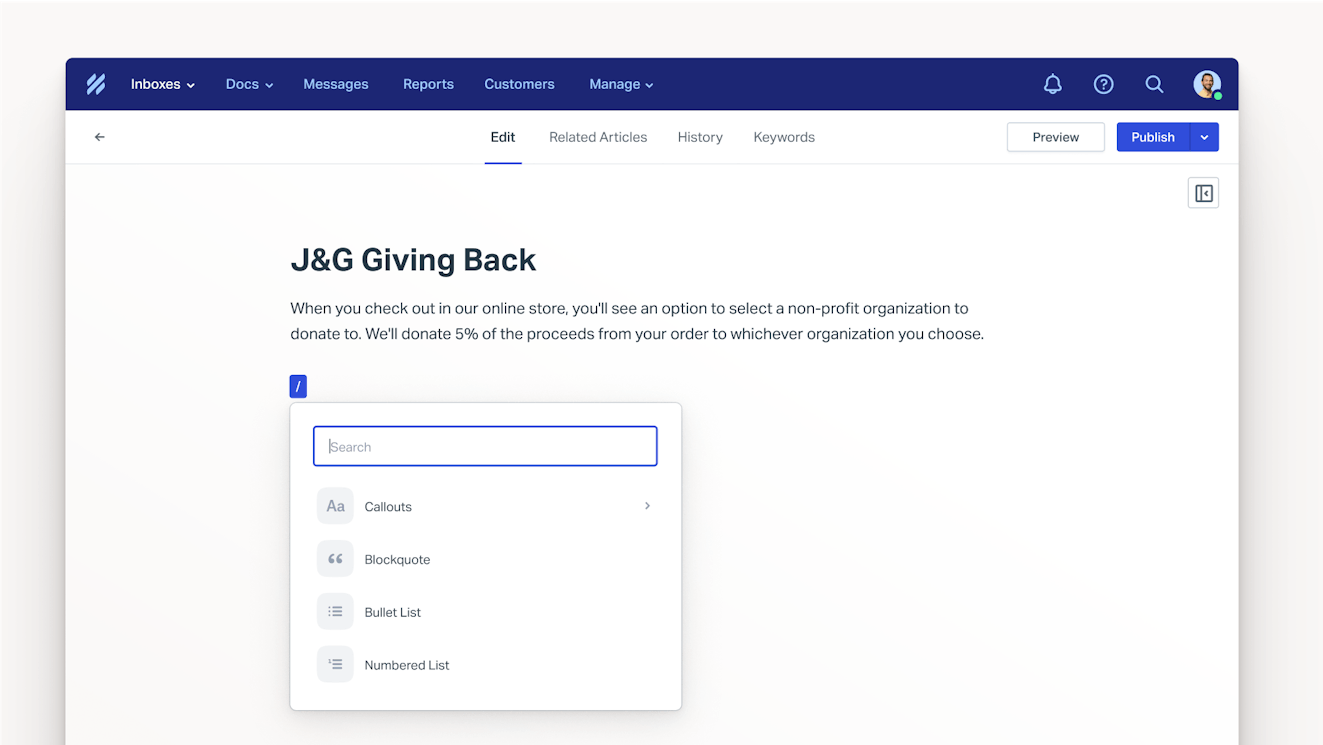
Help Scout's knowledge base builder, Docs, comes with all of the features you need to create and publish a help center.
Create articles in whatever way works best for you. The WYSIWYG editor lets you create beautiful content without the need for code; however, it’s flexible enough to allow you to also work in HTML or markdown if you’d prefer. You can also upload existing files (HTML, markdown, or .txt) to give you a jumping off point if you don’t want to start from scratch.
Customize your site's design. Docs sites can be customized to fit your brand guidelines. Add your business’s colors, logo, favicon, and touch icon — no coding required.
Add any formatting or assets you'd like. The shortcut menu lets you quickly add block quotes, bulleted lists, code blocks, emojis, tables, images, videos, and headings — all without ever taking your hands off of the keyboard.
Auto-save and view version histories. Article drafts are automatically saved as you work so that you never accidentally lose content, and Docs keeps track of each article’s revision history. The revision history details who made changes to the article and when the changes were made, and it gives you the option to restore a previous version.
Create multiple knowledge bases. Help Scout offers multi-site support for teams supporting multiple brands or products, allowing your team to manage all of your help centers from the same account. Each Docs site can have its own branding and subdomain, ensuring that every customer receives a tailored self-service experience.
Build an internal knowledge base for your support team. Docs collections can be public to support external customers or private to provide your internal team with quick access to helpful information. Only people logged into your Help Scout account can view private collections in your help center or within search results.
Make your help center easy to access. Beacon, Help Scout's embeddable web widget, lets customers search your help center from any page of your website or app. If they don’t find the answer they’re looking for, they can use the Beacon to drop your team a line via email or live chat.
View useful reports. The Docs report provides helpful metrics like how many people visit your help center site, which knowledge base articles get the most hits, and how customers rate the content via on-page satisfaction surveys. It also displays any failed searches to identify topic gaps and help prioritize future content creation.
AI features


Help Scout has two AI features in Docs: One makes it easy for your customers to find the answers they're looking for, and another helps your team create knowledge base articles more quickly.
AI Answers is a chatbot that provides answers to your customers’ questions using generative AI and information from your help center and website. This means that your customers don’t need to worry about using specific keywords when searching; AI Answers will understand their search intent and provide relevant information. It lives in your Beacon, so it's easily accessible from any page of your website or app.
AI Assist helps your team adjust the tone or length of the content they've written — or even translate articles into other languages. This lets you offer documentation in your customers’ preferred language, even if no one on your team is a native speaker. It’s also a great helper for members of your team who are less confident in their writing and may need an extra hand with spelling or grammar.
Help desk features
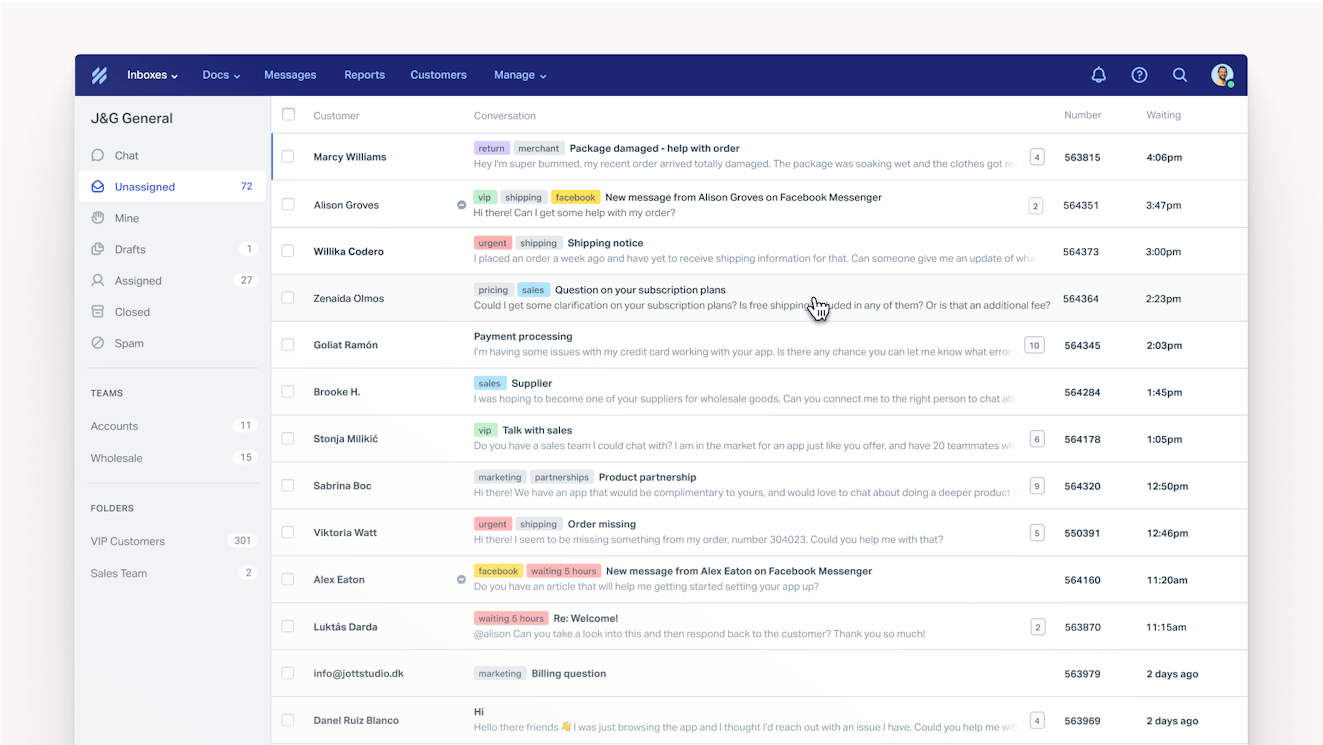
Docs and AI Answers are great for helping customers with simple questions, but there will always be times when customers have more complex needs. Help Scout has you covered there, too. Its Inbox consolidates all of the conversations you receive from email, chat, and social into a single queue so it's easy to know what you need to work on and to collaborate on requests as a team.
Plus, inbox gives you access to even more features that will save you time. Insert answers to FAQs into responses in just a couple of clicks with saved replies. Search your knowledge base without leaving the Inbox to add links to articles in your responses. You can even use AI Drafts to automatically generate replies to emails using knowledge from your help center and previous support replies.
Pricing
Free plan and trial available. View Help Scout's current pricing.
Learn more about Help Scout:
2. Guru – Best internal knowledge base software


The story of internal knowledge management usually goes something like this: You invest in a knowledge base, there's a dedicated effort to add documentation to it, and then it's released to the company to use. Other people and teams add articles, but no one updates them when something changes. Before long, you have thousands of articles with no owners and no idea what's relevant and accurate and what's not.
Guru is an ideal internal knowledge base because it has lots of features to prevent this from happening. First, all articles added require a "verifier" — an individual or group who is responsible for keeping it accurate — so you'll always know who owns the article. Verifiers confirm the content they own, and a "verified" label shows up on the published article so other employees know the content is accurate.
There are also tools to help everyone remember to keep articles up to date. When verifying an article, verifiers can set a date for when the verification expires, reminding owners to go back and update those articles on a schedule. Additionally, admins can see a list of all unverified articles to either follow up with owners or automatically archive articles that can't be verified or are no longer relevant.
Guru's AI features also work to make sure all of your content is accurate and up to date. Its AI agents can auto-verify articles for you — or automatically remove verification from articles — based on user interaction data. It looks at things like how often articles are viewed by anyone on the team, if users were satisfied with the answers provided, and how recently a verifier has viewed the article.
The other highlight of Guru's platform is its extensive set of integrations. It connects with systems like Chrome, ChatGPT, Slack, Teams, and Edge so employees can search your knowledge base from wherever they're already working. Additionally, it integrates with dozens of project management, help desk, and code repository tools to let employees get information from those tools when using the AI agent.
Pricing
No free trial offered. View Guru's current pricing.
3. Document360 – Best multilingual knowledge base software


Document360 is versatile: It can be used to create both internal and external knowledge bases. For the external use case, it integrates with help desks like Zendesk, Freshdesk, and Intercom to serve as an alternative to the built-in knowledge base features of those systems. For the internal use case, it integrates with Slack, Chrome, Salesforce, and more to give you access to knowledge from anywhere.
For businesses that operate globally, Document360’s localization features can be helpful. You can either create language-specific knowledge bases or localize a single knowledge base by creating language-specific versions of an article. For the latter, the system detects a user's location when opening a URL to determine which version of the article should be served. You can also set a default version to be served when you don't have an article in the user's language.
One nice aspect of Document360's localization features is that you can set text to display from left to right, right to left, or top to bottom to correctly display in the way other languages are read (Arabic or Japanese, for example). Then for translating, you can translate all articles manually, or you can use AI to translate the articles for you, though you may need to purchase machine translation credits to use this feature.
Other AI features you'll find in Document360 include an AI chatbot that answers questions using information from your knowledge base; an AI writing agent that can compose knowledge base articles for you from a prompt, video, audio file, or text file; an AI glossary that automatically generates definitions for terms and displays them as a tooltip; a text-to-audio tool that lets people listen to your articles rather than reading them; and an AI summarizer that condenses an article into a quick summary.
If you already have a tool you're using for an internal or external knowledge base, Document360's migration services could be really helpful. They can import your content from 100+ knowledge base tools so no one on your team has to suffer though copying and pasting everything over. They even ensure that the transition off of their platform is smooth. If you decide their platform isn’t the right tool for you, Document360 allows you to download your content as a PDF, CSV, or ZIP file.
Pricing
Free trial available. Contact Document360 for pricing.
4. Obsidian – Best personal knowledge base software


If you're looking for a tool to help you build a personal knowledge base, Obsidian is a great choice. Unlike the other tools on this list, it's not cloud-based; you download the application to your personal device. It's also completely free to use if you just want to use it on a single device, though you can pay a small monthly fee to use it on multiple devices or to publish your knowledge base online.
To create your knowledge base, you write your articles in markdown, then you can link them together with hyperlinks and group them together into folders. One unique piece is its Graph feature. It gives you an interactive view of how all of your content is linked together, which can be great for brainstorming, remembering ideas you've forgotten, or just identifying what topics you've written about the most.
There's also a Canvas feature for more visual brainstorming. You start with a blank canvas onto which you can add text sections; embed videos, webpages, and other articles; group items together; and add arrows between elements to connect them. It's great for when you want to collect your thoughts and resources but aren't ready to sit down and write it all out in a traditional article.
An active community also supports Obsidian by creating plugins for it. At the time of writing, there are 2,718 plugins available that help you do things like extract text from images and PDFs to make it searchable, view the differences between two documents, or embed Figma files as inline previews. There's also an API you can use to build your own plugins if you can't find a feature you need.
Pricing
Free plan available. View Obsidian's current pricing.
5. Helpjuice – Best standalone knowledge base software


Helpjuice is a standalone knowledge base tool that focuses heavily on design and collaboration. Through its editor, you’re able to edit typeface, layout, and colors to match your brand aesthetic. The editor also allows authors to drag and drop files and images into article drafts and copy and paste from Word docs while maintaining the copy’s formatting.
Helpjuice’s collaboration features are also worth mentioning. Everyone on your team can work on article drafts together, leaving comments throughout the drafting process. Need to restrict access to certain employees? No problem. Helpjuice lets you set the roles and permissions for all of your team, deciding who can publish on their own and who must submit drafts for review.
One of the best features of Helpjuice is its ability to create knowledge base articles that include decision trees. With the decision tree option, you can walk readers through a set of questions that display different content based on their answers. This can be especially helpful for technical products where readers may need to use knowledge base content for troubleshooting.
Helpjuice also has a number of AI features. It has a smart search feature called Swifty AI Answer. When someone uses your knowledge base's search bar, they'll see a list of links to relevant articles as well as a CTA to "Ask Swifty AI." If they click that CTA, they'll get a natural language answer to their question directly in the search bar's results, but they can still see the article results if the answer wasn't helpful.
There are also AI tools for improving, drafting, and translating content, plus an AI chatbot widget to help your customers or staff get access to information more easily. As far as integrations, it integrates with Zendesk and Freshdesk for the external knowledge base use case and with Google Chrome, Slack, and Microsoft Teams for the internal use case.
Pricing
Free trial available. View Helpjuice's current pricing.
6. BookStack – Best open-source knowledge base software and wiki


BookStack is a free, open-source, self-hosted knowledge base platform. It has a simple interface and lets you create content using either a WYSIWYG interface or markdown editor. When using the markdown editor, you'll also see a preview of what the published content will look like. The source code is available on GitHub, it's built using PHP on top of the Laravel framework, and it uses MySQL to store data.
When it comes to organization, you structure your content into three groups: books, chapters, and pages. Books are your broad categories, chapters are subcategories, and pages are the individual articles. Once you have several “books,” they can be further organized onto bookshelves.
Content on BookStack is fully searchable, and the platform has powerful features like multilingual support, dark and light modes, role permissions, and an integration with diagrams.net that lets you add diagrams to your documentation. For data-focused companies, there's also multi-factor authentication and single sign-on, and you can set the system to be either public or private.
The platform doesn’t offer any AI capabilities and has very few of the bells and whistles of the other options on this list, but the beauty of open-source software is you can build whatever else you need on top of it and customize it to fit your needs perfectly. This makes it a great option for more technical teams, particularly those who need to protect their data by self-hosting rather than storing data on the cloud.
Pricing
Free.
7. Notion – Best knowledge base software for startups


Notion is a platform that is essentially a blank slate. Its core benefit is how flexible the tool is: You can make kanban boards, checklists, and text documents. You can also assign tasks to other users and set due dates. Even more, you can keep track of employee onboarding and training materials, document decisions made in meetings, and outline the details of email marketing campaigns or product roadmaps.
Having a blank slate can be kind of overwhelming, which is why it’s nice that Notion provides templates — both free and paid — for several main use cases, including internal knowledge bases. If even starting with a template sounds like too much, Notion has a long list of certified consultants who can help you get set up on the platform and build it to your exact specifications (for a fee, of course).
Notion has a lot of great features, including a collaborative workspace (for internal and guest users), teams, version history, calendars, tasks, views, analytics, and integrations, and you can publish an unlimited number of pages. For startups, Notion's flexibility means cost savings: You get an internal knowledge base, project management system, email and calendar platforms, and more in a single tool.
Notion's AI agents also make it easier to create the documentation you need. They connect to all of the platforms you actively work in — Slack, GitHub, Google Drive, Canva, Clay, and more — and can use that data to perform tasks for you. Some of the example use cases in its AI library include planning an offsite, turning a brainstorm into a roadmap, or turning a meeting transcript into a list of to-dos with assignments.
Individuals who want to use Notion to build a personal knowledge base can use the platform for free, but startups and other teams will need to subscribe to a paid plan to add multiple members. To get access to Notion's AI features, you'll need to be on its mid-tier Business plan; its base plan does not include Notion AI and only includes a limited set of non-premium integrations.
Pricing
Free plan available. View Notion's current pricing.
8. Confluence – Best knowledge base for software development teams


Confluence is a knowledge base platform built by Atlassian, the company behind Jira. The two platforms sync together seamlessly: Links to Jira issues in Confluence show real-time status updates, you can create Jira tickets from Confluence without opening another tab, and Confluence articles can be created in Jira. This makes it ideal for software development teams that are already using Jira for issue and bug tracking.
As far as look and feel, Confluence feels a lot like Notion, though perhaps with a little more structure. It’s not really what someone would strictly consider a help center; instead, it’s a place for everyone in your organization to plan, collaborate, and share information.
It comes with tons of templates for structuring content. They are bucketed by department, with options for product and project management, software, IT, sales, marketing, design, HR, and finance. Speaking of departments, you can create team spaces to keep projects and documentation organized and set permissions for different articles.
As for other features, there are whiteboard and note-taking setups for project brainstorms, collaboration features like real-time editing and comments for creating documentation as a team, article versioning, and integrations with third-party software and other Atlassian titles like Trello and Loom.
Confluence also offers several AI features. Its AI solution, Rovo, can create an article for you based on a prompt and any documentation you upload, add additional sections you request to that article, and turn any to-dos from your article into issues in Jira. It can also create summaries of articles in text and audio formats or be used as an AI-powered search assistant that answers questions in natural language.
Pricing
Free plan and trial available. View Confluence's current pricing.
9. Talkdesk – Best call center knowledge base software


Knowledge management for call center teams is very different from the other use cases we've looked at. While it's good to make information quickly accessible for any use case, it's crucial for call centers where you're talking to a person in real time and lengthy pauses while you search for information are awkward. Plus, your end user is an agent who's trying to help your customers rather than customers themselves.
Talkdesk is a robust call center platform that can be used to answer and route incoming calls using IVR and AI. When an agent answers the call, it displays relevant information to them, such as the customer's name, other interactions your team has had with them recently, and historical purchase information. If the call isn't answered, it lets the customer leave a voicemail and creates a ticket for the call in your system.
When it comes to knowledge management, contact center teams can create "cards" (Talkdesk's term for knowledge base articles) directly in Talkdesk itself or in other tools like Slack via integration. That knowledge then powers Talkdesk's AI copilot, which listens to calls and provides agents with suggested answers based on the questions being asked and the information in your knowledge center.
Granular permissions and access controls are available so you can decide who can create, edit, and view cards in Talkdesk. You can let agents improve answers when they're incorrect, or, if you want more control, analytics will give you insights into which cards are being used most often and which received negative feedback because they were outdated, inaccurate, or not in-depth enough.
Your knowledge base in Talkdesk can also be used to power its voice AI agents, which can answer common questions for you over the phone so agents don't have to get involved at all. AI-powered routing can be used to determine when to send customers to AI agents and when not to, and when the answers the AI agents provided are incorrect, you can fine-tune them to improve their accuracy in the future.
Pricing
No free trial offered. View Talkdesk's current pricing.
10. Brainfish – Best AI knowledge base software


While most of the tools on this list are knowledge base platforms with AI features, Brainfish is the only fully automated AI knowledge base software. By fully automated, we mean it does all of the work for you. If you don't currently have an external help center and aren't sure who would do the work to build one, or if you have one but haven't been able to keep it updated, Brainfish might be the right choice for you.
Brainfish integrates with a number of systems — your product, help desk, CMS, and website — and collects data from all of those sources. If it sees a number of customers emailing about a specific issue, it takes the content of your replies and creates a knowledge base article. If it notices you've added a new feature to your product, it creates a new article for the new feature.
Beyond just creating new articles for you, it also updates existing articles when it notices that those articles are no longer accurate. You can also prompt it to make updates by uploading a document or video about product changes. It will process the documentation, scan your knowledge base, find the articles impacted by the change, and update those articles with the new information automatically.
Brainfish also works as an AI agent for customers and an AI copilot for your support team. For customers, it answers questions in natural language using the content of your knowledge base, and, for your support team, it provides answers and links to sources for verification. It connects with Slack so your team can @mention it and ask it questions right where they're already working.
Two final features worth mentioning are analytics and Nudges. Analytics give you insight into the pain points users are encountering with your product most often, and Nudges send proactive messages to users when it feels like they may need help. It can suggest a help article that might be useful, promote an upcoming class or webinar, or guide new users through the process of setting the system up.
Pricing
Free trial available. View Brainfish's current pricing.
Knowledge base software buying guide
Need more general information about knowledge base software before you can make a decision on which tool to buy? We have you covered. Below, we dig into what types of tools are available, what benefits to expect from them, and how to make the right choice.
What is knowledge base software?
Knowledge base software is a tool for creating and managing a repository of information. It can be used by individuals to create a personal database of important resources and references, by businesses to enable self-service customer support, or by employers to collect and share company knowledge across the entire organization.
The two main categories of knowledge bases
Knowledge bases typically fall into two main categories: internal and external. Internal knowledge bases require login credentials to access information, while external ones are written for the general public.
Beyond who can access the information, internal and external knowledge bases each cater to different use cases and audiences.
Internal knowledge bases
Internal knowledge bases are typically used to store a company’s in-house resources, including information like employee handbooks, org charts, company directories, operating procedures, meeting notes, and internal-facing documentation for products and services.
Placing this type of information in a single location lets your team quickly find what they need to do their work or navigate employment issues.
While businesses are the primary users of internal knowledge bases (and help center software in general), they can be used by individuals, too. Some people create personal knowledge bases to store research notes, project information, or even journal entries.
External knowledge bases
External knowledge bases excel at getting information to customers and might contain answers to FAQs, product setup information, and troubleshooting guides.
Similar to its internal counterpart, the goal of an external knowledge base is to reduce the need for direct support. However, instead of acting as a resource for your team, it’s aimed at providing guidance to your customers and the general public.
Common types of knowledge base software
Beyond their audience and use case, knowledge bases also vary depending on how the content is created, presented, and maintained. For instance, some knowledge base types are collaborative while others are designed to be more unilateral:
Intranet: An intranet is a private, secure network that can only be accessed by members of an organization. Intranet software is often used by enterprise companies for sharing company policies, communicating across teams, and collaborating with employees.
FAQ pages: An FAQ page is a web page that lists answers to common questions. For example, a small ecommerce company may have a simple FAQ page with common questions about order tracking, cancellations, and returns rather than maintaining a more robust help center.
Help centers: A help center is a website that acts as a hub for an organization’s or individual’s stored knowledge. It is typically searchable and often comes with content management and reporting functionalities. Depending on the user role and permissions available in the software, a help center can be used as an internal or external resource.
Wikis: A wiki is a knowledge base that is created and maintained by its users. While not technically a social media network, wikis have a social element, as they allow users to collaboratively add, edit, delete, and moderate content.
Document management systems: Document management systems are filing and storage systems for documents, images, PDFs, spreadsheets, and more. This information is generally stored on the cloud so it can be accessed by multiple individuals.
Recommended Reading

The benefits of using knowledge base software
Knowledge base software centralizes knowledge, improving how information is shared, accessed, and used both across the company and with customers.
An internal knowledge base improves productivity by helping team members quickly find the information they need to do their work. It's accessible to all teams and available across all time zones, and it helps you retain knowledge as employees leave the company.
An external knowledge base lets customers find answers to their questions 24/7 without having to wait for support. This creates a better customer experience, reduces the number of support requests your team has to manage, and frees up your team to handle more complex issues.
While you could just throw an FAQ page up on your website for customers and lump all of your important company documents into a shared drive for employees, dedicated knowledge base software delivers a lot of benefits over these alternatives:
It's easy to set up and maintain. Building websites on your own requires some technical know-how, even when using a template. Most knowledge base software is ready to use out of the box — choose a theme, tweak the color palette, upload a company logo, add your content, and you’re ready to go.
It's full of useful features. Knowledge base software has features that a webpage, blog, or shared document don’t have, such as robust search functionality, web widgets for providing broad access, and integrations with other tools in your tech stack.
It's built for collaboration. Knowledge base software makes the process of maintaining documentation as a team simpler. When more folks are involved in flagging errors, updating articles that have fallen out of date, and pruning out information that is no longer relevant, the repository will be more useful for everyone.
It's good for improving satisfaction and increasing profitability. When people can easily self-serve, it decreases support costs, limits the amount of time employees waste tracking down information, and increases customer and employee satisfaction.
It's good for SEO. Knowledge base content can easily rank highly in search engines, particularly for product-specific queries.
While the benefits of knowledge base software are definitely greater for businesses, individuals can also benefit in many of the same ways. Being able to find answers to your questions via search is a huge step up from trying to decipher meeting notes scribbled in the margins of a random notebook four years ago.
Recommended Reading

How to choose the right knowledge base software for your needs
Which knowledge base software is best? It depends on the capabilities you need (or want), the resources you have available, and — if you’re a business — the industry you’re in.
Here are some key questions to help you narrow down the options you want to consider:
Who will be using the software?
Will the content be for an internal or external audience?
Will you need multiple knowledge bases or just one?
Can the design of the knowledge base be customized?
How does the tool’s search functionality work?
Does the platform offer integrations with other apps?
Do you need (or want) AI and reporting functionality?
Is cost a factor? If so, what is your budget?
Once you have an idea of what you’re looking for and have picked out a couple of tools to consider, spend some time using the company’s own knowledge base — they should be the best example of their own capabilities!
You'll also want to start free trials or get demos of the tools you're interested in. While you're in the product, pay particular attention to its ease of use. With knowledge base software, you need to consider both the experience of creating and maintaining a piece of content and the experience of finding and interacting with content as a user.
Finally, consider both your budget and the value you'll get from each tool. Choosing a new tool is a big investment, so there’s a lot of pressure to get it right. Make sure you define your needs and goals upfront so you can ensure you pick the system that delivers the highest number of your must-have features at the most reasonable cost. This will help you from getting distracted by flashy features you'll never use.
When you’re reviewing options, be critical, read reviews, get feedback from peers, and take your time. It may feel overwhelming, but as long as you have a solid game plan, we’re confident you’ll make the right choice.



Ready to go?
